Downloadable Files
You can download ziSpread for free from the bottom of this page.
Even Out Your Edges With Less Effort
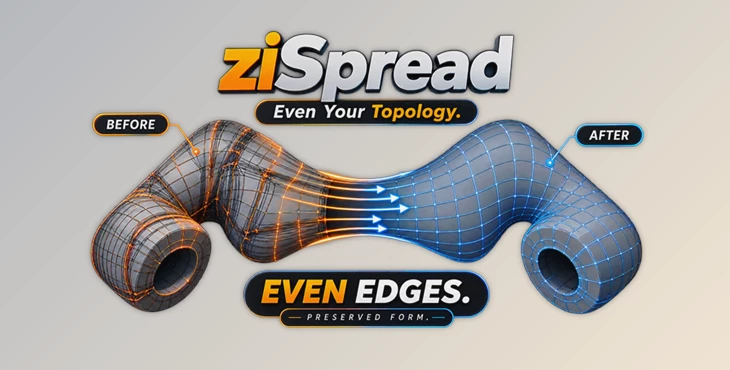
Keeping edge spacing clean and consistent can take a surprising amount of time, especially when you are working on detailed 3D models. ziSpread makes this process much easier by distributing edges evenly while attempting to preserve the existing curvature of your mesh.
Instead of manually moving vertices one by one, you can use ziSpread to quickly create cleaner, more consistent topology. The result is a faster workflow and a surface that is easier to refine.
What Is ziSpread?
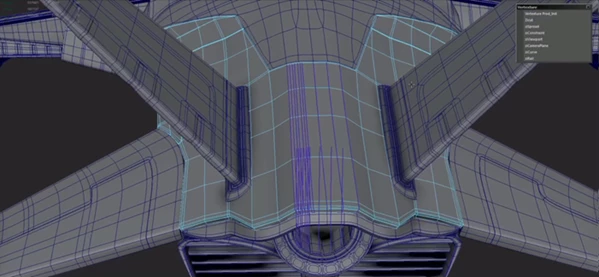
ziSpread is a modeling tool designed to evenly distribute edges while maintaining the natural curvature of a mesh. This makes it particularly useful when you already have important sections of a model established and want to spread the edge loops between them.
For example, imagine you have two well-defined sections of a hard-surface model and several edge loops between them. Rather than adjusting every loop manually, ziSpread can distribute them evenly in a single workflow.
This is especially valuable because consistent edge spacing can improve surface quality, make topology easier to manage, and reduce the need for slow, inaccurate vertex-by-vertex adjustments.
The tool also works with cables and tubes, making it useful beyond traditional mesh surfaces.
Features
Even Edge Distribution
ziSpread makes it possible to even out the distribution of edges on your mesh model. This can assist in evening out the topology of your model.
Curvature Preservation
ziSpread does more than merely move the edges of a model to even out the distribution of its topology. ziSpread also attempts to preserve the curvature of the model during this process.
Works With Cables and Tubes
ziSpread can also be used on models that contain cables and tubes. These models often have curved edges that ziSpread can help even out.
Faster Topology Refinement
Manually moving individual vertices can be slow and inconsistent. ziSpread provides a much faster way to refine edge placement, allowing artists to spend more time on the actual design rather than repetitive topology adjustments.
Useful for Hard-Surface Modeling
Clean topology is particularly helpful when working with hard-surface details and bevels. Evenly distributed edges provide a better starting point for adding and refining those details.
Helpful for Low-Poly Preparation
The tool can also be valuable when preparing low-poly assets for workflows that involve tools such as ZBrush, where clean and predictable topology can make the next stages of the process easier.
Professional Tips for Better Results
Some of the best ways to use ziSpread to get better results for your projects are to first model the important sections of your model. Once you have at least two of these sections created, you can select the edge loops between the two and use ziSpread to even out the distribution of those edge loops.
This technique is especially useful during fast design iterations. It allows you to quickly redistribute intermediate loops to accommodate new design iterations, avoiding the need to manually adjust each vertex.
Make sure the areas of the model that are to be defined are positioned to define the intermediate edges before using ziSpread to redistribute them. This will give ziSpread the best opportunity to create the desired shape.
ziSpread can also be combined with other modeling tools. For example, using ziSpread to set the model’s general shape, then using it again to even out the spacing of the edges will create a more even topology with less manual work.
Why It Can Speed Up Your Workflow
One of the biggest advantages of ziSpread is that it removes a repetitive part of modeling. Instead of treating every vertex as an individual adjustment, you can focus on the larger structure of the model and let the tool handle the distribution of the edges.
This becomes particularly useful when experimenting with different designs. Faster topology corrections mean you can iterate more freely without sacrificing surface quality.
For artists working with hard-surface assets, that can also make later operations such as adding bevels and surface details more straightforward.
Final Thoughts
ziSpread is a tool that can come in handy for anyone looking to improve the spacing of their model’s edges without spending too much time on vertex movement. ziSpread is useful in distributing the model’s edges while attempting to preserve the curvature of the mesh. This could be of use in both general 3D modeling as well as specialized modeling projects, such as creating cables or tubes.
ziSpread can be of use to those who are working on hard-surface assets or any project in which modeling workflow speed is of the essence.
For anyone whose workflow depends upon producing clean topology and iterating quickly on their designs, ziSpread is definitely worth a try.

Files Password : gfxplugin.com OR 123456