Downloadable Files
You can download CarPaintStudio for free from the end of this page.
Give Your Cars a Better Finish
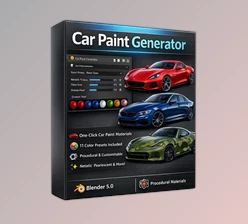
Creating a realistic car material in Blender can quickly become complicated when you need metallic paint, pearls, clearcoat, subtle imperfections, or stylized effects. CarPaintStudio makes the process much simpler by bringing these options into one intuitive material system.
Instead of spending time rebuilding complex node graphs, you can experiment with different automotive finishes, update the material live, and switch between ready-made looks in just a few clicks.
What Is CarPaintStudio?
CarPaintStudio is a professional material system for Blender that allows you to quickly create realistic and stylized automotive paints and finishes. CarPaintStudio can create factory automotive paint as well as metallic, satin, matte, pearl, and metal-flake paint finishes.
Moreover, the tool also goes beyond the realistic materials available for cars. The tool can be used to create comic-book-inspired car shaders that make it useful for a variety of projects.
For example, the tool allows users to take a car model and turn it into a glossy British Racing Green car. Additionally, users can create a Midnight Purple car or even give a concept car a comic-book appearance.
Features
Realistic Automotive Finishes
CarPaintStudio provides controls for a wide range of automotive looks, including factory paint, metallics, pearls, satin, matte finishes, and metal flakes. This makes it easier to create materials that feel appropriate for everything from realistic automotive renders to stylized vehicle concepts.
Custom Livery and Decals
Custom livery and decals are supported by the software, allowing artists to create their designs without having to start from scratch with the original livery colors or by changing the colors of the decals.
This feature is helpful for creating several versions of the same vehicle for a project.
Procedural Metal Flakes
The procedural metal flake shader uses OSL to create detailed flake effects directly in the material. Instead of relying on manually prepared textures, you can create a more flexible finish and adjust it as your design develops.
Clearcoat and Orange Peel
Automotive paint often has subtle surface characteristics that make it look different from a perfectly smooth material. CarPaintStudio includes adjustable clearcoat and orange-peel controls, helping you add more convincing surface detail to your renders.
Live Material Updates
All the changes to a vehicle’s finish can be viewed as the editor makes adjustments. This allows for rapid experimentation with different settings to determine the best finish for the given vehicle.
Material Library
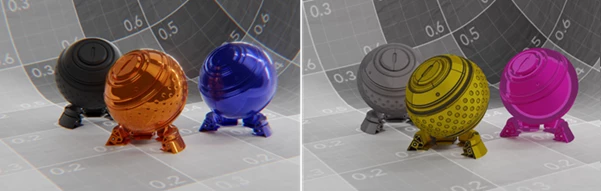
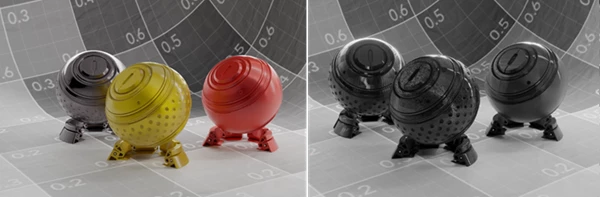
The built-in Material Library includes production-ready factory presets, giving you a useful starting point instead of an empty shader setup.
The included presets are:
- British Racing Green
- Nardo Gray
- Frozen Black
- Soul Red Pearl
- Midnight Purple
- Porsche Chalk Satin
- Cyan / Purple Pearl
- Comic Yellow
User Presets
Your own materials can be saved as custom presets. The User Presets section is separate from the built-in library, and artists can save unlimited custom materials that appear in the User Presets dropdown.
These presets are stored as JSON files, making it convenient to build a personal collection of finishes for future projects.
Automatic Material Reuse
If your vehicle already contains materials, CarPaintStudio can automatically reuse existing materials where appropriate. This can save time when working with models that have already been prepared for rendering.
Optional Auto UV Unwrap
For vehicle bodies without suitable UVs, the tool provides an optional automatic UV unwrap. This can make the material workflow more accessible when you are working with models that were not originally prepared for custom paint materials.
Production-Ready Node Graphs
One of the biggest advantages is that the complex node setup is generated automatically. Artists can focus on the appearance of the vehicle rather than spending their time managing large and complicated shader graphs.
Professional Tips for Better Results
Start with one of the factory presets and modify it rather than trying to build your finish from nothing. This gives you a practical baseline and makes it easier to understand how each adjustment affects the final material.
For realistic automotive renders, pay close attention to clearcoat, metallic response, pearl effects, and orange peel. Small adjustments can make a vehicle feel considerably more believable.
When creating custom liveries, keep the base paint and decals visually consistent. Recoloring decals while preserving their structure can help you create multiple vehicle variants without rebuilding the entire design.
It is also worth saving successful combinations as User Presets. If you frequently work with similar vehicle styles, building your own preset library can significantly speed up future projects.
For stylized work, don’t be afraid to push the controls beyond physically realistic values. The unclamped controls are designed to give artists additional freedom, so you can experiment with exaggerated colors and effects when creating concept art or comic-inspired vehicles.
A Faster Way to Explore Car Materials
The biggest strength of CarPaintStudio is that it removes much of the technical friction from automotive shading. Instead of constantly jumping between complex node networks, you can concentrate on the look you want and refine it directly through the material system.
Whether you are creating a realistic car render, experimenting with custom liveries, building a collection of reusable paint presets, or producing a comic-style vehicle, the workflow gives you plenty of room to experiment while keeping the process non-destructive.
Final Thoughts
CarPaintStudio is aimed at giving artists more control over the materials in their cars without having to dedicate themselves to learning the intricacies of the node editor.
For those who work with cars regularly, having the ability to experiment with different paint materials and finishes will save them time in the long run. Additionally, since all changes are non-destructive, they can keep coming back to their project and refining the look of the cars until they are exactly right.

Files Password : gfxplugin.com OR 123456