Downloadable Files
You can download the product MotionStack for free from the end of this page.
Keep the Motion You’re Still Using
Have you ever found something useful in After Effects that you wanted to use, only for five minutes later to copy something else? That’s exactly the situation that MotionStack was created to fix.
It’s especially handy when you are working on several comps and require the same animation more than once.
What Is MotionStack?
Think of MotionStack as temporary working memory for After Effects.
The native clipboard is essentially one-copy-deep: copy something new, and the previous item is gone. A preset library solves a different problem because it is designed for assets you want to keep long-term.
MotionStack sits comfortably between those two ideas. It gives temporary work a place to live without requiring you to turn every useful animation into a permanent preset.
For example, imagine you create a nice bounce animation for a title. You need that same motion in two other compositions, but you don’t want to save a formal preset just for today’s project. Capture it in MotionStack, switch comps, and paste it when needed.
The same approach works for an expression you just wrote, a set of colors taken from a reference frame, or an effect stack that you want to reuse.
Features
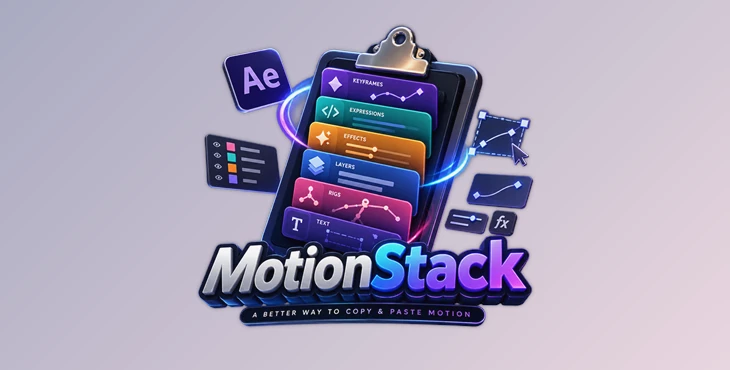
Layers: Keep Complete Rigs Together
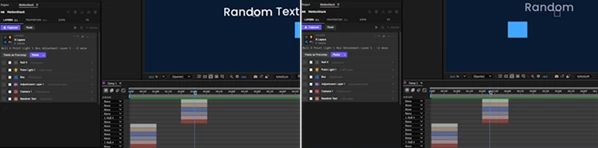
The Layers option is made for more elaborate projects. It will allow you to save a full rig, including all its properties, effects, and compositions.
This is useful for saving a rig from one composition and using it in another.
You can also choose to paste the group as a precomp to save time.
Properties: Save the Details That Matter
Properties are useful if you don’t need the entire layer but want to keep certain aspects of the animation.
MotionStack can preserve keyframes, easing, static values, masks, palettes, and text as cards. This allows you to keep a small aspect of animation within the project.
For instance, if you have animation within a layer that you want to store and use again in other areas of that project, MotionStack can help you do that.
Expressions: Keep Your Code Within Reach
Because expressions can be frustrating to find when moving between compositions, MotionStack will store your expressions as cards and even warn you if any of your expressions may not work in their intended destination.
That added level of awareness is helpful when moving expressions from one composition to another, as the pasting of an expression may technically display correctly within the destination composition, yet rely upon a layer or element that is missing from that composition.
FX: Reuse Effect Stacks
The FX layer within the MotionStack interface allows for the saving of effect setups within a composition.
These saved effects can be quickly deployed to another composition within the same project, saving that layer of effort and enabling the effect to be used in any number of other areas of the composition that may require it.
Visual Cards for Faster Recall
MotionStack isn’t just about storing information. Its card-based approach makes your temporary assets easier to recognize visually.
Rather than remembering what you copied several minutes ago, you can look at the stack and identify the animation, expression, color palette, text, or effect you need.
That makes the workflow feel more like a visual workspace than a traditional clipboard.
Capture Text, Colors, and Expressions
You can also paste plain text, hexadecimal color codes, or expression snippets into MotionStack. The tool routes these captures into the appropriate section automatically.
This is particularly convenient when working from references or notes, and you need to move small pieces of information into After Effects without interrupting your workflow.
Pin Important Cards
Some temporary assets turn out to be more useful than expected.
Pinned cards can survive flushes and remain visible across projects, giving you a simple way to protect something you know you’ll need again without turning the whole stack into a permanent preset collection.
Practical Warnings
Moving animation between compositions can introduce problems with parents, track mattes, or references.
MotionStack surfaces these issues with practical warnings and direct choices, helping you understand what may need attention before a captured item is used in its new context.
Professional Tips for a Smoother Workflow
Capture Before You Switch Context
If you just finished some useful functionality, use the capture function before switching compositions or copying something unrelated to the current project.
Pin the Things You’ll Reuse Today
You don’t have to pin every expression or rig you create. If you know you are going to use a particular rig or expression several more times in the current project, pin it.
Use the Smallest Useful Capture
If you only need a few animated properties from a piece of content, you do not necessarily have to capture the entire layer. Using the Properties stack allows for smaller pieces of content to be captured and pasted into other projects in After Effects.
Check Context-Dependent Expressions
Many expressions will be created to rely on certain layers, compositions, or properties. If there is a warning when pasting an expression into a new composition, it is likely a means of informing you of a dependency of that expression that you should be aware of when applying it to a new project.
Use Precomps When Containment Helps
For larger rigs or groups of layers, pasting as a precomp can be a cleaner solution than introducing every individual layer into the destination composition. It keeps complex setups organized while preserving the captured work.
Export When Temporary Becomes Permanent
MotionStack is designed around session memory, but sometimes a temporary setup becomes valuable enough to keep. When that happens, export it into a portable file instead of relying on your current session stack.
A Better Way to Handle In-Between Work
It doesn’t ask you to build a library every time you create something useful within After Effects. Instead, it ensures good work doesn’t disappear simply because you copied something else from another project.
MotionStack allows you to save your rigs, color palettes, and anything else you create temporarily within After Effects.
Final Thoughts
MotionStack is built around a simple idea: the useful things you create during a project shouldn’t disappear just because you moved on to the next task.
With dedicated stacks for Layers, Properties, Expressions, and FX, plus support for text and color captures, it gives After Effects users a faster way to keep their current working pieces close at hand.
If you regularly jump between compositions, reuse small pieces of animation, or find yourself rebuilding things you created only a few minutes ago, MotionStack can make that part of the workflow considerably less repetitive.