Downloadable Files
You can download the Image Modeler Tools product for free from the bottom of this page.
Get Your Blender Scene Ready Faster
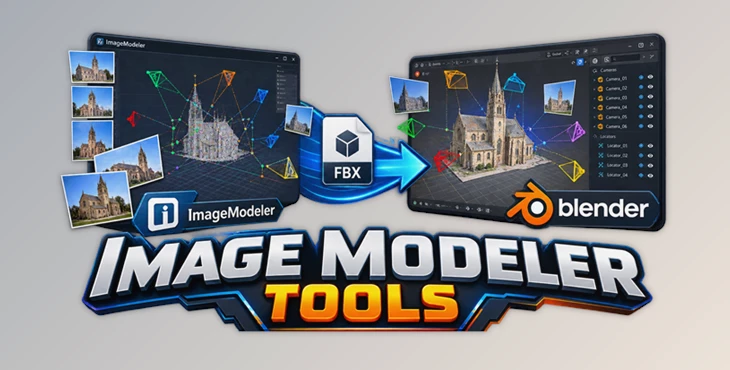
Working with cameras and images created in Autodesk ImageModeler can become time-consuming when you need to prepare everything manually in Blender. Image Modeler Tools makes this process much smoother by helping you load, organize, and configure your ImageModeler cameras and scene data with minimal setup.
Instead of spending time rebuilding camera arrangements and reconnecting images, you can get your scene ready for modeling quickly and focus more on the actual creative work.
What Is Image Modeler Tools?
Image Modeler Tools is a Blender addon designed to optimize the workflow for projects created with Autodesk ImageModeler. It automatically helps prepare the Blender scene for further modeling by working with cameras, images, and scene information transferred through an FBX file.
For example, when a project contains several ImageModeler cameras, the addon can load the cameras and empty objects from the FBX file in one step. It can then configure the cameras and connect the corresponding images, reducing repetitive setup work.
This is especially useful when accurate camera perspectives are important for reconstructing or modeling real-world objects and environments. Having the correct viewpoints available from the beginning makes it easier to compare your model with the original references and maintain a consistent workflow.
Features
One-Click Camera and Scene Setup
The addon helps automate the initial Blender setup after importing an FBX file from ImageModeler. Cameras and empty objects can be loaded without manually recreating the scene structure.
Automatic Image Connections
Image Modeler Tools can configure cameras and connect their corresponding images, helping you get to a usable reference setup much faster.
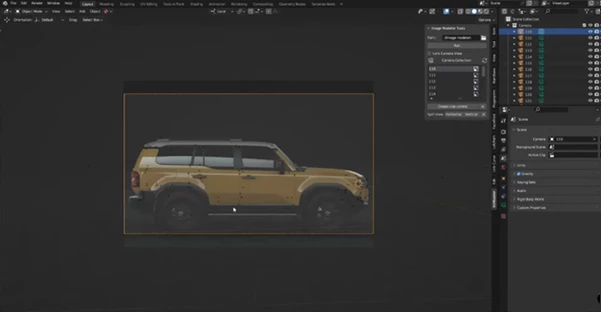
Quick Camera Switching
When a project contains multiple viewpoints, quickly switching between cameras makes it easier to inspect the model from different perspectives and compare details against the reference images.
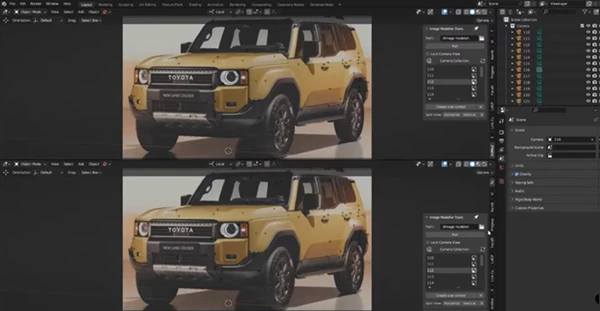
Multiple Camera Views
The tool allows different cameras to be fixed in different windows. This can be particularly convenient when you want to observe several angles simultaneously while modeling.
Real-World Model Scale
Another useful feature is the ability to check the real size of the future model transferred into Blender. You can inspect the dimensions and correct the scale when necessary, helping keep the final model closer to the intended real-world measurements.
A More Organized Modeling Workflow
By handling much of the camera and reference setup automatically, the addon lets you spend less time dealing with technical preparation and more time refining geometry, proportions, and details.
Professional Tips for Better Results
Before starting detailed modeling, take a moment to check that the imported cameras are correctly configured and that their reference images are connected as expected. A properly organized camera setup can save considerable time later.
When working with several viewpoints, use different Blender windows to monitor important angles at the same time. This makes it easier to notice proportion problems that may not be obvious from a single camera.
It is also worth checking the model’s real-world dimensions early in the project. Correcting scale near the beginning is much easier than trying to fix proportions after completing a detailed model.
For the most natural results, regularly compare the geometry against multiple camera perspectives rather than relying on only one reference image. Different viewpoints can reveal subtle shape and alignment issues before they become difficult to correct.
A Smoother Way to Start ImageModeler Projects
The biggest advantage of Image Modeler Tools is that it turns several repetitive preparation steps into a much more straightforward workflow. Loading cameras and empty objects, connecting images, switching between viewpoints, monitoring multiple angles, and checking the model’s real size can all become easier to manage inside Blender.
For artists and modelers working with ImageModeler data, having this setup handled more efficiently means more time can be spent on the part that really matters: building an accurate and convincing 3D model.
Final Thoughts
Image Modeler Tools is a practical Blender addon for anyone who wants a cleaner and faster workflow when bringing Autodesk ImageModeler projects into Blender. Its camera management, image connections, multi-view workflow, and real-scale checking features can make the transition from reference data to actual modeling much more convenient.
If you regularly work with ImageModeler cameras and imported FBX scenes, trying the addon can be a simple way to make your modeling workflow more organized and efficient.

Files Password : gfxplugin.com OR 123456