Downloadable Files
You can download Blendcap for free from the bottom of this page.
Turn a Simple Video into Motion Capture
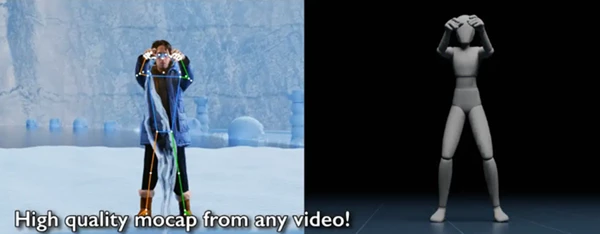
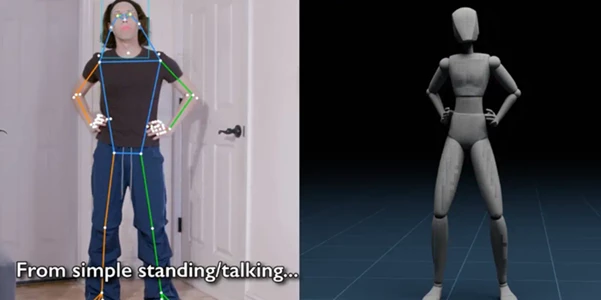
Capturing believable character movement usually means working with dedicated motion capture hardware, tracking suits, markers, or external services. Blendcap takes a much more accessible approach by turning an ordinary recorded video into motion capture directly inside Blender.
With a single video clip recorded on a phone, webcam, or camera, you can capture body movement, facial expressions, hands, fingers, and world-space motion together. The captured performance can then be transferred to a character rig and refined using Blender’s familiar animation tools.
The important thing to remember is that motion capture is a starting point rather than a finished animation. Blendcap is designed to get you to that starting point quickly, while still giving you the control needed for a professional cleanup and polish pass.
What Is Blendcap?
Blendcap is a performance capture add-on for Blender 4.2 and newer. It analyzes recorded footage and converts the performer’s movements into animation data without requiring markers, a motion capture suit, or specialized cameras.
Everything runs locally on your computer after the initial setup. This means footage does not need to be uploaded to an external service, making the workflow especially useful when working with private client footage or projects covered by an NDA.
Blendcap can track several parts of a performance simultaneously, including the body, face, hands, fingers, and overall movement through the scene.
For example, you could record an actor performing a character animation with a smartphone, process that footage in Blender, retarget the captured movement to a Rigify character, convert the limbs to IK controls, and then manually polish the animation.
This can significantly reduce the amount of animation that needs to be created from scratch while still leaving the animator in control of the final result.
From Video to an Editable Character Performance
One of Blendcap’s biggest advantages is that the resulting motion is designed to remain practical for animation work.
Instead of simply generating movement and leaving you with difficult-to-edit data, the add-on includes retargeting, FK-to-IK conversion, post-processing tools, and controls for repairing common single-camera capture problems.
This makes it possible to use captured motion as a foundation and then improve timing, poses, contacts, facial expressions, or individual animation curves manually.
Features
Full Motion Capture from One Video
Blendcap can track body movement, facial performance, hands, fingers, and world-space movement from one ordinary video clip. This makes it possible to capture relatively complete performances without setting up a traditional mocap environment.
Face Tracking
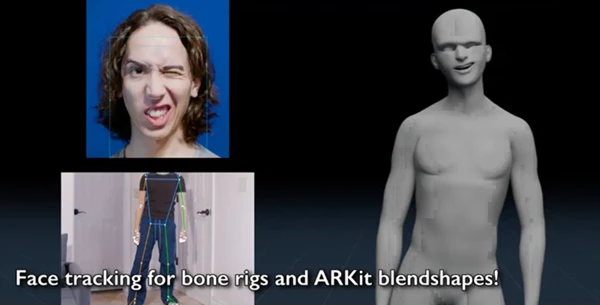
Facial motion can be captured together with the body or processed separately. A separate facial capture can later be combined with another body performance.
The resulting facial data can drive bone-based facial rigs or standard ARKit-style shape keys. Per-region controls also make it easier to adjust the strength of different facial expressions.
Hand and Finger Tracking
Blendcap supports general hand-shape detection as well as detailed finger pose tracking. Controls for finger curl and tracked keypoints help rebuild more recognizable hand poses when the original capture needs additional refinement.
This is particularly useful because hand movement can contribute significantly to the personality and readability of a character performance.
Built-In Retargeting
Captured motion can be transferred to different character rigs through Blendcap’s retargeting system.
Ready-made presets are included for Rigify, Auto-Rig Pro, CloudRig, and Mixamo. Custom characters can be configured through a visual bone-map editor, and custom mappings can be saved as reusable presets.
Standard T-Pose and A-Pose rest-pose presets are also included.
FK to IK Conversion
Blendcap can convert captured FK animation to the IK arm and leg controls of your character rig.
For animators, this is especially useful during the cleanup stage. Having motion available on familiar IK controls makes it easier to reposition hands and feet, correct contacts, or intentionally change parts of the captured performance.
Foot Locking and Grounding
Foot sliding is one of the most noticeable problems in motion capture. Blendcap includes tools for planting the feet and grounding the character to reduce unwanted sliding.
Better foot contact can make a captured walk, run, or acting performance feel considerably more believable.
Depth-Noise Filtering
Capturing movement from a single camera can introduce depth instability and visible wobbling. Depth-noise filtering helps reduce these unwanted movements and produce cleaner animation.
Body and Face Smoothing
Smoothing tools can reduce noisy motion in both body and facial captures. Expression scaling is also available for individual facial regions, giving you additional control over the intensity of a performance.
Camera-Angle Correction
If the source footage produces a tilted performance, camera-angle correction can help straighten the resulting capture instead of forcing you to compensate manually throughout the animation.
Tracking-Failure Repair
Performers may occasionally become difficult to track because of occlusion, fast motion, or problematic frames. Blendcap includes tools designed to repair short tracking failures and help the animation continue through these sections.
Offline Processing
After the required one-time dependency download of roughly 11 GB, Blendcap can perform captures locally without an internet connection.
This provides both convenience and privacy, particularly for professional productions where uploading footage to third-party servers may not be desirable.
Animation Export
Captured and retargeted animation can be exported in BVH and FBX formats, allowing the resulting motion to move into other stages of a 3D production pipeline.
Getting Better Results with Blendcap
The quality of the original footage has a major influence on the final capture. Pose estimation is not perfect, so clear footage generally produces better tracking while difficult footage can introduce errors or even cause the capture to fail.
Try to keep the performer clearly visible and avoid unnecessary occlusion. Good lighting and a camera angle that makes the body movement easy to read can also give the tracking system cleaner information to work with.
Do not expect the first capture to be the final animation. Use Blendcap to establish the main performance, then inspect the animation curves and keyframes manually. Small corrections to timing, foot contacts, hand positions, and body weight can make a significant difference.
Use foot locking and grounding when the character needs firm contact with the floor, but review the results afterward rather than relying entirely on automatic processing.
For facial animation, experiment with the regional expression controls instead of applying the same strength everywhere. Subtle adjustments can often produce a more natural result.
If your production rig is based on Rigify, Auto-Rig Pro, CloudRig, or Mixamo, starting with the included presets can speed up retargeting considerably. Heavily modified or completely custom rigs may require manual bone mapping.
Finally, take advantage of FK-to-IK conversion before the polish stage. Moving the captured animation onto usable IK controls can make manual corrections much more comfortable for experienced Blender animators.
Not Designed for Absolute Beginners
Blendcap automates a large part of performance capture, but it does not remove the need for animation knowledge.
Users should ideally be comfortable with Blender animation and understand the basics of rigging and retargeting. Cleaning motion capture often involves manually editing keyframes and animation curves.
Preset mappings work with supported rigs in their expected default configurations. If a rig has been heavily modified or you are using a completely custom character setup, you should be prepared to map bones manually.
Hardware is another consideration. Blendcap currently supports Windows 10/11 and Linux, requires Blender 4.2 or newer, and an NVIDIA GPU is strongly recommended. macOS capture is not currently supported.
A Practical Starting Point for Character Animation
Blendcap brings body, face, hand, and finger capture together inside Blender using something as simple as recorded video. Its combination of local processing, rig retargeting, IK support, facial controls, and post-processing tools can turn raw footage into a much more useful starting point for character animation.
Its real strength is not replacing the animator. Instead, it handles much of the initial performance capture so you can spend more time refining poses, correcting movement, strengthening expressions, and adding the final artistic polish.
For Blender artists who already understand animation and rigging, Blendcap can provide a flexible bridge between real-world performances and editable 3D character animation.

Files Password : gfxplugin.com OR 123456