Downloadable Files
You can download Kin for free from the end of this page.
A Refined Starting Point for Portrait Editing
In portrait photography, finding the right balance between color and character can be challenging. You want enough of both to evoke the appropriate mood from the audience, but too much of it can take away from the originality of the scene.
Kin is an expansive collection of portrait presets that offer a warm, earth-toned aesthetic that can be tailored to your project’s needs.
Whether you are editing portraits taken in soft indoor lighting, natural outdoor lighting, lifestyle shots, or film-inspired imagery, Kin gives you a great starting point for editing while allowing for your own creative touch.
What Is Kin and What Does It Do?
Kin is a collection of presets and tools for Adobe Lightroom Classic, Lightroom CC, Photoshop, and Adobe Camera Raw that are geared towards speeding up the portrait editing process.
The collection features a series of presets that feature warm, earth tone colors. Each of these features the ability to adjust contrast, curves, saturation, color rendition, dynamics, and more.
For example, each of these presets can be applied to a scene in order to establish the color palette of the scene, adjust the bright areas of the image with Recover Lights, remove green reflections from the subject using Repair Green Bounce, and add grain to the image.
For indoor portraits, the color palette can be the same as the outdoor portrait but with reduced contrast, creams whites, added glow to the skin of the subject, and adjusted backgrounds to separate the subject from the background.
The benefits of each of these editing techniques ensure that the visual style of the images is maintained without forcing all images to have the same appearance.
Features
8 Base Portrait Presets
8 Base Portrait Presets Kin offers 8 different base portrait presets for you to choose from:
- Kin 01
- Kin 02
- Kin 03
- Kin 04
- Kin 05
- Kin 06
- Kin 07
- Kin 08
Each of these features a portrait of a character with earth tones to represent the foundation of the filter. These can be used throughout a photography session to maintain visual consistency.
Flexible Dynamics and Contrast
Kin provides several dynamics options, including Clean, Natural, Pushed, and Dark. You can also increase or decrease contrast independently.
This makes it possible to move from a clean, restrained portrait toward something deeper and more cinematic without rebuilding the grade from scratch.
Advanced Curve Controls
Dedicated curve tools provide quick control over important tonal characteristics, including:
- Bright Whites
- Creamy Whites
- Deep Blacks
- Velvet Blacks
Instead of treating contrast as a single global adjustment, these controls allow you to shape highlights and shadows according to the atmosphere you want.
Color Rendition and Saturation
Four Color Rendition options let you explore alternative interpretations of the base palette, while dedicated saturation controls provide additional flexibility.
The result is a workflow where the preset acts as a starting point rather than a fixed final effect.
Custom Creative Profiles
Creative Profiles form an important part of Kin’s color workflow. Each contains its own base color grade and can be adjusted using the Amount slider.
You can push a profile harder when you want a stylized cinematic result or reduce its intensity when you prefer a cleaner image closer to the original colors.
60+ Dedicated Editing Tools
This tool includes more than 60 tools divided into practical groups for different parts of the editing process.
Scene tools include Balance, Intensify, Diffuse, Contour, Recover Lights, Recover Darks, Repair Harsh Light, Background Vignette, Background Glow, Lower Gradient, Faded Memory, and Edge Haze.
These are useful when you need to shape the overall atmosphere of an image rather than simply change its color.
Subject tools provide more targeted portrait adjustments such as Define, Sharpen, Highlight, Skin Glow, Eye Brightness, Eye Definition, Teeth Whiten, and Clothing Vibrance.
This product also includes tools for correcting common portrait color problems, including green bounce, overly orange skin, and ashen-looking skin.
Lighting tools provide horizontal and vertical flare variations alongside controls for recovering, softening, intensifying, and adding detail to skies. A dedicated Sky Sunset option can also help shape outdoor portrait scenes.
Color Filters provide warm and cool treatments alongside Sun Drenched, Reduce Green Cast, Mint and Olive green shifts, and Aqua and Indigo blue shifts.
Finally, Utility tools provide multiple levels of grain, sharpening, detail, and lens correction for finishing an edit.
AI-Powered Masking
Kin takes advantage of AI masking capabilities to apply targeted adjustments to different areas of an image.
Instead of affecting the entire photograph equally, adjustments can focus on the subject, skin, background, sky, or other relevant regions. This is particularly valuable in portrait photography, where the subject may need very different treatment from the surrounding environment.
A background can therefore be softened or darkened while the person remains clear and naturally rendered.
Warm, Earthy Color Without Losing Flexibility
One of Kin’s defining characteristics is its earthen warmth.
The presets introduce a warm, grounded palette intended to complement portrait photography while maintaining a quiet cinematic character. The goal is not simply to make every image warmer, but to establish a cohesive color foundation that can be refined according to the scene.
This can be especially useful when editing an entire portrait session. Images captured in slightly different lighting conditions can be brought toward a shared visual language while still receiving individual corrections where necessary.
Built for Different Portrait Environments
Portrait sessions rarely happen under perfectly controlled lighting. One photograph may be captured outdoors in bright natural light, another beneath trees with green reflections, and another inside a room with difficult mixed lighting.
Kin includes tools intended to address these differences. For example, Repair Harsh Light can help when dealing with challenging illumination, while Recover Lights and Recover Darks provide additional tonal control. Green reflections affecting skin can be addressed with Repair Green Bounce, while background tools help control the visual relationship between the person and their surroundings.
This makes Kin useful as more than a collection of preset looks. Its supporting tools can become part of a broader portrait-editing workflow.


Tips for Better Results with Kin
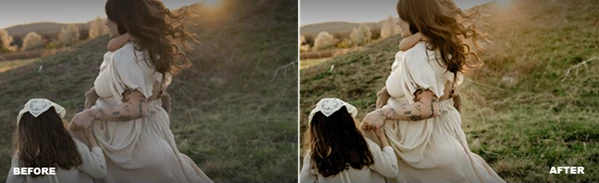
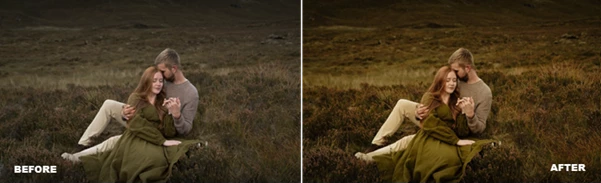
Choose a base preset that complements the lighting in the portrait. Often, the best choice is not the one with the strongest look but the one that minimizes the impact of potential editing to the skin and other elements.
Use the Creative Profile Amount slider to control how much the Creative Profile should influence the portrait. For most portraits, using the Creative Profile for natural lighting may be the best choice, but for editorial or cinematic portraits, increasing the amount of the Creative Profile may be more appropriate.
Pay particular attention to the skin. If the colors of the environment are reflecting onto the subject, use the dedicated skin repair tools before making any global adjustments to the color of the image. This will allow you to maintain the atmosphere of the location while fixing only the skin.
For portraits of individuals outside of the subject, adjust the sky and the subject separately instead of adjusting the entire image. This will allow for more control over how the individual interacts with their environment.
Grain and sharpening should be used only as a final touch-up to your image. Make all of the color corrections for your subject and background first, and then adjust the degree of grain and sharpening to the image as needed for the final photograph.
Finally, avoid putting all of the editing tools in the software at once. The flexibility of the editing tools works best when only making small changes to achieve the desired result.
Final Thoughts
The Kin editing suite combines presets for portraits, creative profiles, AI-assisted masking, color editing tools, lighting adjustments, subject enhancement tools, and finishing tools into a flexible software for editing portraits.
The presets use warm, earth-toned colors to give the portraits a recognizable visual character. However, the various editing tools within the software allow users to switch from natural-looking edits to more cinematic edits of the portraits.
The software allows photographers to fine tune portraits to achieve the desired result in terms of skin appearances, lighting, backgrounds, color rendition, and contrast.
For photographers who enjoy the warm tones associated with portrait color grading and who desire control over their portraits with the editing tools within the software, the Kin editing suite provides various tools for photographers to experiment with and find their own editing aesthetic.

Files Password : gfxplugin.com OR 123456