Downloadable Files
You can download Celestools for free from the bottom of this page and start exploring a faster, more creative way to add magical details to your Blender projects.
Small Details Can Change the Whole Scene
It is possible that your 3D artwork looks good, but something is missing. Maybe a few stars in the background or a constellation following a custom path. Perhaps there are some particles inside the object or a subtle halo.
Creating these elements manually can take a lot of time. Each of these elements has to be modeled individually and added into the 3D art project.
That is exactly where Celestools - Add Details With Ease becomes useful. Instead of spending your time building decorative elements from scratch, you can use ready-made Geometry Nodes tools and focus more on the artistic side of your project.
What Is CelesTools?
CelesTools is a collection of 7 artist-friendly Geometry Nodes tools designed for Blender 4.1 and newer. Its main purpose is simple: make it easier to add decorative and magical details to 3D artwork without requiring complicated manual setups.
Rather than modeling every star, pearl, particle, or constellation individually, you can use procedural tools that generate and customize these elements for you.
For example, you can draw a simple curve and transform it into a constellation, fill an object with small particles, create customizable stars without modeling them manually, or quickly add a rainbow to a scene.
Because these elements remain customizable, they can be adapted to different compositions instead of feeling like fixed decorative assets.
Features
Constellation
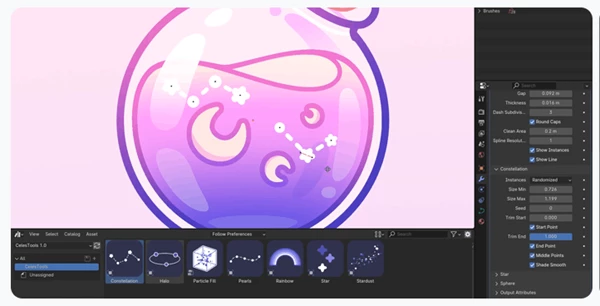
Creating constellations manually can be surprisingly time-consuming. The Constellation tool simplifies the process by allowing you to draw a curve and automatically generate a constellation along it.
You can then customize its appearance to match your composition. This makes it especially useful for dreamy environments, fantasy scenes, celestial artwork, and stylized backgrounds.
Stardust
A little stardust can instantly make a scene feel more magical.
The Stardust tool lets you introduce animated sparkling details into your artwork without having to manually create and animate large numbers of individual elements. It can work particularly well around characters, objects, logos, or fantasy environments where you want a subtle sense of motion and atmosphere.
Star
Instead of modeling different star shapes every time you need one, the Star tool gives you a quick way to create and customize them.
You can experiment with their appearance until the shape fits the style of your project. This is useful for cute illustrations, stylized 3D scenes, space-inspired artwork, and decorative compositions.
Pearls
Pearls can add another layer of detail and visual interest to an otherwise simple object or composition.
With the Pearls tool, these elements can become part of your design without requiring repetitive manual placement. They can be used as decorative accents around characters, objects, abstract shapes, or more whimsical compositions.
Particle Fill
Particle Fill is especially useful when you want to populate the inside of an object with lots of small details.
You can drag and drop the tool onto your project and continue editing the original mesh. As its shape changes, the particles adapt to the updated geometry.
That flexibility makes it much easier to experiment with your design without having to rebuild the decorative elements every time the base model changes.
Rainbow
A rainbow might be a small background detail in one scene and the main visual element in another.
CelesTools makes creating one much easier while still giving you room to customize its appearance. You can even transform the rainbow into a helix, opening the door to more abstract and playful designs.
Halo
The Halo tool provides a quick way to surround an object with spherical decorative elements.
You can add more spheres and adjust their placement until the result works with your composition. It is a simple effect, but it can help make a central object or character feel much more interesting and visually distinctive.
Drag, Drop, and Keep Creating
One of the practical advantages of CelesTools is its compatibility with Blender's Asset Browser.
After adding the CelesTools folder to your Asset Browser file paths, the tools can be dragged directly into your scenes. This removes several repetitive setup steps and makes the collection feel more like a creative toolbox that is ready whenever you need an extra detail.
For artists who frequently create stylized, fantasy, cute, or abstract scenes, this can make experimentation considerably faster.

Tips for Better Results
The easiest way to get good results with CelesTools is to treat these tools as supporting elements rather than trying to use everything at once. If your main subject is already visually complex, a subtle amount of stardust or a simple halo may be enough.
Pay attention to scale as well. Smaller stars, particles, and pearls often work better as secondary details because they enhance the main subject without competing with it.
You can also combine the tools when the composition calls for it. A constellation paired with subtle stardust, for example, can create a richer celestial environment, while pearls and particle fills can add depth to stylized objects.
Since many of these elements are procedural, experimentation is part of the workflow. Adjust shapes, density, placement, and proportions until the details feel like a natural part of the artwork rather than something added afterward.
Make the Technical Part Feel Lighter
The biggest advantage of Celestools - Add Details With Ease is not simply that it provides stars, rainbows, pearls, particles, and other decorative elements. It turns several repetitive detailing tasks into flexible Geometry Nodes tools that are much easier to control.
With seven tools covering Constellation, Stardust, Star, Pearls, Particle Fill, Rainbow, and Halo, the collection gives Blender artists several quick ways to enrich their scenes without constantly interrupting the creative process to build small details from scratch.
If you enjoy creating magical, stylized, cute, or highly detailed Blender artwork, CelesTools is worth experimenting with—especially when you want the little details to make a scene feel more complete without making your workflow more complicated.

Files Password : gfxplugin.com OR 123456