Downloadable Files
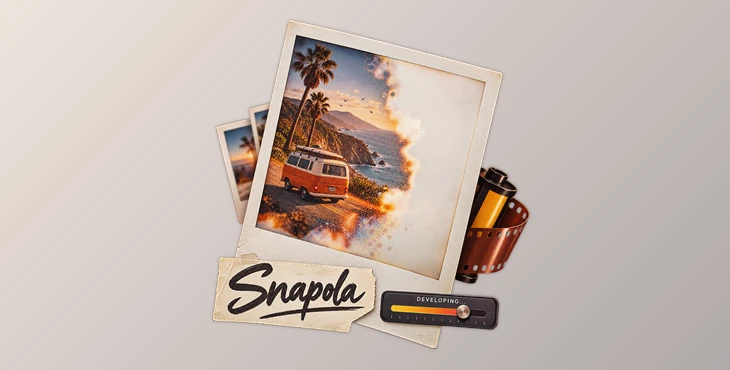
You can download Snapola for free from the product section at the bottom of this page.
Bring the Magic of Instant Photos Into After Effects 📸
There is something special about an instant photo slowly coming to life. At first, the paper looks almost blank. Then shapes begin to appear, colors gradually settle in, details become sharper, and after a few moments, the final photograph is revealed.
It can be difficult to recreate this effect in digital software. Using the opacity of a layer to reveal the contents of an image is easy to do, but it does not come close to the chemicals and colors that come out of an instant photo printer.
Snapola is an After Effects plugin designed specifically for this effect. It can turn almost any layer into a retro instant photo and, more importantly, animate the entire development process from blank emulsion to a finished print.
More Than a Simple Photo Fade
A convincing instant-photo development effect is not just an image slowly becoming visible. Real photographic development happens unevenly. Some areas appear sooner than others, contrast changes over time, edges gradually sharpen, and colors continue to shift while the image fixes.
Snapola recreates these details instead of relying on a basic transparency animation.
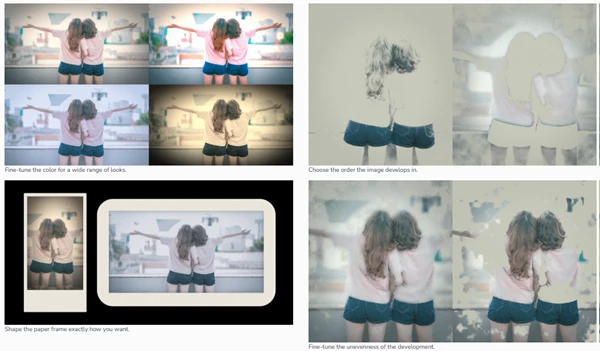
With a single keyframeable development slider, you can move from a blank print to a fully developed photograph. The effect includes luminance-ordered fixing, uneven chemical spread, soft-focus edges that become clearer over time, and a color cast that gradually settles.
This makes the animation useful whenever you want a photograph to feel like it is physically developing rather than simply fading onto the screen.
You could use it to reveal a memory in a documentary, introduce photographs in a travel video, build a nostalgic family slideshow, create a retro title sequence, or even turn logos and typography into instant-photo-style graphics.
Meet Snapola
Snapola brings the complete instant-photo look into a streamlined After Effects workflow. Instead of building the paper frame, grading, grain, development masks, glow, and animation manually, you can control the entire look from one effect.
It works with footage, still images, logos, and text layers, so the concept is not limited to traditional photography.
Features
Animatable Photo Development
The main development control takes your layer from blank photographic paper to a finished image. Because the slider is keyframeable, you can easily control how quickly or slowly the photograph develops.
Realistic Chemical Development
Rather than using a uniform fade, Snapola creates an uneven development pattern inspired by real photographic chemistry. Luminance-based fixing and adjustable unevenness help prevent the reveal from looking too digital or predictable.
Soft-to-Sharp Development
During development, details can initially appear softer and gradually become more defined. This subtle transition adds another layer of realism to the animation.
Instant Photo Color Grading
Built-in controls for fade, tint, grain, halation, and vignette let you push the image toward different retro photographic styles. You can keep the result relatively clean or give it a much stronger aged-film personality.
Procedural Paper Frame
The instant-photo frame is generated procedurally and can be adjusted to fit your design. Size, aspect ratio, margins, and corner characteristics can all be customized instead of forcing every project into the same frame.
Development Order Control
You can choose how different areas of the image appear during development. Combined with the unevenness controls, this gives you much more freedom over the character of each reveal.
Five Editable Presets
Five one-click presets provide quick starting points for different looks. They are fully editable, so you can use a preset to establish the overall style and then fine-tune individual parameters for your project.
Works With More Than Photos
Snapola can process footage, stills, logos, and text. For example, you could place a logo inside an instant-photo frame and animate it as though it were being chemically developed, creating a more unusual brand reveal.
GPU-Accelerated Performance
The plugin supports GPU acceleration through Metal and DirectCompute, with CPU fallback when necessary. It also supports 8-, 16-, and 32-bit workflows and is alpha aware.
Creative Ways to Use It 🎞️
The obvious use for Snapola is a classic instant-photo reveal, but the same effect can fit into many different projects.
For a documentary, photographs could slowly develop as different memories or historical moments are introduced. In a wedding or family video, images can appear one after another like physical prints being placed on a table.
For music videos and fashion edits, stronger grain, halation, fading, and color tinting can create a more stylized analog aesthetic. Even typography can be treated like photographic material, allowing a title or date to emerge organically instead of appearing through a standard motion-graphics transition.
Because the frame is adjustable, these effects do not have to look identical. Different proportions and margins can help each print match the visual language of the project.
Tips for a More Authentic Instant-Photo Look
Avoid making every development animation happen at exactly the same speed. Slight differences between photos can make a sequence feel much more natural, especially when several prints appear in the same scene.
Try not to push every retro control to its maximum value either. Grain, halation, tint, vignette, and fading tend to work best when they complement the source image rather than overpower it.
The uneven development controls are particularly useful for breaking up the digital feel. A perfectly uniform reveal can quickly look like a standard transition, while subtle irregularities make the development process feel more physical.
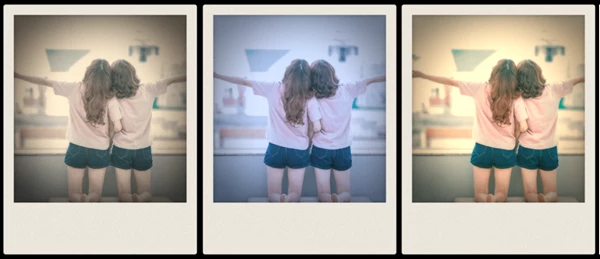
For nostalgic projects, experiment with slightly faded colors and a gentle color cast rather than relying only on heavy grain. Small changes in color and contrast can often communicate the instant-film aesthetic more convincingly.
You can also combine the development animation with physical motion. For example, let the print slide into the frame or rotate slightly before the image begins developing. Once the development finishes, a small camera movement or shadow animation can make the photo feel like a real object sitting in the scene.
A Small Effect With Plenty of Character
Snapola focuses on a very specific visual idea and turns it into a flexible creative tool. Instead of manually combining masks, color effects, blur, grain, frames, and multiple animations, you get a dedicated workflow for creating and animating instant photographs.
The most interesting part is the development itself. Uneven fixing, changing sharpness, settling colors, grain, halation, and customizable paper details help the final animation feel much richer than an ordinary fade.
Whether you are creating nostalgic time-lapse edits, documentary features, photo montages, music videos, social media content, or even experimental animations, Snapola provides an easy way to add the characteristic of old-fashioned instant cameras to your After Effects composition.

Files Password : gfxplugin.com OR 123456