Downloadable Files
You can download Dovetail Key for free from the bottom of this page and use it to make splitting 3D models for printing much faster and easier.
When Your Model Is Too Big for the Print Bed 🧩
You finish a detailed 3D model, prepare it for printing, and then realize there is one obvious problem: it simply does not fit on the print bed.
Splitting a model sounds easy at first, but doing it properly can take much more work than expected. You need to decide where to cut, separate the geometry, create matching connectors, leave enough clearance for printing, and make sure everything lines up correctly when the parts are assembled.
Things become even more difficult with dense character sculpts or million-polygon meshes, where heavy boolean operations can slow Blender down or produce unreliable results.
Dovetail Key is designed to simplify this entire process. Instead of manually building the cut and connection system, you can draw where the model should be divided and let the addon create printable parts with matching joints.
A Smarter Way to Split Models for 3D Printing ✂️
The basic idea behind Dovetail Key is simple: draw a cut, split the model, and automatically create a connection between the resulting pieces.
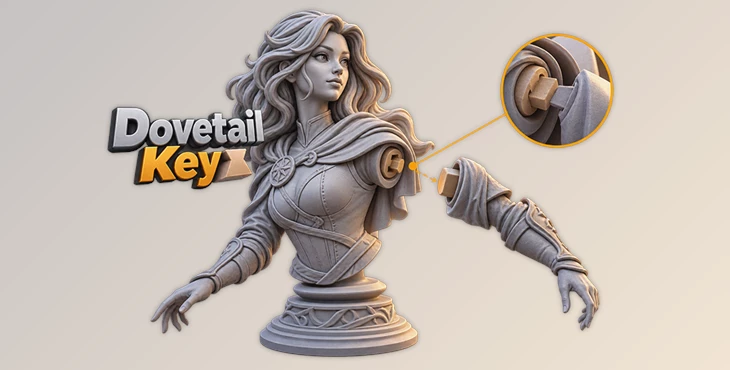
For example, imagine you are preparing a large character statue for a resin printer. The complete model is too tall for the build volume, so you need to separate the torso from the lower body.
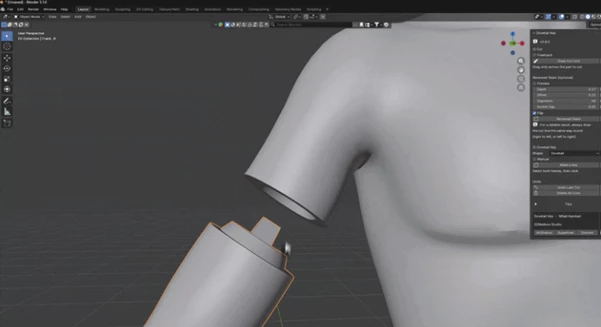
Normally, this could involve several manual operations. With Dovetail Key, you can draw across the area where you want the separation to happen. The add-on cuts the geometry and can create a male and female joint with clearance suitable for 3D printing.
This is especially useful because a good split is not only about making a model smaller. The separate pieces also need to align correctly when you put them back together.
A properly designed joint can help prevent pieces from sliding out of position and make final assembly much easier. Depending on the model, you can also place seams in less visible areas or along natural shapes in the sculpt.
Meet Dovetail Key 🔧
Dovetail Key is a Blender add-on made specifically for splitting models into printable sections and creating joints between those sections.
Its workflow is built around something very intuitive: drawing directly across your model. A simple straight cut can be created with two clicks, while Freehand Cut gives you more freedom when a straight seam does not suit the shape.
The add-on also provides multiple joint systems, including the classic Dovetail Key, Ball Key, and the newer Recessed Seam. This makes it useful for everything from mechanical-looking separations to organic character models where you want the connection to stay hidden.
Features
Draw-to-Cut: Draw across the model to define exactly where it should be separated. Only the geometry affected by the stroke is cut.
Freehand Cut: Instead of being limited to straight lines, you can draw curved cutting paths. This is useful for following clothing lines, muscles, armor panels, or other natural boundaries in a sculpt.
Automatic Dovetail Joints: The addon can automatically generate a male peg and matching female socket with adjustable clearance.
Ball Key: For rounded or organic parts, you can switch to a ball-and-neck style connector. Its wider sphere and narrower neck create a locking connection with a matching socket.
Recessed Seam: This joint creates a conical tab on one side and a matching pocket on the other. Because the connection follows the seam itself, it can be useful when you want the joint to remain less visible inside the model.
Socket Gap Control: Recessed Seam includes its own Socket Gap setting, allowing you to control how much additional room exists between the tab and pocket.
Adjustable Fit: Clearance, taper, height, depth, and other parameters can be adjusted according to your printer, material, and desired fit.
Auto and Manual Sizing: Let Dovetail Key size the connector based on the cut cross-section, or switch to manual controls when you need precise dimensions.
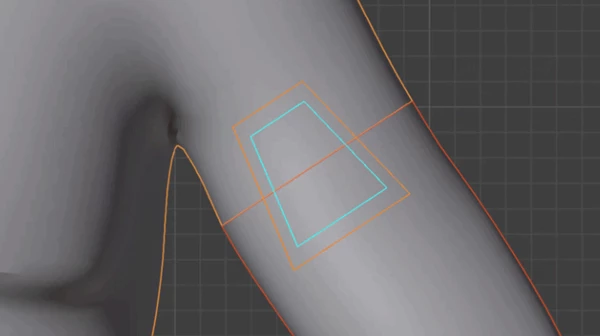
Offset Control: Move the key along the cut instead of keeping it centered. This can be useful when the middle of a part is hollow, detailed, or simply not the best location for a connector.
Live Preview and Flip: Preview the size, height, and orientation before committing to the cut. Flip can also swap the male and female sides.
Explode View: Temporarily separate the pieces so you can inspect the joint, pocket, and overall fit before preparing the model for printing.
High-Poly Support: The cutting system is designed to work with dense sculpts and includes multiple boolean solver fallbacks for more reliable results on difficult geometry.
Non-Destructive Controls: Options such as Undo Last Cut and Delete All Cuts make it easier to experiment without getting stuck with an unwanted result.
Where Dovetail Key Really Comes in Handy 🖨️
One of the most obvious uses is large resin or FDM prints. If a statue cannot fit on your printer in one piece, you can divide it into smaller printable sections while giving each section a practical way to reconnect.
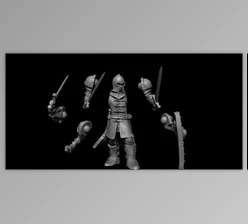
It is also useful for action figures and busts. Arms, heads, accessories, armor, and other parts can be separated for easier printing and assembly.
For cosplay props, a large helmet, weapon prop, or costume component may need to be printed in several sections. Adding controlled joints makes it much easier to position those pieces correctly during assembly.
The same approach works well for modular models and kit-bashing. Instead of permanently joining everything, you can create parts that are designed to separate and reconnect when needed.
Tips for Cleaner, Better-Fitting Results 💡
The addon handles much of the technical work, but where and how you create the cut still matters.
- Use natural seams whenever possible. On characters, try following clothing boundaries, armor panels, folds, or changes in surface direction. A thoughtfully positioned seam is much easier to hide after printing.
- Match the clearance to your printer. A very tight connection may look perfect digitally but become difficult to assemble after printing. If your printer or material needs additional tolerance, increase the clearance or Socket Gap slightly.
- Choose the joint shape based on the model. The classic dovetail works well when you want a strong locking connection, while Ball Key can feel more natural on rounded and organic pieces. Recessed Seam is particularly useful when keeping the connection less visible is important.
- Use Offset instead of forcing the key into the center. Sometimes moving the connector slightly to one side can avoid thin walls, detailed geometry, or other problematic areas.
- Check everything with Explode View. Before exporting the final pieces, pull them apart and inspect the joint from different angles. It is much easier to catch an awkward connector position before starting a long print.
- Test important fits before a large print. Printer tolerances and materials vary, so for an expensive or time-consuming project, a small test of the connection can help you find a suitable clearance before printing the complete model.
From One Big Model to Printable Pieces 🚀
Splitting a model for 3D printing should not require rebuilding connectors from scratch every time. Dovetail Key turns that process into a much more visual workflow: define the cut, choose the type of joint, adjust the fit, and prepare the resulting pieces for printing.
Straight and freehand cuts give you flexibility over where models are divided, while Dovetail, Ball Key, and Recessed Seam joints provide different ways to reconnect those parts afterward. Controls for clearance, sizing, offset, and socket gaps also give you room to adapt the result to different printers and materials.
For large statues, character sculpts, cosplay pieces, modular models, and other projects that cannot—or should not—be printed as a single object, it can remove a surprisingly repetitive part of the preparation process.
For anyone who works with Blender models that are to be 3D printed, giving Dovetail Key a try can help to simplify the process of preparing the models for printing.

Files Password : gfxplugin.com OR 123456