Downloadable Files
You can download NoPrecomp for free from the bottom of this page.
A Smarter Way to Organize Your After Effects Timeline
After Effects projects can quickly become complex with dozens or even hundreds of layers, with adjustment layers, null objects, and precompositions; projects can quickly become difficult to navigate.
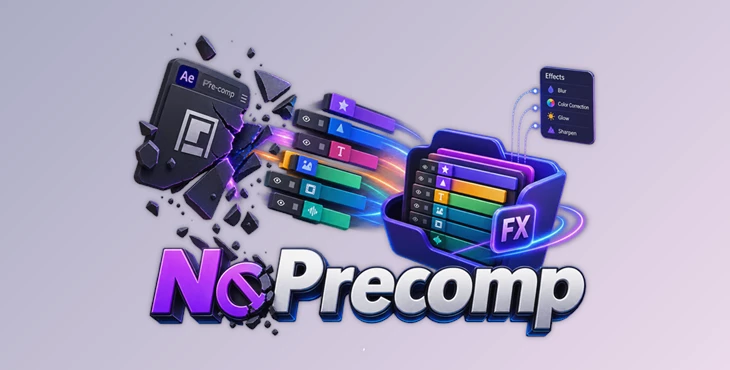
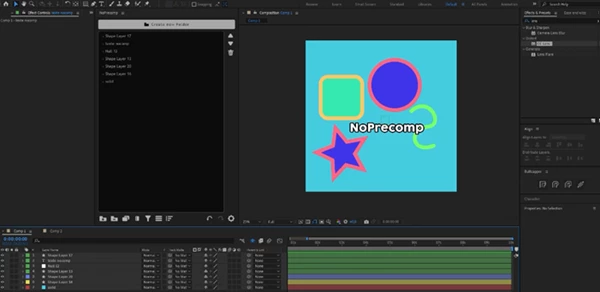
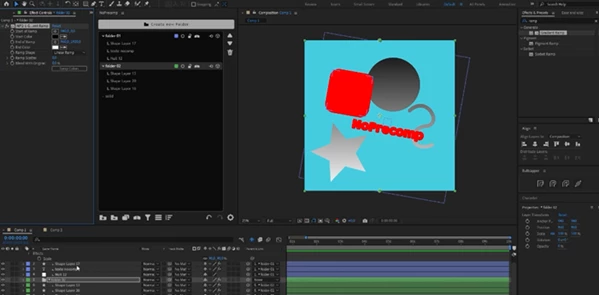
NoPrecomp allows you to create real folders within your After Effects timeline. These folders allow you to group your layers and manage them through a dedicated layer manager.
The best part is that effects applied to these folders will automatically affect the layers within that folder. This allows for better management of your After Effects projects without the need to use adjustment layers and precompositions continually.
What Is NoPrecomp?
NoPrecomp is an After Effects workflow and layer-management tool designed to improve the way complex compositions are organized and processed.
Instead of using precompositions simply to group related elements, you can place layers inside timeline folders. These folders provide both visual organization and effect inheritance.
For example, imagine a motion graphics scene containing several text layers, icons, and vector shapes. You could place all the text elements inside one folder and apply an effect to that folder. Its child layers would automatically inherit the effect while unrelated elements elsewhere in the composition remain untouched.
This approach keeps the original layers accessible in the main composition and provides a more non-destructive way to work.
Why Folder-Based Editing Can Improve Your Workflow
Traditional After Effects projects often become harder to manage as their complexity increases. Precomposing can clean up the timeline, but it also moves layers into separate compositions. Adjustment layers can process multiple elements, but their influence depends heavily on layer placement.
NoPrecomp provides an alternative by allowing organization and processing to happen directly in the timeline.
You can keep related elements together, quickly identify different parts of a scene, and apply effects locally to specific groups. Because you don’t have to precompose those elements, vector layers can also remain sharp and accessible in their original composition.
The result is a timeline that can stay easier to understand even as a project becomes more sophisticated.
Features
Real Timeline Folders
One of the main features of NoPrecomp is the ability to create actual folders inside your After Effects timeline.
Layers belonging to the same visual element, animation, character, interface, or scene can be grouped together. In a large composition, this makes it much easier to understand where everything belongs.
For example, a UI animation could have separate folders for buttons, typography, icons, backgrounds, and decorative elements rather than presenting every layer as one long list.
Automatic Effect Inheritance
Effects applied to a folder are automatically inherited by its child layers.
This allows you to process a specific group of layers without affecting everything else in the composition.
If several graphic elements need the same treatment, for instance, you can group them and apply the effect at the folder level instead of manually applying and maintaining the same setup across individual layers.
Non-Destructive Alternative to Precompositions
NoPrecomp is designed to reduce situations where precomposing is necessary purely for organization or shared processing.
Keeping layers inside the original composition means you can continue editing them directly without repeatedly opening nested compositions.
This can be especially useful when working with vector graphics, since avoiding unnecessary precompositions helps keep the workflow clean while preserving sharp vector elements.
Powerful Layer Manager
Large After Effects projects can contain hundreds of layers, making even simple navigation surprisingly time-consuming.
NoPrecomp includes a dedicated layer manager with advanced controls and organizational tools designed for handling these larger timelines.
Instead of constantly scrolling through the composition looking for a particular group of layers, you can maintain a more structured environment that is easier to navigate and modify.
Faster Everyday Workflow
NoPrecomp is built around reducing repetitive actions.
Shortcuts, quick actions, and automated behaviors help minimize unnecessary clicks. While the difference may feel small on a simple composition, these improvements can become much more noticeable during larger professional projects with many interconnected layers.
Customizable Interface and Behavior
Different motion designers organize their projects differently, so NoPrecomp includes customization options for adjusting its interface and behavior.
This makes it possible to adapt the tool to your preferred workflow rather than completely changing the way you already work.
Multilingual Accessibility
NoPrecomp supports six languages:
English, French, German, Spanish, Chinese, and Japanese.
This makes its workflow and controls more accessible to artists working in different languages.
Practical Examples in Real Projects
Consider a title animation containing ten separate typography and shape layers. Normally, you might precompose those elements or use an adjustment layer to give them the same effect.
With NoPrecomp, they can stay inside the main composition while being placed into a dedicated folder. Apply the effect to that folder, and its children receive the treatment automatically.
The same concept can be useful for character rigs, interface animations, infographic scenes, logo animations, social media graphics, and complex motion design compositions.
It becomes particularly valuable when a project needs frequent revisions because individual layers remain readily accessible.
Tips for Getting More from NoPrecomp
Start by organizing layers according to their actual role in the scene. Instead of creating folders randomly, use clear groups such as typography, foreground, background, character, interface, or effects. A predictable structure becomes increasingly useful as your project grows.
Use effect inheritance selectively. Folder-level effects are especially useful when several related elements genuinely need the same processing. Keeping folder structures logical will make it easier to understand exactly which layers are being affected.
Try to avoid unnecessary precompositions when their only purpose is organization. Keeping editable elements in the main composition can make revisions faster and preserve a clearer view of how the scene is constructed.
For very large projects, establish your folder structure early. Organizing hundreds of layers after a composition is already finished is much harder than maintaining a clean structure from the beginning.
Finally, customize NoPrecomp around the actions you perform most frequently. Shortcuts and quick actions provide the greatest benefit when they support repetitive parts of your own workflow.
A Cleaner Approach to Complex After Effects Projects
NoPrecomp changes timeline organization from simple layer stacking into a more structured folder-based workflow.
Real timeline folders, automatic effect inheritance, powerful layer-management controls, workflow customization, and a non-destructive alternative to unnecessary precompositions make it particularly useful for complex After Effects projects.
For motion designers who regularly work with crowded timelines, the biggest advantage is straightforward: layers remain accessible, related elements stay organized, and shared effects can be managed more efficiently.
Instead of allowing the timeline to become more difficult to control as a project grows, NoPrecomp gives you tools to keep the composition structured from beginning to end.

Files Password : gfxplugin.com OR 123456