Downloadable Files
You can download MagicGrade for free from the bottom of this product page.
Bring the Character of Real Film to Digital Footage
Digital footage can be sharp, clean, and technically impressive, but sometimes it lacks the organic character associated with traditional film. Creating that character manually usually means working with complex node structures, curves, color transforms, grain effects, and numerous small adjustments.
MagicGrade is designed to simplify this process. It is a professional color grading and film emulation tool that lets you adjust color, contrast, exposure, density, saturation, and other important properties directly from the preview. Alongside its grading controls, it includes film grain, halation, bloom, vignette, and lens effects for creating a more complete analog-inspired image.
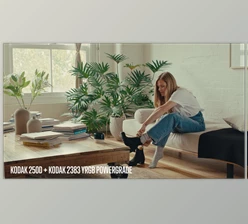
Instead of relying on generic presets that simply make footage look “filmic,” MagicGrade includes 40 film stocks based on measured characteristics of real film, giving each stock its own color response, contrast behavior, and grain profile.
What Is MagicGrade and What Does It Do?
MagicGrade is a color grading and film emulation solution designed to make sophisticated color work more accessible. It can be used directly on the Edit or Color page, allowing you to grade footage without constantly working through complicated node graphs or tiny controls.
At its core, the tool combines color correction, creative grading, film stock emulation, and finishing effects in one streamlined workflow.
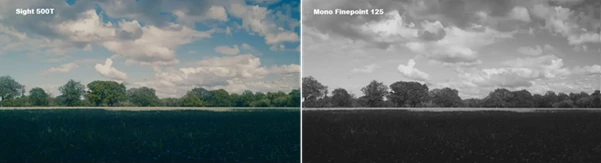
For example, wedding footage can be given soft pastel colors and flattering skin tones with a stock such as Aria 400, while landscape footage can benefit from the deep saturation and dramatic shadows of Velvet 50. For night scenes filled with practical lights or neon, Sight 500T provides a tungsten-balanced cinematic character with lively grain and highlights that work beautifully with halation.
The result is greater control over the mood of an image without requiring every element of the look to be constructed manually.
40 Film Stocks Based on Real Film Data
One of the most important parts of MagicGrade is its collection of 40 film stocks.
These are not presets for generic filmic looks. Each emulation uses the characteristic curves and dye behavior of various film stocks.
From the available presets, the film stock looks range from the standard cinematic look of 83 to the highly saturated colors of Honey 100, which features fine grain that is good for landscapes, or the pastel colors of Starboard 160, which is good for portraits or weddings.
There are also various monochrome film stocks available, from the noir-like look of Mono Duplex 250 or Mono Tritone 400 to the clean black and white images of Mono Vertex 100.
This variety makes it easier to select a film personality that suits the subject of the film rather than using the same personality for every film project.
Features
Intuitive Color Correction
MagicGrade provides essential controls for exposure, contrast, saturation, and temperature in a straightforward interface. This makes basic correction faster while still giving you enough flexibility to shape the image before applying a stronger creative look.
On-Screen Grading Controls
Instead of relying entirely on sliders, you can make adjustments directly on the image by dragging on the preview.
This creates a more visual and intuitive relationship between your adjustments and their effect on the footage.
Filmic Curves
The built-in curves make it easy to lift shadows, soften highlights, or reshape overall contrast.
They are especially useful when you want to preserve highlight detail while creating a softer film-like tonal response.
Color Density
The Density control helps create deeper, richer colors without simply pushing conventional saturation until colors begin to look artificial or neon.
This can be particularly valuable for skin, foliage, clothing, and colorful production design where richer tones are desirable without sacrificing natural color relationships.
Hue vs. Controls
Individual colors can be adjusted through saturation, warmth, density, and hue controls.
MagicGrade also includes Crosstalk, giving you additional control over the relationships between colors. These tools are useful when a specific part of an image needs attention without dramatically changing the entire grade.
RGB Curves
Separate RGB curves allow you to manipulate individual color channels and create effects such as subtle split toning. This can help introduce warmer highlights, cooler shadows, or other controlled color relationships.
Automatic Film Grain Profiles
Film grain is matched to the selected stock rather than applied as the same generic texture every time. Choose a fine-grained ISO 50 stock and the grain becomes tighter and more subtle. Select a faster or pushed stock and the grain becomes larger and more noticeable. Both grain size and density are matched automatically to the film profile.
Colour Space Transforms
MagicGrade includes built-in Colour Space Transforms, allowing you to specify the format recorded by your camera, including options such as S-Log3, Log-C, V-Log, and R3D.
This means you do not necessarily need a fully color-managed timeline before using the film stocks. Select the appropriate input and MagicGrade can place the footage into the intended starting point for the selected look.
Halation
Halation creates the characteristic warm glow that can appear around strong highlights on film. Used carefully, it can make bright practical lights, windows, reflections, and other highlights feel less digitally perfect.
Bloom
Bloom introduces a softer and dreamier spread around highlights. A subtle amount can soften narrative footage, while stronger settings can create a more stylized look for music videos, fashion pieces, or experimental projects.
Vignette
The vignette tool provides smooth edge falloff to gently guide attention toward the center or main subject of the frame.
Lens Blur
Lens Blur introduces gentle softness toward the edges while keeping the center relatively crisp, recreating some of the character associated with vintage lenses used wide open.
Chromatic Aberration
Subtle red and cyan fringing can be introduced around the edges of the image. When used conservatively, this small optical imperfection can help highly clean digital footage feel more naturally photographed.
Lens Distortion
Barrel and pincushion distortion controls provide another way to remove some of the clinical perfection associated with modern digital images and lenses.
Serious Colour Science Behind Simple Controls
Although MagicGrade is designed to feel approachable, its processing goes beyond basic filters.
Its Linear Gain Exposure allows brightness changes to behave more like actual camera exposure rather than a simple brightness effect. The Tetrahedral Colour Warper is designed to keep hue adjustments clean while reducing issues such as banding and broken gradients.
Filmic saturation and density processing also help colors become richer without immediately producing the harsh, neon appearance that can result from aggressive conventional saturation.
These technologies operate behind relatively simple controls, allowing users to focus more on the image and less on the mathematics behind the grade.
MagicGrade Film for Existing Grading Workflows
Not every colorist wants to replace an existing node-based workflow. For that situation, there is MagicGrade Film, a stripped-back version focused on the Colour Space Transform, 40 film stocks, and texture.
It can be placed toward the end of an existing traditional grade, allowing you to retain your own node structure while adding the film emulation and texture afterward.
This makes the film component useful even for experienced users who prefer to perform primary and secondary grading with their existing tools.

Tips for Better and More Natural Results
A good rule of thumb when using the film effect is to use restraint. Always start with exposure and white balance correction before you start playing with the strength of the film stock emulation.
Choose your film stock according to the material you are editing rather than the degree of drama you wish to showcase. For instance, choose a soft portrait film stock for shots of weddings or close-ups, or opt for a slide-film stock for landscapes or other material with less complex action.
Pay particular attention to the characteristics of the film stock: grain, halation, bloom, chromatic aberration, and lens distortion. Each of these effects can be useful in providing an analog look to your footage, but using all of them at once can be too artificial for viewers.
For cinematic footage, introduce grain first, then add halation and bloom while reviewing the footage to ensure that the effects appear natural to the scene. Lens effects are best used as finishing touches rather than elements with which to start your film edit.
It is also worth testing several film stocks on the same shot to see how different the color responses can be to each film stock.
Final Thoughts
MagicGrade combines film emulation with color grading and finishing effects into a single, easy to use plugin.
With 40 film stock presets, users can choose from a range of different film stocks to emulate in their editing projects. Each of these film stocks comes with its own type of grain, Colour Space Transforms, density, curves, halation, bloom, and lens effects to allow editors to fine tune the look of their footage.
For editors who would like to move away from the overly clean look of digital footage, but do not want to build each component of a film look manually, MagicGrade offers editors a plugin that contains simple controls and deeper colour science controls. By simply experimenting with the different film stocks and subtly adjusting the finishing effects, editors can transform their digital footage from a simple recording to a more cinematic edit.

Files Password : gfxplugin.com OR 123456