Downloadable Files
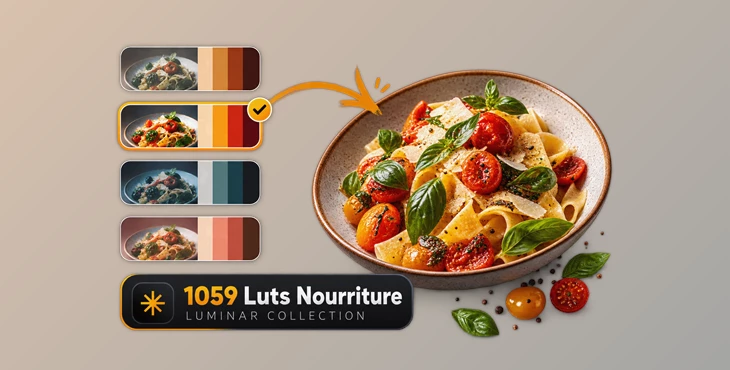
You can download 1059 Luts Nourriture Luminar Collection for free from the end of this page.
When Good Food Photos Still Feel a Little Flat 🍽️
You can have a beautifully plated dish, soft natural light, and a well-composed shot, but sometimes the final image still doesn’t have the mood you imagined. The colors may feel slightly dull, the food might lack warmth, or the overall photo simply needs a stronger visual identity.
Color grading may help fix this issue. Grading the food photograph can add warmth, add contrast, or highlight specific colors within the photograph to improve the visual appeal of the food to the reader.
The challenge is getting there without spending too much time manually adjusting every image. This becomes even more important when you’re editing an entire restaurant shoot, a recipe collection, or dozens of photos for social media.
What Do LUTs Actually Do? 🎨
A LUT, or Look-Up Table, is essentially a predefined color transformation. Instead of manually adjusting multiple color settings one by one, you can apply a LUT to quickly give an image a particular color style or mood.
Think of it as a starting point for color grading rather than simply another basic filter.
For example, a food photo with fairly neutral colors could be transformed into a warmer image with richer browns and golden highlights. Another LUT might create cooler shadows and stronger contrast for a more cinematic restaurant atmosphere.
LUTs can be particularly useful for:
- Food and recipe photography
- Restaurant and café images
- Social media food content
- Menu photography
- Product and packaging shots
- Lifestyle photography
- Images captured under different lighting conditions
They can also help maintain a more consistent visual style across a collection of photos, which is especially useful when multiple images need to feel like part of the same project.
Meet 1059 Luts Nourriture Luminar Collection ✨
1059 Luts Nourriture Luminar Collection is a large collection of LUTs designed to make photo color grading faster and easier in Luminar.
The collection provides a wide variety of looks developed for different photography styles and lighting conditions. Instead of building every color treatment manually, you can experiment with ready-made LUTs and quickly find a look that complements your image.
This can be especially practical for photographers who regularly work with large batches of images and want to explore different visual directions without repeatedly rebuilding their color adjustments.
Features
1059 LUTs in One Collection
With a large selection of LUTs available, you have plenty of room to experiment with different moods and color treatments rather than relying on only a handful of predefined looks.
Designed for Different Lighting Conditions
Not every photograph is captured under the same lighting. The collection is designed to provide options for different photographic and lighting situations, making it easier to find a suitable starting point.
Quick One-Click Color Transformation
Applying a LUT can instantly change the overall color character of an image, helping you explore different looks before moving on to more detailed adjustments.
Cinematic Color Styling
The LUTs can help give photographs a more distinctive cinematic appearance, adding character and atmosphere through color.
Faster Editing Workflow
Instead of recreating similar color adjustments for every photograph, you can use LUTs as a quick foundation and spend more time refining the details that actually need individual attention.
Suitable for Different Experience Levels
Beginners can use LUTs as an accessible way to experiment with color grading, while experienced photographers can incorporate them into a broader editing workflow and customize the final result further.
From Everyday Food Shot to a Stronger Visual Style 📸
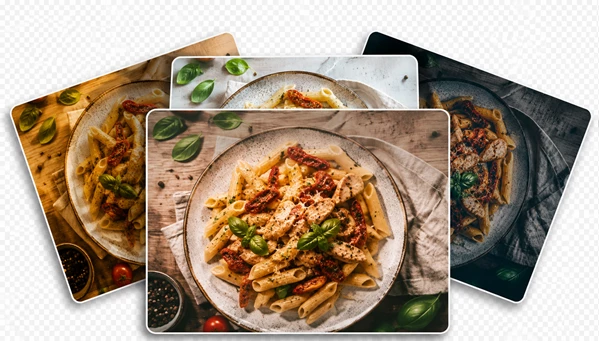
Imagine you have photographed a plate of pasta next to a window. The exposure looks good and the composition works, but the colors feel slightly neutral.
Applying a warmer LUT could emphasize the golden tones of the pasta, enrich the reds in the sauce, and give the overall image a warmer atmosphere.
For a dark restaurant scene, you might instead choose a more cinematic treatment with deeper shadows and controlled highlights.
The same idea works when editing a complete series. If you have 20 photos from the same food shoot, starting with similar LUTs can help create a more consistent visual language across the entire collection.
How to Get Better Results with LUTs 💡
A LUT doesn’t necessarily need to be the final step of your edit. In many cases, the best results come from treating it as a creative starting point.
After applying a LUT, check the intensity of the effect. If the colors look too strong, reduce its influence until the result feels more natural. Subtle color grading often works particularly well with food photography because you usually want the ingredients to remain recognizable and appetizing.
It’s also worth correcting basic exposure and white balance before choosing your final look. A LUT applied to an image with an unwanted color cast may produce a very different result from the one you expected.
Pay particular attention to reds, oranges, yellows, and greens. These colors appear frequently in food photography, and excessive grading can quickly make ingredients look unnatural.
Finally, don’t hesitate to try several LUTs on the same photograph. A look that works beautifully for a warm indoor restaurant shot may not be the best choice for bright daylight photography.
Build a Consistent Look Without Starting from Scratch 🌟
Color grading plays a major role in how food photography feels. It can make an image warmer, moodier, cleaner, richer, or more cinematic while helping an entire series maintain a consistent visual identity.
1059 Luts Nourriture Luminar Collection provides a large library of ready-made color looks that can make this process quicker and easier. Rather than manually creating every grade from scratch, you can explore different LUTs, choose a suitable starting point, and then fine-tune the result to match your photograph.
For food photographers and content creators who use Luminar often, experimenting with the various LUTs can help develop a better understanding of the different color grading possibilities for food photography projects while making the editing process more efficient.

Files Password : gfxplugin.com OR 123456