Downloadable Files
You can download RoundPro for free from the bottom of this page.
Create Consistent Rounded Corners in After Effects
Rounded corners may seem like a small design detail, but they can make a big difference in how polished a motion graphics project feels. From interface elements and title cards to video frames and animated panels, smooth corners often help create a cleaner and more modern visual style.
However, when you attempt to apply this rounded corner effect to shapes of varying dimensions, you quickly run into problems. The radius that looks great on a small shape might not be easily visible on a much larger shape. Each of these variations will require you to rebuild the shape, masks, and adjust the corner radius, which can be quite time-consuming.
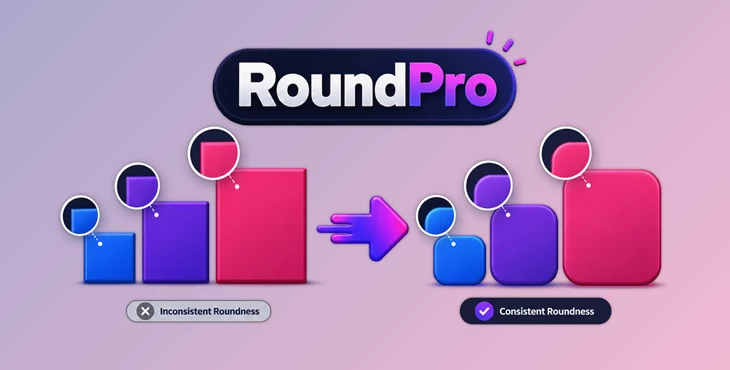
This is where RoundPro offers a much easier approach. Instead of manually rebuilding elements just to get the corners right, it lets you apply and control rounded corners directly while keeping the result visually consistent across different layer sizes.
Why Consistent Rounded Corners Matter
Rounded corners are used throughout your project to give a slightly more approachable feel to your designs. They are incorporated into buttons, cards, thumbnails, and more.
In After Effects, however, your elements rarely have identical dimensions. Imagine creating a motion graphics package containing a small button, a medium-sized text card, and a large video panel. Applying exactly the same corner radius to all three does not necessarily make them look equally rounded.
What matters is visual proportion.
When roundness responds appropriately to the size of each element, different parts of the composition feel like they belong to the same design system. This becomes especially useful when creating UI animations, explainer videos, social media graphics, product presentations, and other projects containing multiple rectangular elements.
Meet RoundPro
RoundPro is a free After Effects tool that helps to speed up the process of applying rounded corners to elements in compositions. RoundPro’s main benefit is that it helps to avoid the necessity of rebuilding shapes or masks to achieve the same effect.
RoundPro can be utilized to apply roundness to different types of layers within After Effects, and can be used in both small projects or large projects that include many elements to apply the same visual language to all elements.
Features
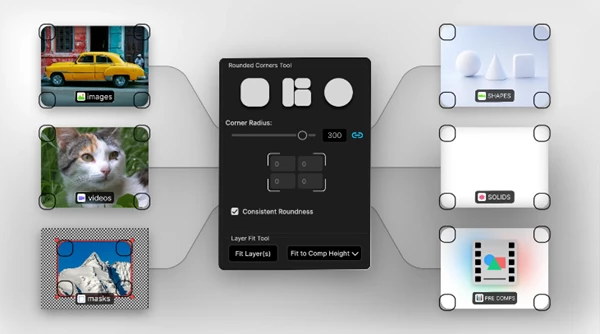
Consistent Roundness Engine
One of the key features of RoundPro is its Consistent Roundness Engine. The tool applies proportional roundness according to the size of each layer, helping different elements maintain a visually consistent appearance even when their dimensions are different.
For example, if your composition contains several cards ranging from small labels to large video containers, RoundPro can help prevent one element from looking excessively rounded while another appears almost square.
Works with Different Layer Types
RoundPro is not limited to basic shape layers. According to its product description, it works with:
Shape layers
Solid layers
Precomps
Video layers
Masked elements
This flexibility means you can use the same corner-rounding workflow across different parts of a composition instead of relying on separate techniques for each layer type.
Individual Corner Control
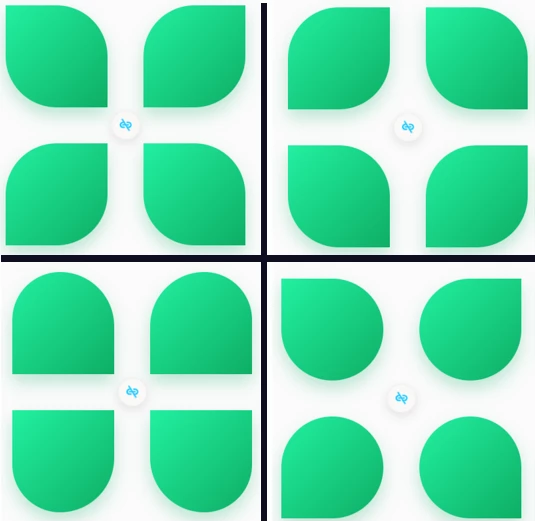
Not every design needs four identical corners. RoundPro includes individual corner radius control, allowing you to unlink the corners and adjust them independently.
For instance, you could create a panel with strongly rounded corners on one side and sharper corners on the other. This can be useful for custom UI elements, stylized title cards, image containers, or layouts where several panels connect visually.
Quick One-Click Workflow
The ability to apply roundness with a single click can save time when working with many layers. Instead of recreating an element as a shape or repeatedly modifying masks, you can focus more on the actual composition and animation.
Where Can RoundPro Be Useful?
Consider a UI animation containing ten cards of different sizes. Manually giving every card the right corner radius can become surprisingly tedious, particularly when you later resize some of them.
With RoundPro, proportional roundness can help those elements maintain a consistent visual relationship.
The same idea applies to social media layouts containing videos inside rounded frames. Instead of manually preparing every frame, you can apply rounded corners directly to the relevant layers.
It can also be useful when designing lower thirds, animated dashboards, presentation graphics, interface mockups, or modular motion design systems where rounded rectangles appear repeatedly throughout the project.
Tips for Cleaner Results
Try to think about rounded corners as part of the overall design system rather than treating each layer independently. If several elements belong to the same visual family, keeping their perceived roundness consistent can make the entire composition feel more intentional.
Use individual corner controls selectively. Asymmetrical corners can create interesting designs, but using too many different corner styles in the same composition may reduce visual consistency.
It is also worth checking your design at its final viewing size. Extremely rounded corners can look attractive while working close-up but may feel exaggerated once the complete composition is viewed normally.
For interface-inspired motion graphics, combine consistent roundness with consistent spacing, typography, and element sizing. Rounded corners work best when they support an already organized visual hierarchy rather than becoming the main visual feature.
Finally, take advantage of RoundPro when experimenting with layout sizes. Since the tool is designed to maintain proportional roundness according to layer size, it can be particularly convenient when elements need to be resized during the design process.
Final Thoughts
While the rounded corners effect is simple, it often requires more manual work than is first predicted when trying to maintain rounded corners across a variety of layer sizes. RoundPro makes this substantially easier with its features.
Its biggest advantage is not adding a complicated new effect to your workflow. Instead, it makes a familiar design task quicker and easier to control.
For projects involving UI elements, cards, video containers, panels, or other rectangular graphics, RoundPro can be a practical way to maintain a cleaner and more consistent visual style while spending less time rebuilding shapes and adjusting masks.

Files Password : gfxplugin.com OR 123456