Downloadable Files
You can download FEATHERS for free from the bottom of this page.
Bring Feathered Designs to Life Faster
Creating detailed feathers from scratch can take a surprising amount of time, especially when a character or creature needs dozens of feathers with different shapes and purposes. FEATHERS is a collection of 40 high-poly feather sculpts designed to make this process much faster and more flexible.
Instead of sculpting every feather individually, you can start with ready-made detailed meshes and quickly build wings, feathered creatures, fantasy characters, accessories, or ornamental designs. The collection is especially useful during sculpting and concepting, where being able to experiment quickly can make a big difference.
What Are High-Poly Feather Sculpts?
High-poly sculpts are detailed 3D meshes containing enough geometry to preserve small surface forms and sculpted details. In the case of FEATHERS, these meshes provide pre-sculpted feather forms that can be incorporated into a larger 3D design.
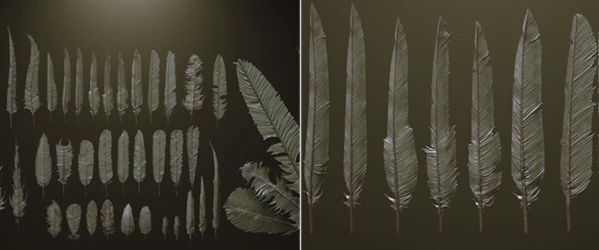
The pack contains several feather categories, making it easier to create variation instead of repeatedly using the same shape. Primary and secondary feathers can help establish larger wing structures, while covert feathers can be used to fill transitions and create more convincing layering.
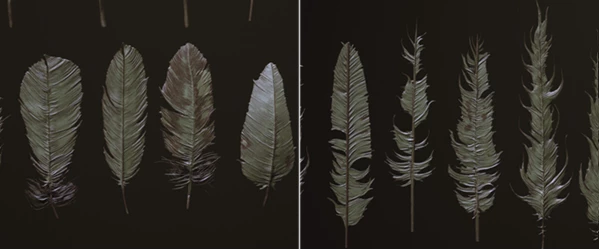
The included “dirty” feathers are useful when a perfectly clean silhouette would look too artificial. Stone feather variations can also work well for statues, fantasy creatures, architectural ornaments, or stylized concepts.
Having these different forms available helps break repetition and gives feather-covered surfaces a more organic and believable appearance.
Meet the FEATHERS Collection
FEATHERS is essentially a time-saving sculpting resource for artists who regularly work with feathered characters and designs. The collection contains 40 high-poly sculpts, supplied in several practical formats so they can be incorporated into different workflows.
It is designed for ZBrush 2021.6.5 or later, with IMM brushes provided for quickly inserting feathers while sculpting.
Features
40 Detailed Feather Sculpts
The collection gives you a varied library rather than a single generic feather. It includes:
- 14 primary feathers
- 10 secondary feathers
- 6 covert feathers
- 5 dirty feathers
- 5 stone feathers
This variety makes it much easier to construct layered feather arrangements and avoid obvious duplication across a model.
Three ZBrush IMM Brushes
All 40 feathers are organized into three InsertMultiMesh (.ZBP) brushes with different levels of geometry: HIGH, MEDIUM, and LOW.
The HIGH versions retain a high polygon count for maximum sculptural detail, MEDIUM provides the same 40 designs at a reduced polygon count, and LOW offers lightweight alternatives when you need less geometry.
ZBrush Master File
A master.ZTL file is included with the feathers organized as separate SubTools. This can be useful when you want direct access to individual sculpts for editing, positioning, or customization.
FBX and OBJ Formats
Alongside the ZBrush files, the pack contains a single FBX with all meshes laid out as well as separate OBJ files for every mesh. This gives artists additional flexibility when bringing the feather geometry into different stages of a 3D workflow.
Optimized High-Poly Geometry
This product has been decimated as much as possible without sacrificing its important sculpted detail. This helps reduce unnecessary geometry while maintaining the visual qualities of the original sculpts.
Keep in mind that these are untextured high-poly sculpts, so materials and textures are not included.
Getting Better Results with FEATHERS
One of the easiest ways to make feather arrangements feel natural is to avoid perfect repetition. Mix primary, secondary, and covert feathers while slightly changing their scale, rotation, angle, and overlap.
For wings, start with the largest structural feathers before adding smaller layers. Establishing the silhouette first makes it much easier to judge whether the overall wing shape works before spending time on finer details.
You can also combine different polygon versions depending on importance. This tool close to the camera or important to the silhouette can use higher-detail meshes, while less visible areas can use MEDIUM or LOW versions to keep the scene more manageable.
The dirty feather variations are particularly useful for breaking up overly clean patterns. Adding only a few irregular feathers among cleaner ones can make a creature feel more organic without making the entire design chaotic.
For fantasy or sculptural projects, try mixing the stone feathers with other hard-surface or rock-like forms. They can provide an interesting starting point for statues, decorative wings, ancient creatures, and stylized architectural elements.
A Practical Shortcut for Feather Sculpting
FEATHERS gives 3D artists a useful collection of ready-made feather forms without forcing them to sculpt the same basic elements again and again. With 40 high-poly sculpts, multiple feather categories, three levels of geometry, IMM brushes, and ZTL, FBX, and OBJ files, the collection can fit comfortably into different sculpting and concepting workflows.
Its biggest advantage is simple: it saves time while still leaving plenty of room for customization. By mixing, transforming, layering, and modifying the supplied feathers, you can quickly create anything from convincing wings to stylized fantasy designs while keeping your attention on the overall character or concept.
If feather-heavy designs are a regular part of your work, experimenting with the different feather types and polygon levels can make the sculpting process considerably faster and more enjoyable.

Files Password : gfxplugin.com OR 123456