Downloadable Files
You can download Drop Cast for free from the end of this page.
Turn Asset Collections Into Complete Scenes
When building 3D environments, it’s common to place dozens or even hundreds of individual assets into a scene. Placing each of these individually can be tedious and is often not the way that you wish to create your content.
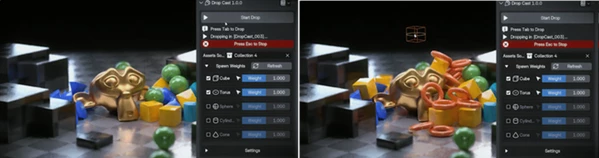
Drop Cast allows you to take a collection of 3D assets and scatter them within your scene using physics-based technology. Simply drop your collection into the scene and scatter them to get started building your scene.
This is why Drop Cast is especially useful for populating environments with objects quickly.
What Is Physics-Based Scattering?
Physics-based scattering is a practical way to distribute multiple objects throughout a 3D scene while allowing their placement to feel more physically believable.
Imagine creating a scene filled with rocks, debris, boxes, props, or other environmental assets. Placing each object manually can take a significant amount of time, and repeating similar rotations, scales, or spacing can make the environment look artificial.
With Drop Cast, collections of assets can be scattered across a defined area in only a few clicks. This helps introduce natural variety while reducing the amount of repetitive manual placement required.
The result is particularly valuable for scenes where objects need to look casually distributed rather than perfectly arranged.
Meet Drop Cast
Drop Cast is designed to turn an existing asset collection into a populated scene quickly. Its main goal is to make scattering simple while still giving you control over how individual assets appear.
Instead of manually dragging objects into the scene one at a time, you can work with collections and adjust important parameters to create different distributions.
This approach can speed up environment building while also making experimentation easier. You can quickly test different asset combinations, densities, scales, and scattering areas until the scene feels right.
Features
Effortless Asset Placement
One of the main advantages of Drop Cast is its straightforward asset-placement workflow. Collections of objects can be scattered throughout your scene with just a few clicks.
For example, if you have a collection containing different environmental props, you can distribute them together rather than manually positioning every variation.
This can be especially helpful for filling larger environments where repeating the same placement process would otherwise consume a lot of time.
Individual Spawn Probabilities
Not every asset needs to appear equally often.
Drop Cast allows you to assign individual spawn probabilities to assets, giving you more control over how frequently each object appears in the final distribution.
For instance, you might want small rocks to appear frequently while larger rocks remain relatively rare. Adjusting their spawn probabilities can create a more convincing visual hierarchy and prevent the scattering from feeling overly uniform.
Randomized Object Sizes
Variation in scale is another simple way to make scattered environments feel more natural.
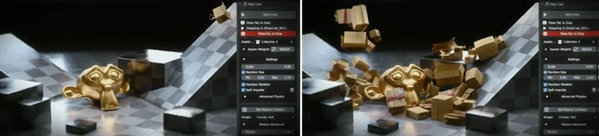
Drop Cast lets you randomize the sizes of your assets. Even when similar objects are used repeatedly, differences in scale can help break obvious repetition.
This is useful when working with elements such as stones, debris, environmental props, or other objects that naturally appear in different sizes.
Adjustable Drop Area
Different scenes require different scattering boundaries.
With Drop Cast, you can adjust the dimensions of the drop area to better match your environment. A smaller area can be useful for localized clusters, while larger dimensions can help populate broader sections of a scene.
This gives you more control over where scattering happens without requiring you to manually reposition every generated object.
Getting Better Results With Drop Cast
Use several objects within a collection. All objects should be visually similar.
Spawn probabilities can be used to even out the appearance of unusual objects within the scene. Objects that are common to the scene will have higher probabilities of being spawned than the more distinctive assets.
Scale randomization should also remain believable. Small variations in size are generally believable, but significantly different sizes may appear somewhat unnatural unless they are appropriate for the objects that are being scattered.
Another consideration for the scattering algorithm is the dimensions of the drop area. For instance, the entire environment could be utilized for dropping the objects. However, it may be easier to manage the scene if only a portion of the environment is utilized for scattering the objects.
Finally, the generated scattering is merely the starting point for the objects in the scene. After generating the scattering of the objects throughout the scene, it may be beneficial to inspect each important area of the scene and further adjust the objects within that area to provide more artistic control over those elements.
Faster Scattering Without Losing Control
Drop Cast offers a simple solution to one of the more repetitive parts of environment creation: placing large numbers of assets throughout a scene.
Its collection-based scattering workflow can dramatically reduce manual placement, while individual spawn probabilities, randomized sizes, and adjustable drop areas provide useful control over the final distribution.
Whether you are filling an environment with props, creating natural object variation, or simply looking for a faster way to transform an asset collection into a populated scene, Drop Cast can make the process more efficient and enjoyable.
Instead of spending your time positioning every object individually, you can focus more attention on composition, atmosphere, and the overall quality of your scene.

Files Password : gfxplugin.com OR 123456