Downloadable Files
You can download Advanced Composition Grids for free from the end of this product page.
Build Better Compositions with Smarter Guides
A strong composition can instantly make a design feel cleaner, more balanced, and more professional. But setting up guides manually in After Effects can quickly become repetitive, especially when you need more advanced layouts such as golden ratios, isometric grids, or precise symmetry guides.
Advanced Composition Grids makes this process much easier. It gives After Effects users a flexible collection of customizable composition grids that can be added directly to a project and adjusted whenever needed.
Instead of building guides from scratch, you can focus on positioning your elements and creating a visually balanced composition.
What Are Composition Grids?
Composition grids are visual guides that help you decide where important elements should appear within a frame. They can help organize typography, graphics, subjects, logos, and other design elements in a more intentional way.
For example, the Rule of Thirds can help position a subject away from the center for a more dynamic frame, while a Golden Spiral can guide the viewer’s eye toward the most important part of a composition.
These guides are useful for motion graphics, title sequences, social media content, advertisements, presentations, and many other After Effects projects. They make alignment and spacing easier to judge while helping maintain consistency across multiple scenes.
Meet Advanced Composition Grids
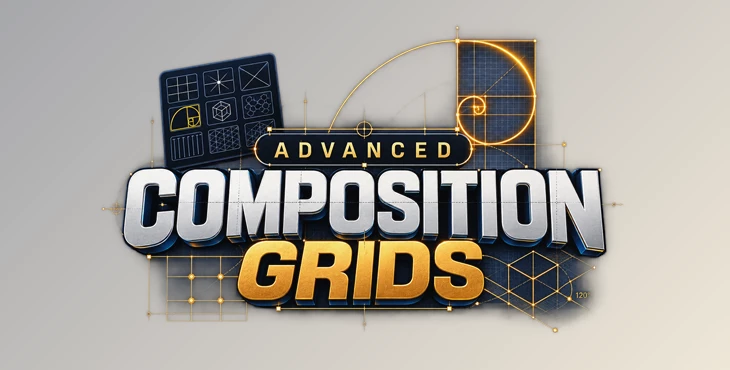
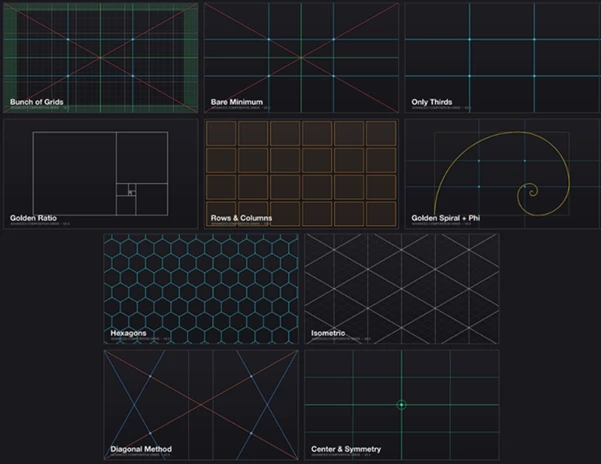
Advanced Composition Grids is an After Effects tool that provides 10 customizable grid systems for organizing compositions.
Each grid is generated as a guide shape layer and remains fully parametric. This means you can continue changing sizes, spacing, and other options directly through the layer’s effect controls instead of being locked into a fixed grid.
Colors and stroke widths can also be adjusted through the shape groups, giving you control over how the guides appear while working.
Features
10 Flexible Grid Systems
The tool includes a wide selection of composition guides for different design situations:
- Rule of Thirds
- Proportional Square Grid
- Diagonals and Center Cross
- Safe Margins
- Hexagons
- Isometric Grid
- Golden Rectangles
- Rows & Columns
- Golden Spiral + Phi Grid
- Diagonal Method with Reciprocals and Rebatment
- Center & Symmetry Guides
These options make it easy to move between traditional composition techniques and more specialized geometric layouts.
Fully Parametric Guides
The generated grids are not baked into the composition. Their parameters remain editable directly on the drawn layer.
You can adjust dimensions, spacing, and available toggles whenever your composition changes. This is especially useful during projects where layouts evolve throughout the design process.
Rows & Columns with Gutters
The Rows & Columns system provides a practical design grid with adjustable gutters. It can be particularly helpful when creating structured layouts involving text, cards, interface-style graphics, or multiple visual elements.
Instead of estimating spacing manually, you can establish a clear visual structure and use it throughout the composition.
Golden Spiral and Phi Grid
For compositions based on the golden ratio, the Golden Spiral + Phi Grid provides a convenient visual reference.
This can help guide the placement of subjects and focal points while creating a natural visual flow through the frame.
Isometric and Geometric Layouts
The Isometric Grid supports a true 120-degree layout, with an alternative old-school variation available by holding Alt.
Combined with hexagonal and proportional grids, this gives designers useful foundations for geometric motion graphics, technical designs, and stylized compositions.
Center and Symmetry Guides
When a project requires precise centered or symmetrical positioning, dedicated center and symmetry guides can make the process much faster.
These are especially useful for logo animations, centered typography, product presentations, and compositions where visual balance is essential.
Live Editing and Workflow Improvements
The tool has been rewritten from the ground up to work smoothly alongside other scripts and extensions.
Grid parameters remain live-editable, and Advanced Composition Grids also remembers the last grid you used between sessions, helping reduce repetitive setup when returning to your projects.
Practical Ways to Use the Grids
One of the best ways to use the grids is to pick the grid based on the elements you want the viewer to notice first in your composition. For instance, if you want to emphasize elements in the Rule of Thirds or Golden Spiral, you can pick that grid to start your composition with.
Typography designs can benefit from the type of guides offered by Center & Symmetry, as they can provide a better reference for maintaining even margins and alignments for your design elements.
Geometric designs can benefit from the Isometric and Hexagon grid guides, as these will help your elements align properly according to your design intentions.
While grid guides can help your designs with structure, it’s up to the designer to make small visual adjustments to the designs according to the grids to enhance the final product.
Create Cleaner and More Balanced Layouts
The Advanced Composition Grids plugin for After Effects helps to transform design principles into editable guides that can be used within your projects. Advanced Composition Grids offers various grid types and customizable parameters to help with projects ranging from motion graphics to social media content.
Each of these grids can assist in creating designs with even spacing between elements and with a strong visual structure.

Files Password : gfxplugin.com OR 123456