Downloadable Files
You can download Text Background Pro for free from the bottom of this product page.
Create Better Text Backgrounds in Seconds
Adding a colored background behind text in Photoshop sounds simple, but it can quickly become repetitive. You create a rectangle, resize it, adjust the padding, align it with the text, and then repeat the same process for every new line.
Text Background Pro turns this manual workflow into a fast and flexible process. Simply select your text, click Create, and the tool automatically generates clean, perfectly aligned backgrounds. Whether you are working on social media graphics, posters, thumbnails, advertisements, or typography-heavy layouts, it can save a surprising amount of time.
What Is Text Background Pro?
Text Background Pro is a Photoshop tool designed to automatically create customizable shapes and colored backgrounds behind text.
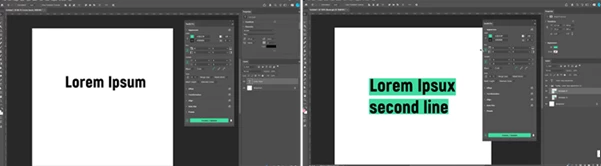
Instead of manually drawing and adjusting shape layers, the tool analyzes your typography and generates backgrounds that fit the text automatically. You can create an individual background for every line or use one unified shape behind the entire text block.
What makes the workflow especially useful is its understanding of actual typography. It works with real font metrics and x-height alignment, helping backgrounds feel properly fitted to the letters rather than simply placed around a rough text bounding box.
For example, a three-line headline can have three individually sized colored boxes, while a paragraph can use one consistent background covering the complete text area. This makes it useful for captions, titles, promotional graphics, editorial layouts, and many other Photoshop projects.
Turn Repetitive Photoshop Work Into One Click
The main advantage of Text Background Pro is automation. Tasks that normally require multiple shape layers and repeated resizing can be handled directly from its dockable UXP panel.
The tool supports both point text and paragraph text and can intelligently handle multi-line layouts. Backgrounds can follow the width of individual lines or match the longest line for a more uniform appearance.
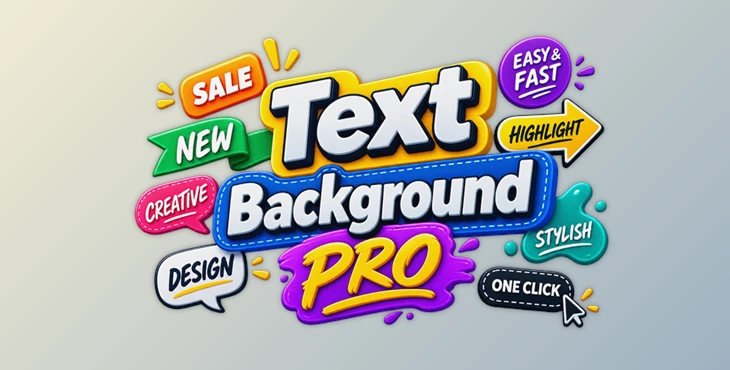
It also goes far beyond basic rectangles. Ribbons, waves, speech bubbles, blobs, arrows, circles, ellipses, and dashed designs allow the generated background itself to become part of the visual style.
Features
Smart Layout
- Create backgrounds for individual lines or an entire text block.
- Support for both point text and paragraph text.
- Match every line individually or use the longest line as the reference.
- Work efficiently with multiple text and background layers.
- Automatically manage complex multi-line typography.
Advanced Typography Engine
Text Background Pro uses real font metrics and x-height information to improve alignment between text and its background.
Smart auto-sizing helps the background adapt as needed, while support for rotated and scaled text makes the tool practical for more dynamic compositions. This is particularly useful for posters and social graphics where typography is rarely limited to simple horizontal layouts.
Flexible Styling Controls
You can customize fill, stroke, and opacity while independently controlling padding on different sides of the text.
Offsets and spacing provide additional control over positioning, while corner radius, bevels, and inverted corners make it easy to move from simple label designs to more distinctive graphic treatments.
Creative Shapes
You are not limited to standard rectangular boxes. The tool includes options such as:
- Rounded rectangles
- Circles and ellipses
- Ribbons
- Waves
- Blobs
- Arrows
- Speech bubbles
- Dashed styles
These shapes make Text Background Pro useful for everything from minimal captions to playful promotional graphics.
Faster Everyday Workflow
Creating a background only takes a click, but you can also update or remove generated backgrounds whenever necessary.
Settings can be loaded from existing backgrounds, making it easier to maintain consistency across a design. A visual preset browser also lets you quickly explore saved styles instead of rebuilding the same settings for every project.
Practical Ways to Get Better Results
For clean and professional designs, start with subtle padding rather than making the background significantly larger than the text. A balanced amount of space around the letters usually creates a more intentional appearance.
For multi-line headlines, try individual line widths when you want an energetic editorial or social-media style. If you need something cleaner and more structured, matching every background to the longest line can produce a stronger visual block.
Corner radius is another useful detail. Slightly rounded corners work well for modern captions and interface-inspired graphics, while ribbons, waves, blobs, and arrows can add personality to posters and promotional designs.
You can also experiment with opacity instead of always using solid backgrounds. A slightly transparent shape can keep photography or artwork visible underneath while still improving text readability.
Finally, presets are particularly useful when working on a series of graphics. Saving a consistent combination of padding, corners, colors, and shapes can help multiple posts or designs maintain the same visual identity.
Make Typography Faster and More Flexible
Photoshop has a problem that is surprisingly common: creating text backgrounds that follow the text.
The tool offers solutions for all the common issues with text backgrounds, making it perfect for those who frequently design elements with text such as captions, posters, thumbnails, and social graphics.
Instead of spending time fixing the rectangle around your text, you can focus on your typography. For those who use text backgrounds in Photoshop frequently, this tool offers a much more efficient way to create them.

Files Password : gfxplugin.com OR 123456