Downloadable Files
You can download the Caption Creator Pack for free from the end of this product page.
Turn Simple Captions Into Eye-Catching Content
Captions are no longer just a way to make dialogue easier to follow. In short-form videos, reels, social media edits, and promotional content, the way text appears on screen can play a big role in keeping viewers engaged.
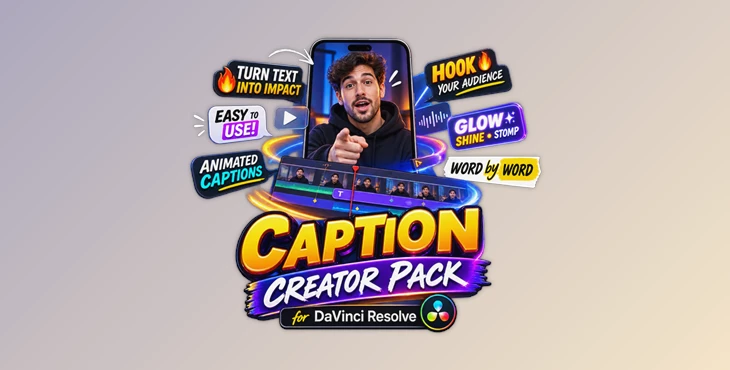
Caption Creator Pack gives DaVinci Resolve editors a fast way to create stylish animated captions without spending time building text animations from scratch. With 191 caption presets across 9 different styles, you can move from clean and minimal subtitles to bold, attention-grabbing social media captions in just a few clicks.
Simply drag a preset onto the Edit page, customize the text and appearance, and continue editing—no Fusion setup or manual keyframing required.
What Is Caption Creator Pack?
Caption Creator Pack is a collection of ready-to-use caption presets designed to speed up text styling and animation inside DaVinci Resolve.
Instead of manually creating animations for every subtitle or headline, you can drag and drop a preset directly onto your timeline. The caption arrives already styled and animated, allowing you to focus on timing, readability, and the overall rhythm of your edit.
This can be especially useful for reels, short-form videos, talking-head content, tutorials, promotional clips, interviews, and other projects where captions are an important visual element.
For example, a simple spoken sentence can appear one character at a time for a more energetic feeling, build word by word to emphasize the speaker’s rhythm, or appear as a complete line for a cleaner presentation.
Make Captions Part of the Edit
The captions should feel a part of the video itself. Each project is different and will require different captions. With all of these options, you will be able to find the perfect caption for your video editing project.
Use these clean captions for interview and educational videos or go for the more animated captions for your social media reels. There are 191 different caption presets in 9 different styles to choose from.
The included reveal modes also make it easy to change how viewers experience each line of text.
Features
191 Caption Presets Across 9 Styles
The pack comes with 191 different caption presets that can be used across 9 different styles. From subtle subtitles to social-media commentary, these will fit a variety of videos.
Simple Drag-and-Drop Workflow
The caption presets can be dragged directly onto the Edit page within DaVinci Resolve. There is no need to use Fusion to create the captions or to use keyframes to adjust the captions.
Simply drop the caption you want into your project and edit it to your liking.
Three Reveal Modes
You can control how text appears using three different reveal styles:
- Letter by Letter – characters animate onto the screen individually.
- Word by Word – words appear progressively, creating a rhythmic reveal.
- Full Text – the entire caption appears at once for a clean and immediate presentation.
These modes let you use the same caption design while creating completely different pacing and energy.
21 Stylized Hooks
The pack also contains 21 stylized hooks designed specifically for the opening moments of reels and short-form videos.
These can help make the first few seconds more visually engaging by presenting key statements, questions, or attention-grabbing phrases with stronger typography.
Caption Shaders
Three additional caption shaders are included to give text more visual character.
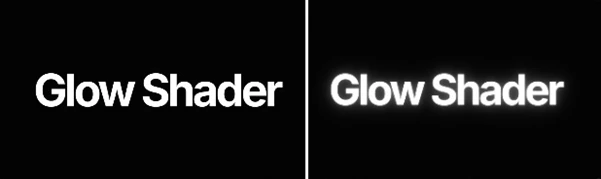
Glow Shader adds a soft glow together with a built-in drop shadow.
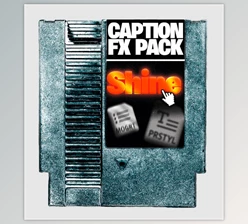
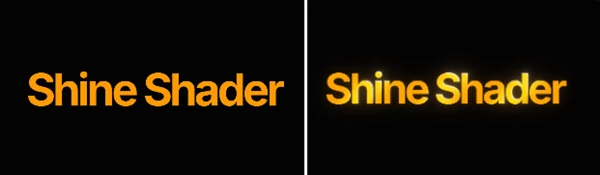
Shine Shader introduces a metallic shine effect for a more polished and stylized appearance.
Stop Motion lets you change the motion from smooth animation to a stepped frame-rate effect.
These effects provide quick ways to add personality without creating additional effect stacks manually.
12 Included Fonts
Every font used by the presets is included, helping the captions display as intended immediately after installation.
The included fonts are Inter, Poppins, Oswald, Manrope, Playfair Display, Cormorant Garamond, Great Vibes, Alex Brush, Caveat, Gloock, Imbue, and Kapakana.
This selection covers bold sans-serif typography, elegant serif styles, handwritten looks, and decorative scripts.
Practical Ways to Use the Pack
Imagine editing a talking-head reel where the speaker delivers an important sentence. A word-by-word caption can follow the speech and reinforce its rhythm. For a tutorial, a cleaner full-text preset can keep instructions readable without distracting from the demonstration.
For promotional content, you might use one of the stylized hooks at the beginning, switch to cleaner captions during the main section, and use glow or shine selectively for important words.
Because the presets are ready to use on the Edit page, experimenting with these combinations takes considerably less time than manually recreating every text style.
Tips for Better-Looking Captions
Match the captions to the content’s animation speed and reveal mode. For instance, faster edit speeds work better with more dramatic reveal modes than slower editing speeds.
Do not make every sentence on screen look dramatically designed. Only use strong caption presets for the words or phrases that you want to highlight the most.
Finally, ensure that the captions are readable. Increase the contrast of the captions against the footage, and use the drop shadow preset options for captions that need to stand out more against the background footage.
Finally, experiment with the three reveal modes. Changing from letter-by-letter to word-by-word animation can change the personality of your caption completely.
A Faster Way to Build Engaging Captions
The Caption Creator Pack includes 191 presets, 21 hooks, three reveal modes, caption shaders, stop-motion controls, and 12 fonts in one easy to use pack.
With the Caption Creator Pack, you can simply drag the caption you want onto the Edit page and make your edits right there. There’s no diving into Fusion to make your edits.
This Caption Creator Pack is perfect for those who create reels, social media videos, tutorials, and more. Each of the 191 presets will give your video an engaging text that complements your edit perfectly.

Files Password : gfxplugin.com OR 123456