Downloadable Files
You can download 65MM FILM for free from the bottom of this page.
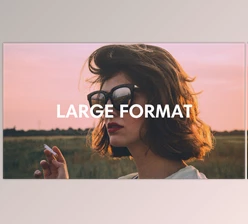
Bring the Large-Format Film Look to Your Footage
There is something instantly captivating about footage shot on large-format celluloid. The rich colors, cinematic character, and distinctive tonal response can give an image a sense of scale and atmosphere that feels different from a standard digital grade.
65MM FILM is designed to bring that visual inspiration into your own color-grading workflow. Instead of building a cinematic palette from scratch, you can start with carefully created LUTs inspired by iconic motion pictures shot on large-format film.
Whether you are grading a short film, commercial, music video, travel sequence, or cinematic social content, these LUTs can provide a strong creative starting point for developing a more film-inspired image.
What Is 65mm Film Emulation?
Film emulation is a color-grading approach designed to recreate or take inspiration from characteristics associated with traditional film stocks and photochemical cinema.
Rather than simply adding a filter over an image, a good film-inspired grade can influence the overall relationship between colors and tones. This can help digital footage feel more cohesive and give it a distinctive cinematic personality.
For example, imagine a wide landscape shot with dramatic natural light. A carefully selected film palette can reshape the mood of the scene and make its colors feel more intentional. The same idea can work beautifully with portraits, atmospheric interiors, narrative scenes, or cinematic outdoor footage.
The advantage is creative consistency. Instead of manually trying to recreate a particular large-format-inspired palette for every project, LUTs give you a repeatable foundation that you can refine according to your footage.
Meet 65MM FILM
65MM FILM is a film-emulation LUT pack featuring 10 striking color palettes inspired by some of the most iconic motion pictures captured on large-format celluloid.
The complete pack contains 10 LUTs in .cube format, making them practical additions to compatible color-grading and video-editing workflows.
The goal is simple: give creators a collection of distinctive cinematic palettes that can quickly establish the visual direction of a project while leaving room for additional creative grading.
Features
10 Cinematic Color Palettes
The pack includes 10 individual LUTs, giving you multiple visual directions to explore rather than limiting your footage to a single film-inspired look.
This is especially useful when experimenting with the mood of a scene. One palette may complement an atmospheric landscape, while another may work better for portraits, dramatic sequences, or stylized commercial footage.
Inspired by Iconic Large-Format Cinema
The palettes take inspiration from iconic motion pictures shot on large-format celluloid. This gives the collection a clear cinematic foundation and makes it particularly interesting for filmmakers and editors who appreciate the visual character associated with large-format film production.
.CUBE Format
Every LUT is supplied in the widely used .cube format.
This makes the pack easy to integrate into color workflows that support .cube LUT files, allowing you to test different palettes without rebuilding the look manually.
A Faster Starting Point for Color Grading
Creating a distinctive cinematic grade from zero can take considerable experimentation. With 65MM FILM, you can apply a palette first and then fine-tune your footage around it.
For example, you might apply one of the LUTs to a cinematic outdoor scene and then adjust exposure, white balance, contrast, and LUT intensity until the result complements the original lighting and skin tones.
Where Can You Use These Looks?
The palettes can work across many types of visual projects where a cinematic color direction is important.
Narrative films and short films can use them to establish a more unified visual atmosphere across scenes. Music videos can benefit from their stronger stylistic character, while commercials and fashion videos can use the palettes as a foundation for polished, cinematic imagery.
They can also be useful for travel films, cinematic reels, documentaries, trailers, and personal filmmaking projects where you want digital footage to move toward a large-format film-inspired aesthetic.
The important part is not to treat every LUT as a one-click final grade. Think of each look as a creative starting point that helps define the direction of your image.
Tips for Better Results
For the most natural results, correct your footage before applying the final creative look. Make sure exposure and white balance are reasonably balanced so the LUT has a cleaner image to work with.
After applying a 65MM FILM LUT, adjust its strength when necessary. A subtle application can sometimes look more convincing than using the effect at maximum intensity.
Pay particular attention to skin tones, highlights, and shadows. If the LUT pushes any area too far, make small corrections rather than forcing the entire image to fit the preset.
It is also worth testing several of the 10 palettes on the same shot. The most dramatic option is not always the best one. Choose the palette that complements the lighting, location, wardrobe, and emotional tone of your scene.
Finally, try to maintain consistency across related shots. Once you find a palette that suits a sequence, use it as the foundation and make shot-by-shot corrections where needed. This can help the finished edit feel much more cohesive.
Give Your Grade a Cinematic Starting Point
65MM FILM offers a straightforward way to explore color palettes inspired by the visual character of iconic large-format celluloid productions.
With 10 LUTs in .cube format, the pack gives editors, filmmakers, and colorists several creative directions to experiment with while keeping the workflow simple. Instead of spending all your time trying to build a look from scratch, you can establish a film-inspired foundation and concentrate on refining the details that make each shot work.
If you enjoy experimenting with cinematic color, try the different palettes, adjust them to suit your footage, and see how each one changes the atmosphere of your project.

Files Password : gfxplugin.com OR 123456