Downloadable Files
You can download Rename-a-Duper for free at the end of this page.
Rename Smarter, Duplicate Faster
If you frequently create multiple versions of After Effects projects, you already know how repetitive it can be to duplicate compositions, rename them, update text layers, and repeat the same process for every pre-comp. These repetitive tasks can quickly consume valuable production time.
Rename-a-Duper is designed to eliminate that workflow bottleneck. Instead of manually renaming compositions and editing text one by one, this powerful After Effects script lets you rename, duplicate, and update entire composition structures—including nested pre-comps and text layers—with just a few clicks. Whether you’re creating multiple language versions, client revisions, broadcast graphics, or template variations, this tool dramatically speeds up the process.
What is Rename-a-Duper?
Rename-a-Duper is a script for Adobe After Effects that makes it easier to rename and duplicate compositions.
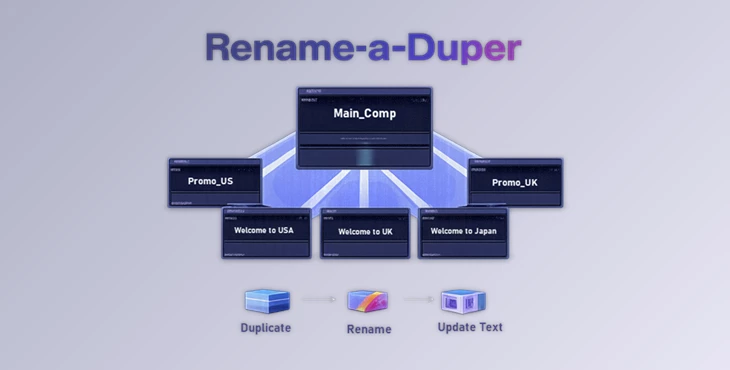
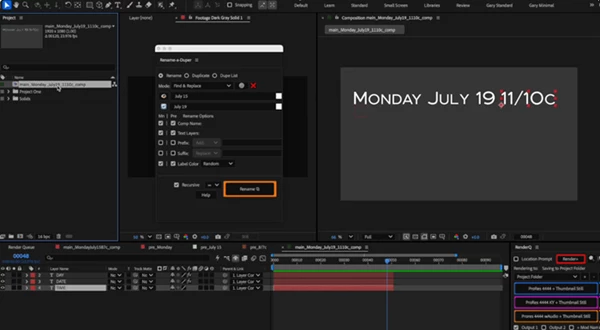
Where standard tools for duplicating compositions in After Effects only allow you to change the name of the composition, Rename-a-Duper also changes the text within the composition. Additionally, it can process pre-compositions within the composition itself, making it a remarkably powerful tool.
Imagine creating a project that includes text for different days of the week. Using Rename-a-Duper, rather than having to change the names of dozens of compositions from, say, “Monday” to “Tuesday” over and over again, you could just run Rename-a-Duper once to automate the entire process.
This saves hours of work and reduces the chance of making a mistake.
Features
Rename and Duplicate Entire Composition Structures
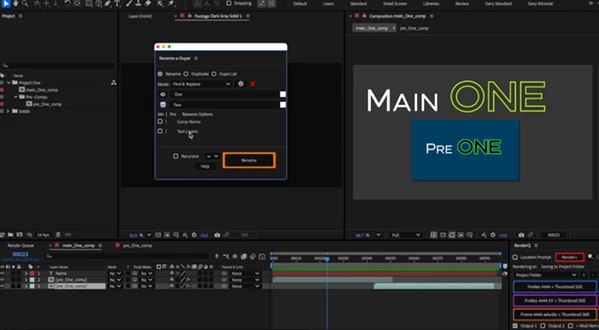
The script supports multiple workflow modes, allowing you to:
- Rename selected compositions
- Duplicate compositions while automatically renaming them
- Create multiple duplicate versions from a custom word list
- Process both the Project Panel and Timeline selections
- Rename folders inside the Project Panel
Everything can be applied recursively to nested pre-compositions as deeply as needed.
Powerful Find & Replace Modes
Rename-a-Duper offers several flexible renaming methods:
- Standard Find & Replace
- Multiple Find & Replace
- Force Replace
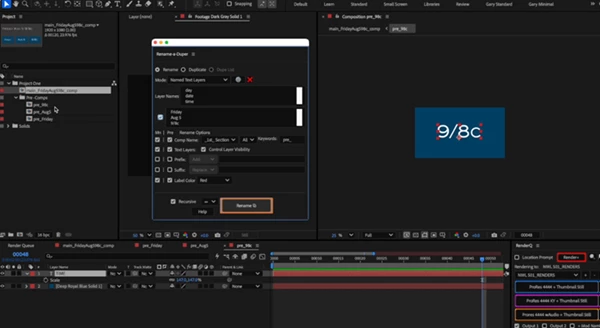
- Named Text Layer Replacement
- Spreadsheet-based Named Text Layer Editing
- Spreadsheet-based Find & Replace
These modes make it easy to generate dozens or even hundreds of composition versions with minimal effort.
Built-in Spreadsheet Workflow
One of the most powerful features is the integrated spreadsheet system. Instead of relying on external spreadsheet software, users can:
- Import CSV files
- Create multiple composition versions
- Edit text layers in bulk
- Save spreadsheet presets as JSON
- Reload projects later for future updates
This workflow is especially useful for multilingual projects and large template libraries.
Advanced Pre-Comp Processing
Rename-a-Duper provides exceptional control over nested compositions. Users can:
- Define recursion depth
- Rename only main compositions
- Rename only pre-comps
- Process both simultaneously
- Duplicate linked assets such as solids, footage, audio, vectors, and 3D objects
This level of flexibility makes complex project management significantly easier.
Intelligent Layer Filtering
The script includes advanced filtering options that allow users to process only specific layers. Examples include:
- Skip locked layers
- Skip shy layers
- Skip hidden layers
- Skip guide layers
- Include or exclude layers by label color
- Filter layers based on naming patterns
This prevents unwanted modifications while targeting exactly the elements that need updating.
Batch Text Editing
Rename-a-Duper can search for named text layers and replace their contents automatically. It also preserves:
- Mixed fonts
- Font styles
- Colors
- Font sizes
- Rich text formatting
This ensures professional-looking results even after large-scale text replacements.
Modify Composition Settings
Beyond renaming, the script can also modify important composition properties, including:
- Frame rate
- Duration
- Start time
- Background color
These options make it useful for preparing different delivery versions without manually opening each composition.
Automatic Expression Repair
Expressions can become broken when elements are renamed or duplicated.
Rename-a-Duper can fix these expressions automatically when they are duplicated or renamed.
Flexible Organization Options
Keeping large projects organized becomes much easier. The script can automatically:
- Group duplicated compositions into folders
- Preserve original folder hierarchy
- Create new folder structures
- Organize assets by composition names
This keeps even very large projects clean and manageable.
External Script Support
Rename-a-Duper supports external automation scripts for additional functionality within the software. Some of the included scripts allow for:
- Changing the case of the compositions to all uppercase or all lowercase
- Resizing compositions
- Removing the solo mode from compositions
- Splitting compositions into their first and last names
- Splitting compositions and their text into different languages using Apple Shortcuts on macOS
These scripts allow for additional customization of projects.
Professional Tips
To get the most out of Rename-a-Duper, use it in the following ways:
- Use spreadsheet modes to create several versions of projects for different clients
- Use recursion depth to only rename the topmost compositions rather than the pre-compositions within them
- Use the expression repair mode when working with projects with many expressions
- Use the folder organization mode to keep very large projects easily manageable
- Use the layer filtering options to protect certain elements from being renamed or duplicated
- Use the built-in spreadsheet presets to save time on similar projects
These few tips will save you considerable time on your After Effects projects.
Final Thoughts
Rename-a-Duper will change the way you duplicate and rename compositions within After Effects. Whether you need to create a few versions of a project or hundreds, Rename-a-Duper will help you to create them with a few clicks.
All its features will allow you to work more efficiently and keep your projects organized.
If your projects require you to rename and duplicate compositions, Rename-a-Duper is one of the most valuable After Effects scripts you could own.

Files Password : gfxplugin.com OR 123456