Downloadable Files
You can download Conjure AI for free at the end of this page.
Your Private AI Creative Studio
AI image generation platforms have become very popular in recent times. However, most of them require users to upload their artwork or design prompts to the cloud servers of the company that manufactures the image generation software. Additionally, most of them require users to subscribe to the program and create an online account to use its features.
Conjure AI takes a different approach to AI image generation. It transforms your computer into an offline AI art studio. Use Conjure AI Photo & Art Studio to create artwork, marketing materials, business cards, posters, and more. All of your creative ideas will stay on your computer, giving you maximum privacy and creative control.
What Is Conjure AI?
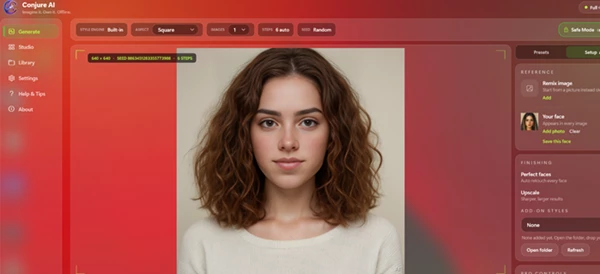
Conjure AI is a fully offline AI-powered design and image generation application that runs directly on your GPU. Instead of relying on cloud servers, it generates high-quality images locally while also providing professional print-ready design tools.
Unlike many AI generators that struggle with typography, Conjure AI separates image creation from text placement. The AI creates beautiful artwork while the software adds crisp vector text afterward, producing professional-quality business cards, posters, menus, certificates, and other printable materials at 300 DPI.
This workflow produces cleaner, sharper, and more reliable results for both digital and print projects.
Features
Fully Offline AI Image Generation
Everything runs locally using your graphics card. No internet connection is required for image creation, and no artwork or prompts are uploaded to external servers.
This gives creators complete privacy while also reducing waiting times caused by cloud processing.
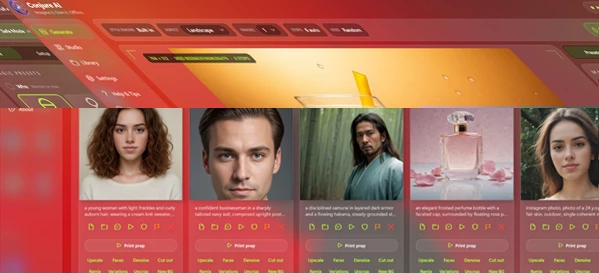
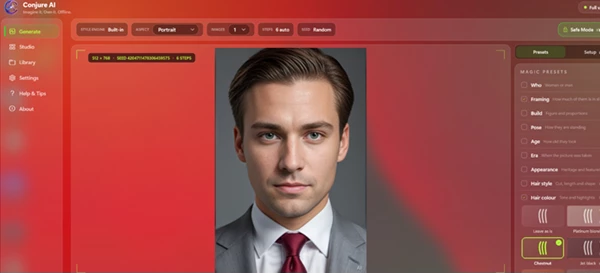
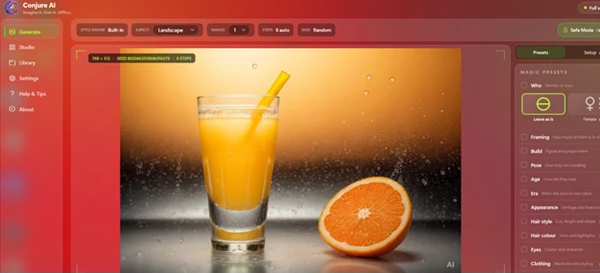
Magic Presets for Better Prompts
Writing professional AI prompts can be difficult.
Conjure AI simplifies the process by offering fourteen preset categories including pose, framing, wardrobe, lighting, background, era, hair, eyes, fabrics, and more.
The software intelligently combines these selections into optimized prompts, helping beginners create professional-quality images without prompt engineering experience.
Multiple Artistic Finish Styles
Choose from nineteen visual styles ranging from realistic photography to illustrations, product renders, artistic concepts, and creative graphics.
Users can also lock a seed value for consistent results or shuffle new variations when exploring different ideas.
Professional Print Templates
Instead of stopping at image generation, Conjure AI includes forty professionally designed templates for:
- Business Cards
- Posters
- Flyers
- Menus
- Wedding Suites
- Certificates
- Book Covers
- Album Covers
- Labels
- Logos
- Social Media Posts
- Thumbnails
- Character Sheets
- Letterheads
This allows creators to move directly from AI artwork to finished printable designs.
Real Vector Typography
One of the biggest limitations of AI image generators is distorted or unreadable text.
Conjure AI solves this by placing real vector typography over the generated artwork rather than asking the AI model to draw letters.
The result is sharp, scalable typography that remains crystal clear in both digital exports and high-resolution printing.
Complete Image Enhancement Toolkit
The application also includes several professional editing tools such as:
- Face Restoration
- Image Upscaling
- Denoising
- Background Removal
- Inpainting
- Batch Processing
These features help polish AI-generated artwork without requiring additional software.
Brand Kit & StyleDNA
Maintaining a brand identity with AI-generated artwork can be a challenge. However, Conjure AI’s Brand Kit and StyleDNA applications allow users to capture the color palette, type of artwork, prompts, and seeds of an initial design project and use those elements for future projects.
This is helpful for individuals or companies that produce numerous AI-generated designs for their clients or products.
Spreadsheet Batch Merge
Need hundreds of personalized certificates, labels, invitations, or place cards?
Conjure AI can merge spreadsheet data into templates automatically, dramatically reducing repetitive design work while maintaining consistent formatting.
Local QR Code Generation
QR codes are generated entirely on-device and rendered as scalable vectors for reliable scanning and professional print quality.
Export Ready for Printing
Projects can be exported as professional PDFs with:
- 300 DPI Resolution
- Bleed
- Crop Marks
- Trim Box
These features make files suitable for commercial printing without additional preparation.
Real-World Applications
Conjure AI is suitable for many creative workflows, including:
- Designing marketing materials for small businesses.
- Creating posters, menus, and promotional graphics.
- Producing business cards and corporate stationery.
- Generating concept art and character designs.
- Building social media campaigns.
- Creating YouTube thumbnails.
- Designing wedding invitations and event materials.
- Producing certificates and personalized labels in bulk.
- Developing branded visual assets with consistent styling.
Its combination of AI generation and professional layout tools makes it useful for both hobbyists and experienced designers.
Tips for Better Results
To get the most out of your experience with Conjure AI, try some of these tips and techniques:
- Use the Magic Presets to generate an appropriate prompt for your project.
- Use a locked seed to generate multiple versions of an image.
- Use the Brand Kit to design with a specific style. Use StyleDNA to replicate a specific design project for other projects.
- Use vector typography to ensure your text remains readable when printed.
- Export your project files at 300 DPI for print orders.
- Use batch processing for tasks that require a variety of similar images.
- Save your most used actions as Saved Actions for future projects with similar requirements.
These suggestions will significantly improve your experience using Conjure AI Photo & Art Studio.
Final Thoughts
Conjure AI is much more than just an AI image generation tool. It includes professional print design templates, image enhancement capabilities, a brand kit, and more. Additionally, the software remains private and offline so that users will never have to leave their computers to complete their projects.
For creators, designers, businesses, and individuals looking to have complete control over their design projects without having to subscribe to online services, Conjure AI is an excellent application to use.

Files Password : gfxplugin.com OR 123456