Downloadable Files
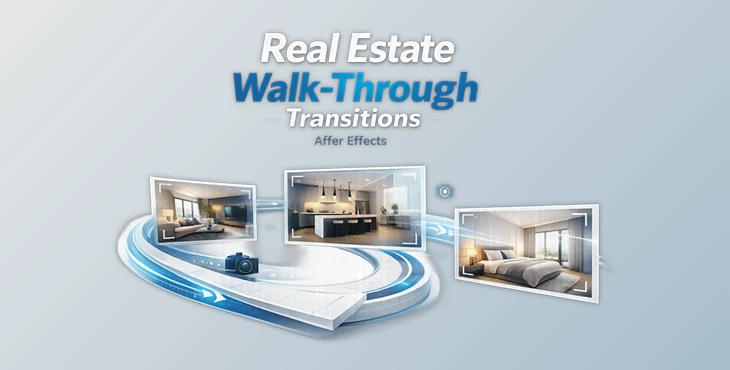
You can download Real Estate Walk-Through Transitions for free from the end of this page.
Create Cinematic Property Videos with Seamless Walk-Through Effects
Real estate videos have become one of the most effective ways of showcasing properties to potential buyers. However, it can be challenging to maintain the viewers’ attention throughout the video.
Smooth scene changes and creative editing can make a huge difference in how professional your property videos look and feel.
Real Estate Walk-Through Transitions can help you transform your real estate walkthrough videos into dynamic, cinematic presentations that feature impressive teleportation and energy-based scene transitions that will leave your viewers focused on your properties.
What Are Walk-Through Transitions and Why Are They Important?
Walk-through transitions are visual effects that allow the camera or presenter to move naturally between different scenes, rooms, or even separate properties without interrupting the flow of the video.
Instead of abruptly cutting from one room to another, this project (Videohive 64397052) creates the illusion that the viewer is continuously moving through the property.
This approach improves the viewing experience because it:
- Makes property tours feel smoother and more immersive.
- Keeps viewers engaged for longer periods.
- Adds a premium cinematic appearance.
- Creates stronger visual storytelling.
- Helps luxury listings appear more modern and professional.
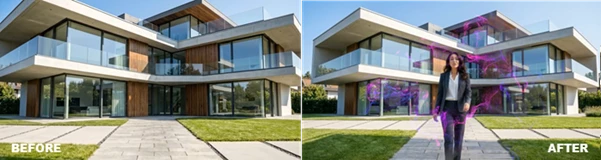
For example, a real estate agent can seemingly teleport from the living room to the kitchen, instantly reveal another floor of the house, or transition from a daytime exterior shot to a nighttime version of the same property. These effects (Videohive 64397052) make listings more memorable while maintaining a natural viewing experience.
Real Estate Walk-Through Transitions: A Professional After Effects Toolkit
If you’re editing property videos in After Effects, Real Estate Walk-Through Transitions provides an easy workflow for producing stylish cinematic scene changes without requiring complicated animation techniques.
Designed specifically for real estate creators, videographers, and content producers, the toolkit allows you to drag and drop transitions into your projects while maintaining professional-quality results.
Features
- 10+ Unique Walk-Through Transitions: Choose from a variety of transition styles that connect rooms, buildings, or outdoor locations with smooth cinematic movement.
- Teleport & Reveal Effects: Create the illusion that people or objects instantly appear, disappear, or move between scenes, making property tours much more engaging.
- Particles, Light Bursts & Energy Portals: Modern visual effects add excitement to scene changes while giving videos a polished, high-end appearance.
- Pinch, Zoom & Camera Shake Effects: Dynamic camera-based transitions make movement feel faster and more realistic, helping videos maintain energy without distracting the viewer.
- Drag & Drop Workflow: The simple workflow allows editors to build impressive transitions quickly, reducing editing time while maintaining consistent quality.
- Easy Color Controls: Customize transition colors to match your brand, property style, or project without complicated adjustments.
- 4K Resolution: High-resolution assets ensure sharp visuals suitable for professional marketing videos and premium real estate presentations.
- No Plugins Required: Everything works directly inside After Effects, eliminating the need to install additional third-party plugins.
- Video Tutorial Included: Step-by-step guidance helps both beginners and experienced editors start using the transitions quickly.
- Compatible with After Effects: Built specifically for Adobe After Effects, making it easy to integrate into existing editing workflows.
Real-World Applications
These transitions (Videohive 64397052) are especially useful for:
- Property tours
- Real estate listing videos
- Luxury home showcases
- Open house presentations
- Interior and architectural videos
- Before & after renovation projects
- Day-to-night transformations
- YouTube, Instagram, and TikTok content
For example, an agent can walk through a doorway and instantly appear inside another property, or smoothly transition between a home’s daytime and nighttime appearance without breaking the visual flow.
Pro Tips for Better Results
For the best results when using these transitions, editors should:
- Keep the movement of the camera before and after the scene changes to be as similar as possible.
- Use teleportation effects only when the agent is walking past a doorway or another entry point for the property.
- Ensure that the timing of the scene changes is even throughout the edit.
- Adjust the color settings for the transitions to match the color of the real estate property.
- Use wide shots of the property with close-ups of the interiors for the best results.
- Do not use the effects too frequently throughout your video editing projects.
- Use these effects only at crucial moments within your video to maintain the perception of a professional property channel.
- Maintaining the 4K resolution will produce the best results for viewers’ screens and for your real estate brand.
These tips will significantly enhance your editing projects’ final products.
Final Thoughts
For real estate channels and even individual property agents, professional editing can make a significant difference in the perception of the properties that are showcased in their videos.
Real Estate Walk-Through Transitions will make it easier for editors to produce smooth walkthrough videos, teleportation effects, and scene changes for their real estate projects.
With the drag and drop workflow, customizable features, available in 4K resolution, and without the need for additional plugins, this After Effects project will significantly enhance your editing experience.
Therefore, whether you are producing luxury home videos, renovation projects, or editing content for social media, Real Estate Walk-Through Transitions (Videohive 64397052) will make your editing efforts look more immersive, dynamic, and professional.

Files Password : gfxplugin.com OR 123456