Downloadable Files
You can download the Franzis CutOut for free from the end of this page.
Remove Backgrounds Like a Pro
Have you ever tried removing a background from a photo, only to end up with rough edges, missing hair details, or unnatural-looking cutouts? Creating clean selections can quickly become frustrating, especially when dealing with fur, transparent objects, smoke, or busy backgrounds.
Franzis CutOut is designed to make this process much easier. With intelligent subject detection, advanced masking tools, and automatic edge recognition, it helps users create accurate cutouts in just a few steps. Whether you’re editing portraits, creating product images, or designing creative photo compositions, this software saves time while producing professional-quality results.
What Is Franzis CutOut?
At its core, Franzis CutOut is a dedicated image masking and background removal application for Windows. Instead of manually tracing complicated objects pixel by pixel, the software combines intelligent edge detection, color analysis, and segmentation technology to identify subjects automatically.
This approach improves editing accuracy because the software analyzes multiple image characteristics simultaneously rather than relying on simple color selection. As a result, difficult details like hair strands, animal fur, glass, and semi-transparent objects can be separated much more naturally.
Some practical examples include:
- Creating transparent PNG product images for online stores.
- Replacing backgrounds in portrait photography.
- Building realistic photo manipulations and composites.
- Removing unwanted objects from travel photos.
- Preparing marketing materials with clean object cutouts.
- Editing RAW photos before exporting them.
By automating much of the difficult selection work, users can focus more on creativity instead of spending time correcting imperfect masks.
Why Franzis CutOut Stands Out
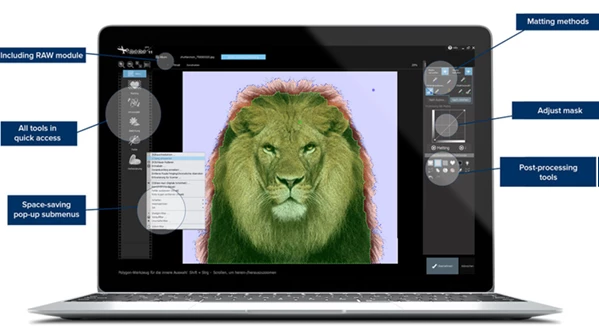
Unlike basic background removal tools, Franzis CutOut combines automatic AI-assisted selection with professional manual refinement tools. This balance gives beginners fast results while allowing experienced editors to achieve extremely precise selections.
The software also includes post-processing features, making it possible to complete many editing tasks without switching between multiple applications.
Features
Intelligent Subject Recognition
The software automatically detects the primary subject in an image and even suggests an initial cutout, dramatically reducing manual work.
Why it matters
Instead of spending several minutes creating an initial selection, users can begin refining an already accurate mask.
Improved Magnetic Selection Tool
The redesigned magnetic tool follows object edges more accurately than before.
Benefits
- Faster selections
- Better edge precision
- Easier editing of complex shapes
Advanced Edge & Contour Detection
Fine details are often the hardest part of any cutout. The intelligent contour recognition system helps preserve realistic edges around difficult subjects. This is especially useful for:
- Hair
- Animal fur
- Smoke
- Glass
- Transparent materials
- Soft fabric edges
Multiple Masking Methods
Different images require different approaches. Franzis CutOut includes several masking techniques so users can choose the most effective method depending on the subject and background complexity.
This flexibility leads to cleaner and more natural-looking results.
Combined Color, Edge & Segment Analysis
Rather than relying on color alone, the software analyzes:
- Colors
- Image edges
- Segments
- Object boundaries
Combining these factors produces significantly cleaner selections while reducing unwanted artifacts and jagged borders.
Smart Eraser
Removing unwanted objects becomes much easier with the integrated Smart Eraser. You can quickly eliminate:
- Distracting people
- Small objects
- Background imperfections
- Unwanted elements in landscapes
without needing separate editing software.
RAW Image Support
Photographers can work directly with RAW files using the fast album mode.
Editing RAW images preserves more image information, allowing better adjustments before exporting the final result.
Built-In Editing Toolbox (Professional Version)
The Professional edition includes additional editing tools for improving images after the cutout process. Users can adjust:
- Colors
- Contrast
- Image quality
- General corrections
without leaving the application.
Adobe Photoshop Plug-in
One of the biggest workflow advantages is the included Photoshop plug-in. Editors can use CutOut directly inside Adobe Photoshop CS6 and newer, making it easy to integrate precise masking into existing professional workflows.
Transparent PNG Export
Once editing is complete, images can be exported as PNG files with transparent backgrounds. This is perfect for:
- Graphic design
- Web design
- E-commerce
- Social media
- Marketing materials
Real-World Uses
Franzis CutOut fits many creative workflows, including:
- Professional portrait retouching
- Product photography
- Online store image preparation
- Advertising design
- Social media graphics
- Digital art
- Photo compositing
- Marketing campaigns
- Creative posters
- Content creation
Its combination of automatic detection and precision tools makes it suitable for both beginners and professionals.
Tips for Better Results
To get the most natural-looking cutouts, keep these practical tips in mind:
- Start with the automatic subject detection, then manually refine important edges.
- Zoom in when editing hair or transparent objects for maximum precision.
- Use different masking methods depending on the complexity of the image.
- Export as a transparent PNG to preserve clean backgrounds.
- Edit RAW files whenever possible for better image quality.
- Use the Smart Eraser before final exporting to remove distractions.
- Slightly soften difficult edges instead of making them overly sharp for a more realistic appearance.
- Combine the Photoshop plug-in with your existing workflow for faster editing on large projects.
Final Thoughts
Creating professional-quality cutouts no longer has to be a slow or frustrating task. Franzis CutOut combines intelligent subject recognition, advanced masking technologies, precise edge detection, and powerful editing tools into one complete solution.
Whether you’re removing backgrounds, preparing product photos, creating photo manipulations, or editing portraits, the software helps you achieve cleaner results with less effort. Its professional feature set, Photoshop integration, and support for complex subjects make it a valuable tool for photographers, designers, marketers, and digital artists who want faster workflows and more polished images.

Files Password : gfxplugin.com OR 123456