Downloadable Files
You can download CHERUB Themes for Blender for free from the end of this page.
Give Your Blender Workspace a Fresh Look
Spending long hours inside Blender can be exhausting, especially when working late at night. Bright interfaces, low-contrast panels, and distracting colors can reduce focus and make navigation feel less comfortable over time.
CHERUB Themes for Blender is designed to solve that problem by giving Blender a cleaner, darker, and more comfortable interface. Instead of changing how Blender works, it improves how you experience it, helping you stay focused while making important UI elements easier to recognize.
Whether you’re modeling, sculpting, animating, or rendering, a well-designed interface can make daily work feel more enjoyable.
What is CHERUB Themes for Blender?
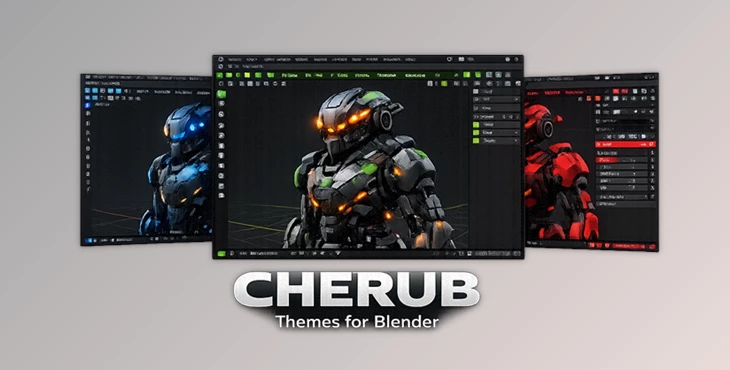
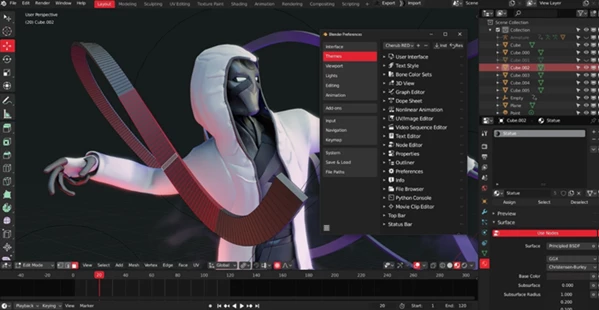
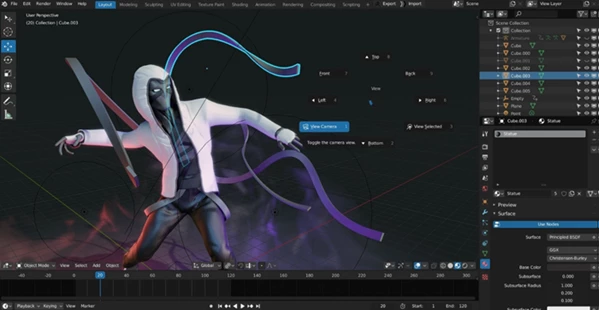
CHERUB Themes for Blender is a collection of three professionally designed high-contrast dark themes created specifically for Blender 2.8 and newer versions.
Rather than using a standard dark interface, these themes feature carefully selected RGB accent colors that highlight important tools and interface elements. This makes it easier to distinguish panels, buttons, and active selections while reducing unnecessary eye strain during long creative sessions.
The result is a workspace that feels cleaner, more organized, and more comfortable.
Why does this improve your workflow?
A thoughtfully designed interface can make everyday tasks noticeably easier. For example:
- Important controls are easier to identify at a glance.
- High contrast improves visibility across Blender’s interface.
- Dark colors reduce eye fatigue during long editing sessions.
- Color accents help you quickly recognize active tools and settings.
- A cleaner workspace allows you to stay focused on your creative work instead of the interface itself.
Even though the themes don’t add new Blender features, they improve the overall user experience every time you open the software.
Meet CHERUB Themes for Blender
If you spend hours working inside Blender, customizing the interface is one of the easiest ways to create a more enjoyable workflow.
CHERUB Themes for Blender includes three premium dark themes, each designed with high contrast and balanced RGB accent colors that improve readability without becoming distracting.
Unlike generic themes, these were created with artists in mind, ensuring that the colors support productivity rather than simply changing Blender’s appearance.
Features
Three Professional Dark Themes
Choose from three unique high-quality themes depending on your personal style and workspace preferences.
High Contrast Interface
Panels, icons, and controls are easier to distinguish, improving visibility throughout Blender.
RGB Accent Colors
Carefully selected accent colors highlight important interface elements while maintaining a clean and modern look.
Reduced Eye Strain
The dark design creates a more comfortable working environment, especially during extended modeling or rendering sessions.
Designed for Blender 2.8+
Fully created for Blender’s modern interface and compatible with Blender 2.8 and newer versions.
Optimized for Daily Work
Whether you’re creating assets, sculpting characters, building environments, or animating scenes, these themes make the interface easier to work with every day.
Professional Tips
Getting the most out of CHERUB Themes for Blender is easy, but these simple tips can make your workspace even better:
- Use the theme in a dimly lit room for maximum viewing comfort.
- Combine the dark interface with Blender’s workspace customization tools.
- Choose the theme whose accent colors are easiest for you to recognize quickly.
- Keep your viewport uncluttered so the clean interface remains effective.
- If you work for many hours, adjust your monitor brightness together with the theme for better eye comfort.
Final Thoughts
A comfortable workspace can have a surprisingly positive impact on creativity and productivity. CHERUB Themes for Blender doesn’t change Blender’s powerful tools—it improves the way you interact with them every day.
With three professionally designed dark themes, strong contrast, and thoughtfully chosen RGB accent colors, it offers a cleaner and more enjoyable interface for both beginners and experienced Blender artists. If you spend a lot of time inside Blender, this simple visual upgrade can make your workflow feel smoother and more comfortable.

Files Password : gfxplugin.com OR 123456