Downloadable Files
You can download Amalgam for free at the end of this page.
Discover a Better Way to Blend Your Footage
If you use the Cross Dissolve transition, you know the effects are a little flat. But the industry-standard plugin for video editors, Amalgam, delivers a much more refined approach to blending your footage together.
Amalgam’s Blend and Transition tools will intelligently combine your two selected clips and produce beautiful double exposure effects and seamless transitions between your clips. Perfect for adding to cinematic videos, commercials, travel videos or even music videos, this editing tool will give your videos a professional look.
What is Amalgam?
This professional editing plugin features two separate tools that enhance the capabilities of Adobe applications:
- Amalgam Blend - Available for Adobe After Effects and Premiere Pro
- Amalgam Transition - Available for Adobe Premiere Pro
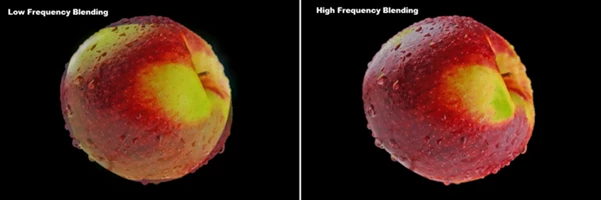
Both tools use an advanced Laplacian Pyramid Blend algorithm to merge your two images together naturally. With this process, your transitions will feature smooth blends with detailed images without any noticeable seams between the two clips.
The result is professional-looking, cinematic edits.
Features
Two Professional Plugins in One Package
Amalgam combines two creative tools inside one workflow.
Amalgam Blend
Compatible with:
- Adobe After Effects
- Adobe Premiere Pro
This effect lets you blend two clips together with impressive realism. It’s ideal for creating artistic double exposures, dream sequences, layered compositions, and cinematic visual effects.
Amalgam Transition
Compatible with:
- Adobe Premiere Pro
Designed specifically for timeline editing, this transition plugin lets editors quickly create elegant scene changes without manually building complicated transition effects.
Advanced Laplacian Pyramid Blending
One of the biggest strengths of Amalgam is its blending algorithm. Instead of performing a simple opacity fade, the plugin analyzes both images by separating them into multiple frequency bands. This allows:
- Broad colors and lighting to fade smoothly.
- Fine textures to remain sharp.
- Natural transitions without muddy details.
- Better preservation of image quality.
The final result feels significantly more organic than traditional dissolve effects.
Create Beautiful Double Exposure Effects
Double exposure is one of the most recognizable cinematic styles, but creating it manually often requires masking, blending modes, and extensive tweaking. Amalgam simplifies the entire process by producing realistic double-exposure effects automatically. This makes it perfect for:
- Music videos
- Fashion edits
- Movie titles
- Promotional videos
- Creative storytelling
- Social media content
Smooth Cinematic Scene Transitions
Traditional cross dissolves can sometimes feel outdated. Amalgam introduces transitions that naturally merge one scene into another while maintaining detail throughout the transition. This creates a much more premium viewing experience, especially for:
- Wedding films
- Travel videos
- Documentary edits
- Commercial projects
- Corporate presentations
Fast Workflow
The plugin is designed to be simple.
Editors can apply the effect quickly without building complicated node structures or manually adjusting multiple blending layers.
This speeds up post-production while still producing high-end visual results.
Real-World Creative Uses
Use Amalgam to blend two scenes together. For example, go from a mountain landscape to a close-up of a person’s face. Both videos will blend naturally with textures preserved.
Similarly, you can create a double exposure of a city transitioning to a silhouette of a person walking down the street.
These edits would typically require a significant amount of effort to create with standard editing software. With Amalgam, it is significantly easier to achieve these edits.

Professional Tips for Better Results
Follow a few easy tips to get the most out of the Amalgam editor:
- Use clips of similar exposure
- Choose clips of complementary colors
- Use this effect only for important moments in your edit
- Use slow edits to give viewers time to appreciate the blending
- Use cinematic color grading with your footage
- Experiment with different videos to find unique double exposure edits
These small editing choices can significantly enhance the look of your edit.
Final Thoughts
Using the Amalgam editing tool, editors can upgrade their standard dissolve transitions for better, more cinematic results. The tool’s use of an advanced blending algorithm allows for cinematic transitions without losing any details within the edited footage.
No matter the type of videos that you edit, whether it is for films, commercials, educational videos on YouTube, music videos or special effects, this editing tool will significantly speed up your editing process to create beautiful, professional transitions and double exposure effects. For any editor looking to significantly enhance their editing software with additional features and tools, Amalgam is an essential software add-on to their editing workflow.

Files Password : gfxplugin.com OR 123456