Downloadable Files
You can download Luma Shifter for free at the bottom of this page.
Create Cinematic Luma Transitions in Seconds
If you have spent any time searching for luma matte transitions, you know how challenging it is to find the right one. There are dozens of free and paid overlay packs out there. But every time you want to apply a new transition, you have to download the files and apply them manually in your editing software.
Luma Shifter takes all of that and creates a collection of transitions that you can simply apply to your edited clips in After Effects. It is ideal for those who work on YouTube videos, commercials, social media, travel films, and more.
What is Luma Shifter?
Luma Shifter is a plugin that makes it incredibly easy to work with luma matte transitions. All you have to do is select the type of transition you would like to apply to your edits, and it will automatically be applied to your project.
This tool was designed for both beginners and professionals who are fluent in After Effects. It features numerous controls so that you can customize your transitions to your hearts’ content.
For example, you can use Luma Shifter to apply the following transitions to your projects:
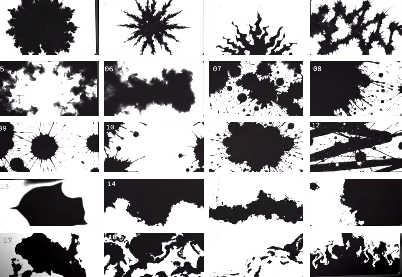
- Ink Splash - Use this for more energetic scenes.
- Smoke - Great for cinematic fades.
- Fire - Perfect for revealing new content on screen.
- Strokes - Best for adding creativity to your commercial content.
- Fractal - Use for abstract sequences in your project.
All of these transitions are within the plugin itself, meaning that your editing process will be faster and more organized than ever before.
Why Luma Shifter Makes Editing Easier
Traditional luma matte workflows often require searching for overlay packs, importing large files, positioning them correctly, adjusting timing, and repeating the process for every transition.
Luma Shifter eliminates these repetitive tasks.
Instead, you simply choose a transition, apply it, and customize it using built-in controls. This not only saves valuable editing time but also allows you to experiment with different transition styles much more freely.
The result is cleaner edits, faster production, and more consistent visual quality across your projects.
Features
Complete Library of Luma Overlays
Luma Shifter includes a collection of professional transition overlays, including:
- Ink Splash
- Fire
- Smoke
- Strokes
- Fractal
- Additional creative overlay styles
Having all transitions available inside one panel means you never have to search for external luma matte files again.
One-Click Apply
Applying transitions is incredibly simple
. Select your clips, choose your preferred overlay, and apply it with only a few clicks. The plugin removes much of the manual setup typically required for luma transitions.
This makes it especially useful for editors working under tight deadlines.
Reapply Transitions Instantly
Need to update an existing transition?
The Reapply function lets you quickly apply the effect again to a selected keyframe, making revisions much faster during client feedback sessions.
Adjustable Playback Speed
Every project has a different pacing style.
Luma Shifter offers four playback speed options, allowing you to match transitions to slow cinematic edits or fast-paced promotional videos.
Scale Up to 8K
Modern productions often require high-resolution delivery.
Luma Shifter allows overlays to scale up to 8K resolution without sacrificing image quality, making it suitable for everything from Full HD videos to professional 8K productions.
Position Controls
Every edit is unique.
The Offset controls let you reposition transition effects anywhere within the frame, giving you more creative freedom when designing scene changes.
Flip Effects
Mirror overlays horizontally or vertically to create additional transition variations from the same asset library.
This simple feature significantly increases creative possibilities without requiring extra resources.
Random Flicker Effect
For more dynamic transitions, Luma Shifter includes a Flicker option that introduces randomized flashing effects.
This works particularly well for music videos, action sequences, trailers, and stylized promotional content.
Real-World Creative Uses
Luma Shifter fits naturally into many different editing workflows. You can use it for:
- Cinematic travel films
- YouTube content creation
- Commercial advertising
- Music videos
- Product showcases
- Fashion edits
- Event highlight reels
- Short films
- Social media reels
- Motion graphics presentations
Its flexibility makes it suitable for almost any project requiring creative scene transitions.

Professional Tips for Better Results
To get the best out of Luma Shifter, try the following techniques:
- Match the playback speed of the overlays to match the editing style you are producing.
- Use smoke transitions for moments of sadness or subtle scenes. Use fire for more energetic edits.
- Use the offset controls to even further personalize the edits.
- Flipping the transitions can also add variety to your projects.
- Use the random flicker feature only when the edit will support the flashing of the footage.
By using these techniques, editors can ensure that their projects look more professional when released.
Final Thoughts
Luma Shifter can make the editing process of applying luma matte transitions much faster and more enjoyable.
With so many features within the plugin, including the ability to adjust the speed of the transitions, reposition the edits, flip the transitions, reapply them, zoom them in or out, and even randomly flicker the edits, editors can produce professional projects with minimal effort.
Whether you are editing for your clients or your social media accounts, this plugin can significantly speed up your editing process and save you time.
For editors looking for a solution that will allow them to produce more projects with faster results and with more control over their editing software, Luma Shifter is an excellent solution.

Files Password : gfxplugin.com OR 123456