Downloadable Files
You can download Versa for free from the end of this page.
Manage Your Media Versions Smarter in Premiere Pro
When working on professional projects, editors have to deal with multiple versions of the same media clip. They may have to add VFX to a media clip or add a new animation shot; however, managing all of these files and maintaining version control can take up a lot of an editor’s time.
Versa is a powerful plugin that makes managing media versions within Premiere Pro so simple. It allows editors to manage and replace media versions with a few clicks of the mouse.
Instead of having to manually search for media versions and select the files that they want to replace, Versa allows editors to maintain better control of their projects and focus on the creative side of editing.
What Is Versa and How Does It Help?
This tool is a professional media versioning solution designed for editors, assistant editors, VFX artists, and post-production teams who work with constantly changing media files.
In a typical production workflow, a single shot may go through many revisions:
- Shot_01_v001
- Shot_01_v002
- Shot_01_v003
- Shot_01_final
Finding the right version manually can slow down the entire editing process. Versa automatically detects available versions and lets you switch between them directly inside Premiere Pro.
This makes it easier to keep timelines updated, avoid using outdated files, and maintain a cleaner production workflow.
Meet Versa – Version Control Directly Inside Premiere Pro
Versa allows editors to have version control directly within their editing workspace in Premiere Pro.
Its simple and fast control interface allows editors to quickly update any media clip in their project without interrupting their editing process.
For instance, if a VFX artist delivers a new version of a media clip, this project will automatically detect the media file and import that media into the project, automatically replacing the current media clip in their project timeline.
This will save that editor a significant amount of time, especially on large projects that contain hundreds of media shots.
Features
One-Click Version Switching
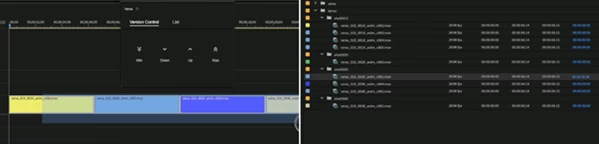
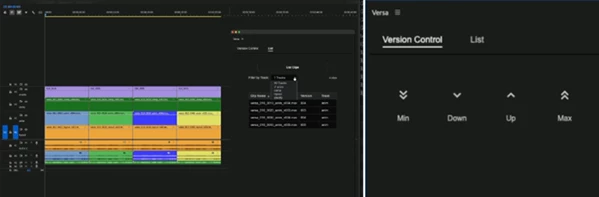
Switching between versions of your media files can be done with the ease of a single click. Versa includes four main controls for easy management of your media files:
- Max - will take you to the newest available version of a media clip
- Up - will take you to the next highest available version of your media clip
- Down - will take you to the previous available version of your media files
- Min - will take you to the oldest available version of your media files
Automatic Import and Relink
Versa can automatically search your storage for available versions and handle the replacement process for you. It can:
- Find newer and older versions of clips
- Import detected files into your Premiere Pro bin
- Replace selected timeline clips
- Relink media automatically
Even if some versions are missing, Versa can intelligently skip unavailable files and move to the next available version.
Review and Audit Every Version
This product includes a version list panel that gives you a complete overview of clips used in your timeline. You can:
- Filter clips by track
- Sort files by version number
- Review current media versions
- Compare your timeline with production notes
This is especially helpful before final delivery, ensuring that every shot is connected to the correct version.
Clean and Minimal Interface
Versa is designed to fit naturally into professional Premiere Pro workflows. Its lightweight interface allows you to:
- Resize the panel
- Dock it beside your timeline
- Access controls quickly without clutter
The simple design makes version management faster without adding unnecessary complexity.
How Versa Improves Professional Workflows
Animation Projects
Animation projects often require many updates before final approval. Versa makes it easy to replace outdated renders with the newest versions.
Editors can quickly update:
- Motion graphics scenes
- Animated sequences
- Title animations
- Render previews
This eliminates the need for manually importing and replacing every updated file.
VFX Production
VFX workflows depend heavily on version management. A single shot may have many iterations from different departments.
This tool helps VFX editors manage:
- Lighting updates
- Compositing revisions
- Client review versions
- Final delivery shots
This ensures the timeline always contains the correct visual assets.
Assistant Editing and Post Production
Large productions often involve multiple editors, artists, and departments. Versa helps teams maintain consistency by making media updates faster and reducing mistakes caused by outdated files.
It is especially useful for:
- Feature films
- Commercial projects
- Series production
- Large-scale video editing workflows
Professional Tips for Using Versa
To get the best results from Versa, follow these workflow recommendations:
- Use clear version naming
- Consistent naming systems like v001, v002, and v003 help Versa recognize and organize your files more effectively.
- Keep your project folders structured
- Organized media folders make searching and importing versions faster.
- Check versions before delivery
- Use the audit list to confirm that all timeline clips are connected to the correct files.
- Use Versa during review cycles
- When clients request changes, quickly switch between revisions instead of rebuilding your timeline.
- Combine it with a professional workflow
- Versa works best when your team follows consistent file organization and naming standards.
Final Thoughts
Managing multiple media versions is common in editing projects. However, editors often spend significant time searching for media versions, manually replacing media clips, and reviewing the project media versions.
Versa simplifies this process for editors and teams working in post-production.
Its automatic importing and relinking of media clips and one-click version controls will make editors and post-production teams more efficient in their work.
Whether working on animation, VFX, or large editorial projects, Versa will allow editors to maintain control of their projects and work faster to deliver the project to their production teams.

Files Password : gfxplugin.com OR 123456