Downloadable Files
You can download VoxMark for free at the end of this page.
Make Voice Editing Faster Than Ever
If you’ve ever spent hours listening to a voiceover just to place timeline markers or create subtitles manually, you know how repetitive and time-consuming the process can be. VoxMark eliminates that workflow by automatically transcribing your composition’s audio and converting it into frame-accurate markers or subtitle files with just a few clicks.
Whether you’re editing tutorials, YouTube videos, documentaries, interviews, podcasts, or promotional content, VoxMark helps you organize spoken content faster and with impressive accuracy, allowing you to focus on creative editing instead of repetitive tasks.
What is VoxMark and Why Is It Useful?
VoxMark is an AI-powered transcription tool for Adobe After Effects and Premiere Pro. It analyzes your composition’s audio, converts speech into text, and automatically places timeline markers or generates SRT subtitle files.
Instead of manually finding every spoken sentence, editors can instantly navigate their timeline using AI-generated markers.
Imagine editing a 30-minute interview. Normally, locating specific quotes requires constantly scrubbing through the timeline. With VoxMark, every sentence—or even every individual word—becomes searchable markers, making navigation almost effortless.
This dramatically improves editing speed because you always know exactly where important dialogue begins and ends. It also reduces human error when creating subtitles or syncing graphics with narration.
Meet VoxMark
VoxMark is designed specifically for motion designers and video editors who regularly work with voiceovers inside Adobe After Effects and Premiere Pro.
Rather than relying on external transcription software, everything happens directly inside your editing workflow. The plugin renders your composition’s audio, sends it to your preferred AI transcription provider, and immediately imports the results back into your timeline.
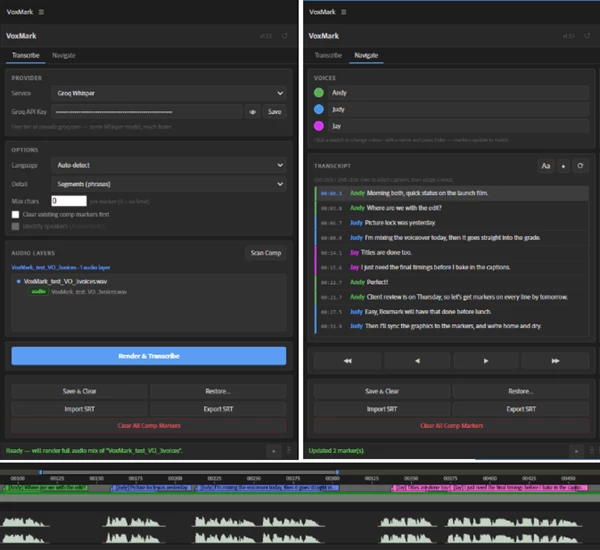
It supports multiple AI services, including OpenAI Whisper, Groq Whisper, and AssemblyAI, allowing users to choose the transcription engine that best fits their workflow.
Features
Native After Effects and Premiere Pro Support
Works seamlessly inside both Adobe applications without switching between external tools.
One-Click AI Transcription
Render your composition audio and automatically convert speech into editable timeline markers.
Word-Level or Phrase-Level Markers
Choose whether you want highly detailed word-by-word markers or cleaner phrase-based segments depending on your editing style.
Automatic Language Detection
The plugin can detect the spoken language automatically or allow you to manually select it for greater accuracy.
Smart Marker Splitting
Long transcripts can automatically be divided into shorter markers based on a configurable character limit, keeping timelines clean and readable.
Import Existing SRT Files
Already have subtitles? Import any SRT file and instantly convert it into timeline markers without running transcription again.
Export Professional Subtitle Files
Export all generated markers directly as standard SRT subtitle files for Premiere Pro or other editing software.
Marker Backup and Restore
Temporarily remove timeline markers while keeping them safely stored in memory, then restore them whenever needed.
Multiple AI Providers
Choose between:
- OpenAI Whisper
- Groq Whisper (free)
- AssemblyAI
This flexibility lets users select the balance between speed, cost, and transcription accuracy.
Speaker Identification
Different speakers can automatically receive different marker colors, making interviews and multi-person conversations much easier to edit.
Timeline Navigation
Jump directly to any spoken sentence using the built-in navigation panel without manually searching through the timeline.
Real-World Examples
YouTube creators can use VoxMark to instantly create markers for each chapter in their educational tutorials.
Documentary editors can use VoxMark to quickly jump to interviews of specific people by their marker colors.
Podcast producers can use VoxMark to automatically create subtitles in their videos in just a few minutes.
Motion designers can use VoxMark to create text animations that match the narration in their videos.
Professional Tips for Better Results
Always solo the voiceover tracks in your composition prior to scanning with VoxMark to ensure that other sound effects are not recognized.
Use the word-level marker option if you are creating text animations or lip-syncing to the voiceover. Use the phrase-level option for faster editing of your project.
For projects with different languages, manually choose the language of speech in your project to improve transcription accuracy.
Assign different colors to each speaker so that interviews can be easily edited by jumping to specific speakers in your project.
Once you are satisfied with the subtitles VoxMark created for your composition, click the export button to save the project as an SRT file that can be used in other video editing platforms such as Premiere Pro.
Final Thoughts
VoxMark can save you time and effort in your editing processes. VoxMark’s AI automatically transcribes your composition’s voiceover into text and places markers, subtitles, and speakers in your Premiere Pro or After Effects project.
Furthermore, VoxMark is a great addition to your editing software if you work on different types of videos such as tutorials, documentaries, interviews, podcasts, and more.
 VoxMark for AE, PR (v2.3.1).rar (Size: 2.6 MB - Date: 10/30/2026 7:07:09 PM)
- VoxMark - Voiceover to Markers Tool for AE, PR by Aescripts (v2.0.3).rar (Size: 1.2 MB - Date: 9/7/2026 2:59:44 PM)
- VoxMark - Voiceover to Markers Tool for AE, PR by Aescripts (v2.0.2).rar (Size: 1.2 MB - Date: 8/29/2026 11:22:20 AM)
- VoxMark - Voiceover to Markers Tool for AE, PR by Aescripts (v2.0.0).rar (Size: 1.2 MB - Date: 8/22/2026 2:06:02 PM)
- Aescripts - VoxMark v1.5.2 for AE, PR.rar (Size: 1.4 MB - Date: 8/1/2026 8:51:02 AM)
Files Password : gfxplugin.com OR 123456