Downloadable Files
You can download Pioneer for free at the end of this page
Turn Your Editing Timeline into a Creative Music Sketchpad
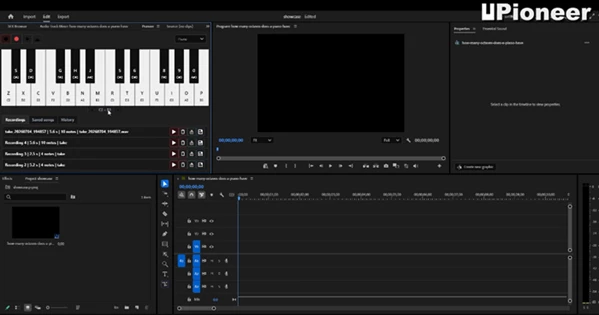
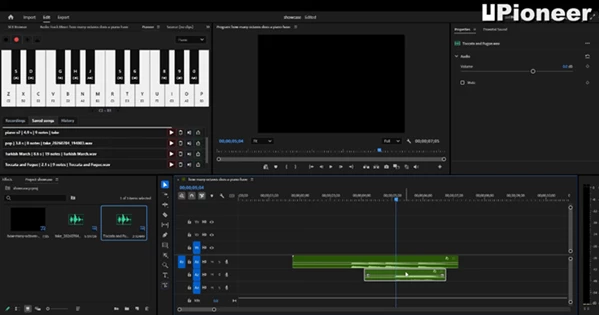
When inspiration strikes during video editing, switching to a full digital audio workstation can interrupt your creative flow. That’s exactly the problem Pioneer solves. Instead of leaving Adobe Premiere Pro to create a simple melody, transition sound, or musical accent, Pioneer lets you compose, record, preview, and export audio directly from your editing workspace.
Whether you’re creating a temporary soundtrack, adding a transition stinger, or experimenting with simple musical ideas, Pioneer makes the process fast, intuitive, and distraction-free.
What Is Pioneer?
Pioneer is a lightweight creative music panel designed for Adobe Premiere Pro. Rather than functioning as a complete music production software, it focuses on helping editors quickly generate short musical phrases, melodies, and sound ideas without breaking their editing workflow.
Instead of opening another application, you simply play notes with your computer keyboard, record your performance, preview the result, and instantly render it as a WAV file ready for your timeline.
This streamlined workflow saves valuable time and keeps creativity flowing throughout the editing process.
Why Is Pioneer Useful?
Many video editors only need small pieces of music—not a full composition. Pioneer is built specifically for these everyday creative moments.
Imagine you’re editing:
- A YouTube intro that needs a quick piano melody.
- A logo reveal requiring a short musical hit.
- A cinematic transition that feels empty without a stinger.
- A rough project that needs temporary background music before final sound design.
Instead of searching through audio libraries or opening complex music software, Pioneer lets you create these sounds within seconds.
This approach speeds up production, encourages experimentation, and helps editors communicate musical ideas more effectively before sending projects to professional composers or sound designers.
Features
Built Directly for Premiere Pro
Pioneer works as a dockable panel inside Adobe Premiere Pro, allowing editors to stay focused on their timeline without constantly switching between applications.
Play Notes with Your Keyboard
There’s no need for an external MIDI controller. Simply use your computer keyboard to perform melodies and experiment with musical ideas instantly.
This makes creative exploration incredibly accessible, especially for editors who aren’t professional musicians.
Record and Preview Instantly
After playing a melody, Pioneer records your performance so you can immediately preview it before exporting.
This quick feedback encourages experimentation and allows you to refine ideas without slowing down your editing session.
Export Standard WAV Files
Once satisfied with your recording, Pioneer renders it as a standard WAV file that can be dropped directly onto the Premiere timeline.
Because WAV is universally supported, your audio remains compatible with virtually any editing or post-production workflow.
Perfect for Temporary Music and Sound Design
Pioneer isn’t trying to replace professional audio software. Instead, it excels at creating:
- Temporary melodies
- Transition stingers
- Musical accents
- Sound-design sketches
- Short title sounds
- Quick creative ideas
These elements help editors shape the emotional rhythm of a project long before final audio production begins.
Simple Workflow with Minimal Distraction
Its four-step workflow is intentionally straightforward:
- Choose an instrument.
- Play notes.
- Record your performance.
- Render a WAV file.
This simplicity removes technical barriers and lets creativity take center stage.
Real-World Creative Uses
Pioneer fits naturally into many editing scenarios.
For example, a YouTube creator can quickly generate a soft piano intro without searching for royalty-free music.
A commercial editor can build temporary transition sounds that help clients visualize the pacing before final sound design.
Motion designers working on title animations can create subtle musical cues that enhance reveals and visual timing.
Even documentary editors can sketch emotional melodies during rough cuts before collaborating with composers.
These practical applications make Pioneer an excellent productivity tool rather than a replacement for professional music software.
Pro Tips for Better Results
Keep your melodies simple when creating temporary music. Even a few well-placed notes can communicate the emotional direction of a scene.
Use Pioneer to experiment with timing before investing time in detailed sound design.
Create multiple short takes instead of trying to record one perfect performance. Comparing different ideas often leads to stronger creative decisions.
Pair your temporary melodies with Premiere Pro’s editing tools to fine-tune synchronization between visuals and sound.
Finally, remember that Pioneer works best as a creative sketchpad. Once your edit is locked, you can always replace temporary audio with professionally produced music if needed.
Final Thoughts
Pioneer was built with editors and the demands of their editing projects in mind. Rather than forcing editors to deal with full featured music programs, Pioneer allows them to have a few quick musical elements created directly within Premiere Pro.
For those editing projects that require temporary music, Pioneer will help editors quickly compose melodies, stingers, and other musical elements. Pioneer is a great tool for editors who are looking for a way to rapidly add music to their editing projects.

Files Password : gfxplugin.com OR 123456