Downloadable Files
You can download Advanced Fire Shader Pro for free at the end of this page.
Bring Your Fire Simulations to Life
Creating realistic fire in Blender is no longer just about running a Mantaflow simulation. The final look depends heavily on the shader, and building a convincing fire material from scratch can take a significant amount of time. Advanced Fire Shader Pro eliminates that complexity by providing a ready-to-use procedural fire shader that instantly transforms your simulations into cinematic-quality flames.
Whether you’re working on visual effects, animations, game cinematics, or fantasy scenes, this add-on lets you focus on creativity instead of spending hours tweaking shader nodes.
What Is Advanced Fire Shader Pro?
Advanced Fire Shader Pro is a Blender add-on designed to apply a professional procedural fire shader to Mantaflow simulations with a single click. Instead of manually appending node groups or building complex materials, the add-on automatically places the shader directly into your Node Editor.
The shader is fully procedural, meaning every element can still be customized if needed. You can quickly switch between presets, adjust colors, and create unique fire styles without rebuilding your material every time.
This simple workflow makes producing cinematic fire much faster while maintaining a professional appearance.
Features of Advanced Fire Shader Pro
One-Click Fire Shader
Forget manually importing materials. With a single button, the fire shader is instantly available in your Node Editor, allowing you to begin shading immediately.
Why it matters
You save valuable setup time and avoid repetitive tasks, making your workflow much smoother.
9 Ready-to-Use Fire Presets
The add-on includes nine carefully designed presets that provide different fire appearances for various scenes.
These presets give you an excellent starting point while still allowing complete customization.
Fully Customizable Colors
Although presets are included, you’re never limited by them.
You can easily adjust the colors to match magical fire, explosions, fantasy flames, energy effects, or any artistic style your project requires.
Completely Procedural Shader
The entire shader is procedural, meaning it doesn’t rely on image textures.
If you enjoy experimenting, you can enter the node group and customize every aspect of the material.
However, the default setup is already optimized, so most users won’t need to modify anything.
“Click and Go” Workflow
One of the biggest advantages of Advanced Fire Shader Pro is its incredibly simple workflow.
Instead of spending time importing assets and rebuilding node trees, everything is prepared automatically with one click.
This lets artists spend more time creating animations and less time configuring shaders.
Compatible with Multiple Blender Versions
The add-on supports Blender versions:
- Blender 2.81
- Blender 2.82
- Blender 2.83
- Blender 2.90
- Blender 2.91
- Blender 2.92
- Blender 2.93
This wide compatibility makes it easy to integrate into many existing production pipelines.
Real-World Uses
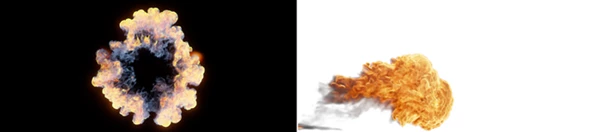
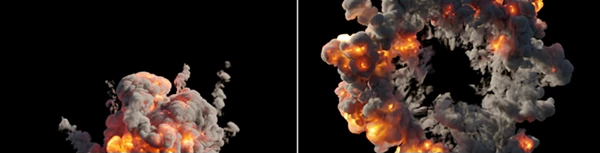
The procedural shader can improve many different types of Blender projects, including:
- Cinematic explosions
- Fireplace animations
- Campfires
- Fantasy magic effects
- Torch flames
- Burning objects
- Environmental visual effects
- Stylized fire scenes
- Animation projects
- VFX sequences
Instead of building different fire materials for every project, you can start with a preset and customize it in minutes.
Professional Tips
Start with a Preset
Rather than building your shader from scratch, begin with one of the included presets and adjust only the colors you need. This produces excellent results much faster.
Match Fire Colors to Your Scene
Changing the fire colors allows the shader to blend naturally with the overall lighting and mood of your environment. Even subtle color adjustments can dramatically improve realism.
Customize Only When Necessary
The procedural node group offers deep customization, but the default shader is already optimized. For most projects, simple color adjustments are enough to create convincing results.
Focus on Lighting
Even the best fire shader looks better when combined with proper scene lighting. Use the fire as a light source to enhance the cinematic feeling of your renders.
Final Thoughts
If you are looking for a way to quickly create professional fire simulations in Blender, Advanced Fire Shader Pro is an excellent add-on to purchase. This product comes with a one-click workflow to add the procedural fire shader, customizable colors for your fire, a suite of ready-to-use fire presets, and full control over every aspect of your fire simulations.
Whether you are working on visual effects projects, animations, or even fantasy environments, this add-on will allow you to create fire to any specifications you need and give you complete control whenever you need it.

Files Password : gfxplugin.com OR 123456