Downloadable Files
You can download Blender Cobweb Addon for free at the end of this page.
Add Realistic Cobwebs to Any Scene Effortlessly
Small details in a scene can make a big difference in the believability of the environment as a whole. Whether you are creating an abandoned house, an ancient castle, a forgotten basement, or a dungeon full of treasure, cobwebs are a detail that can instantly add that atmosphere to your scene.
Instead of having to manually create dozens of cobwebs in your scene, Blender Cobweb will automatically generate realistic cobwebs for you based on your scene. This will save you a big amount of time in your production pipeline and allow you to create renders with convincing levels of detail in a short period of time.
What is Blender Cobweb Addon?
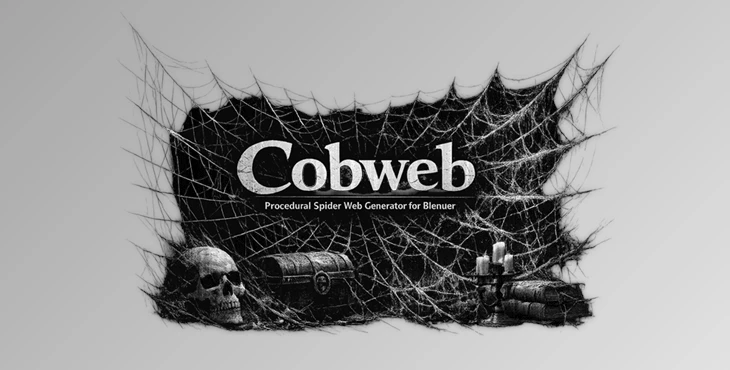
Blender Cobweb is a procedural Blender addon designed to generate customizable cobwebs directly inside your scenes. Rather than creating each web by hand, the addon automatically builds webs that fit surrounding geometry and lets artists paint where they want cobwebs to appear.
This approach saves a tremendous amount of production time while giving artists complete creative control.
Imagine decorating:
- An abandoned mansion
- A haunted hallway
- An old library
- A forgotten laboratory
- Fantasy ruins
- Medieval castles
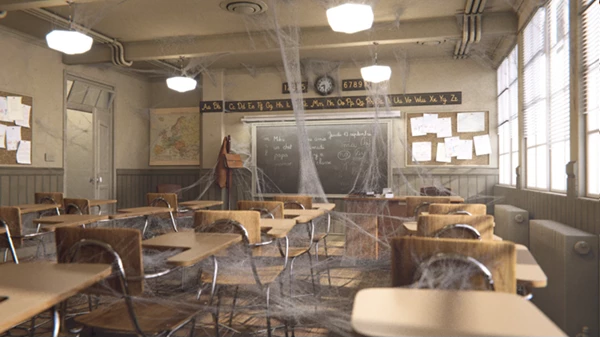
Instead of placing every strand manually, you simply generate and paint the cobwebs exactly where they belong. Because the webs conform to nearby meshes, they naturally fit corners, ceilings, furniture, and architectural details, making environments feel much more authentic.
Meet Blender Cobweb Addon
Creating believable environmental storytelling usually comes down to subtle details, and cobwebs are one of the easiest ways to communicate age, neglect, mystery, or fantasy.
Blender Cobweb makes this process simple by providing an intuitive procedural workflow that requires very little setup while producing attractive results suitable for rendering.
Features
Simple and Beginner-Friendly Workflow
The workflow for Blender Cobweb has been intentionally designed to be as easy to use as possible. Installing the program is simple and will allow you to begin generating cobwebs in your scenes without any additional training.
Procedural Cobweb Generation
Instead of manually having to create cobwebs in your scene, Blender Cobweb will automatically generate procedural cobwebs for you. This will save you a tremendous amount of time in your production process.
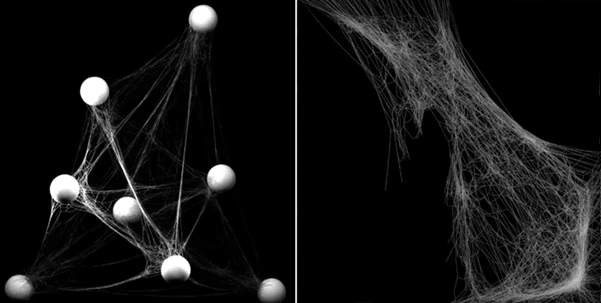
Cobwebs That Adapt to Meshes
One of the main features of Blender Cobweb is the ability for the generated cobwebs to adapt to the meshes in your scene. This means they will automatically fit the environment in which you create them.
Paint Cobweb Placement
Rather than manually having to click on each mesh in your scene, you can paint the areas in which you would like to generate cobwebs. This feature is much faster than manually selecting each mesh in your scene.
Customizable Material
The material used to generate the cobwebs in your scene is lightweight and easily customizable. You can change the material of the cobwebs quickly to accommodate the different lighting options for your scene.
Fast Rendering
The material of the cobwebs is specifically constructed in a way that allows your scene to render quickly without losing any of the detail that the cobwebs can provide to your environment.
Professional Tips for Better Results
To achieve the most realistic cobwebs, avoid covering every corner of your scene. Real cobwebs usually accumulate in quiet, undisturbed areas, so placing them selectively creates a much stronger visual impact.
Combine cobwebs with dust particles, worn materials, cracked walls, and soft volumetric lighting to enhance the feeling of abandonment or age.
Experiment with subtle material adjustments rather than making webs completely opaque. Slight transparency often produces a much more natural appearance.
Painting the cobweb locations instead of filling entire rooms also helps maintain realism while keeping your environments visually balanced.
Although cloth simulation has been removed from the addon because of Blender’s newer cloth system limitations with single-edge meshes, artists who require additional deformation can still apply Blender’s Cloth modifier manually when needed.
Final Thoughts
Many of the best three-dimensional environments include small details that enhance the believability of those environments. Cobwebs are one of the easiest of these details to add to a scene.
Blender Cobweb will save artists a tremendous amount of time when adding cobwebs to an environment. The ability to automatically generate cobwebs, have them adapt to the meshes in the scene, allow artists to paint the location of the cobwebs, and provide those cobwebs with customizable materials will allow any artist to quickly populate their scene with convincing cobwebs in just a few minutes of their time.
For anyone who creates abandoned scenes, fantasy scenes, or even medieval castles, Blender Cobweb will be a valuable addition to their Blender installation.

Files Password : gfxplugin.com OR 123456