Downloadable Files
You can download Soft Flow for free from the end of this page.
Bring Your Motion Graphics to Life
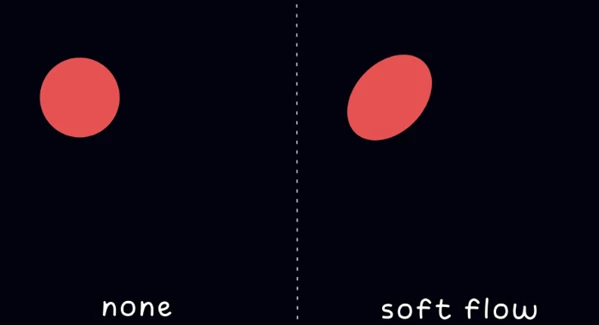
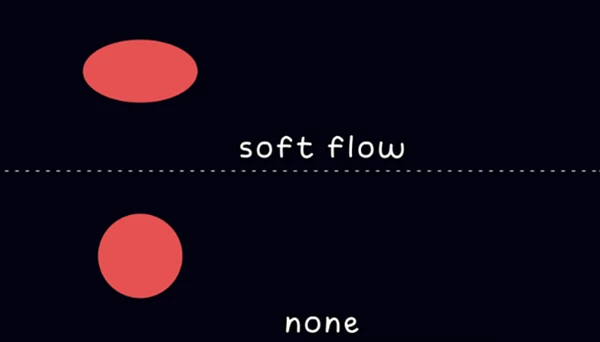
Motion graphics often have issues where the shape layers do not contain the flexibility required to realistically represent movement in the same way that the real world displays. Even the most well-designed motion graphics can look awkward and mechanical if the individual objects within the project have abrupt starts and stops to their movement. Soft Flow comes in and fixes this problem by automatically adding soft-body movement to any shape layer that is selected.
From animating logos to user interfaces (UI), icons, and even typography, Soft Flow will allow you to quickly add beautiful elastic movement to any project with a single click. You can focus on your ideas rather than the technicalities of animation software when using this tool.
What Is Soft Flow and Why Is It Useful?
Soft Flow is a script that will automatically add soft-body deformation to the shape layers within your project in After Effects. This will allow your motion graphics to exhibit the same physical properties as objects in the real world.
With Soft Flow, objects will exhibit the following movement within your projects:
- Logo elements will bounce up to their original position after being scaled.
- Buttons on a user interface will exhibit elasticity when they are manipulated.
- Animated icons can have a soft and playful movement that contrasts the otherwise rigid nature of motion graphics software.
- Titles will not abruptly stop when they reach their destination on the screen.
All of these features will allow your animations to be more engaging for the viewer by providing a smooth and natural movement to the elements of your project.
Soft Flow’s ability to respond dynamically to the Position, Scale, and Rotation movement of the layers within your project will automatically increase the production value of your projects without the need to edit your animations.
Soft Flow Features
One-Click Organic Animation
Apply realistic soft-body deformation instantly with no manual keyframes. A single click transforms static motion into smooth organic animation.
Automatic Motion Generation
Forget tedious graph editor adjustments. The script generates natural movement automatically in real time, saving valuable production time.
Realistic Drag and Follow Through
Objects react with convincing inertia, overshoot, and smooth settling, closely mimicking real-world physical behavior.
Adjustable Softness
Control exactly how flexible your shapes become. Create subtle elasticity for elegant branding or exaggerated jelly-like movement for playful animations.
Speed and Damping Controls
Fine-tune how quickly objects react and how fast they return to their original shape, giving complete creative flexibility.
Works With Every Shape Layer
Soft Flow supports:
- Rectangles
- Circles
- Polygons
- Custom paths
- Text outlines
- Imported vector artwork
This makes it suitable for virtually every type of motion graphics project.
Responsive to Transform Animations
The deformation automatically reacts to Position, Scale, and Rotation animations without requiring any additional setup.
Perfect for Logos and Typography
Brand animations become more refined with subtle secondary motion that adds personality without distracting from the design.
Excellent for Explainer Videos
UI components, icons, infographics, and animated characters become more approachable and visually appealing with soft organic movement.
Real-Time Preview
View changes immediately inside the After Effects viewport, allowing fast experimentation without lengthy rendering.
Lightweight Performance
Soft Flow is lightweight and will not slow the performance of your software, even when your project contains numerous layers of animated content.
Standalone Workflow
No external plugins or third-party software are required. Everything works directly inside Adobe After Effects.
Preset Support
Soft Flow will allow you to save your presets for specific settings that you find to be the most useful in your projects. These can then be called upon to apply those settings to other projects in your composition.
Undo Friendly
Experiment freely knowing every adjustment fully supports After Effects’ Undo and Redo system.
Suitable for Everyone
Soft Flow has an easy-to-navigate interface that even beginners to motion graphics software can learn and use to their advantage.
Tips for Better Results
Use moderate softness settings for corporate projects.
Use softness combined with easing to even further enhance your projects.
Create playful animations by using exaggerated softness settings within Soft Flow.
Saving presets will also help you to speed up the production of your projects.
Final Thoughts
Typical motion graphics often involve a significant amount of effort in adding keyframes to the features of the elements of your project. You will then spend additional time fine-tuning the movements of those elements.
Soft Flow eliminates this requirement by automatically creating soft-body movement for your elements in your project in After Effects with a single click.
Soft Flow’s features and benefits make it a great tool to enhance your existing software for After Effects users who are interested in incorporating more organic movement into their projects.
From logo animations to explainer videos, social media content, user interfaces, and general motion graphics

Files Password : gfxplugin.com OR 123456