Downloadable Files
You can download PathSmear for free at the end of this page.
Add Dynamic Light Flow to Your Motion Graphics
Adding glow effects to your After Effects compositions is a common practice. Radial glows and blur effects are the most common methods of achieving glowing elements within your projects. However, there are instances when light has to emanate from an object in only one specific direction.
PathSmear was created with this exact need. PathSmear allows users to add a glow effect to their projects but stretch that glow in the direction of a mask path they define on their project layers. This effect is ideal for creating futuristic user interfaces, lasers, neon signs, and any other type of motion graphics effect that features glowing elements that travel in only one direction.
What Is PathSmear?
PathSmear is a professional After Effects plugin that allows users to add glow effects to the elements in their projects. The glow will stretch in the same direction as the mask path chosen by the users. This effect allows artists to produce much more natural light in their projects.
PathSmear is great for adding the following types of effects to your projects:
- Neon tube effects
- Energy beams
- Speed trails
- Motion graphics transitions
- Light painting effects
- Sci-fi interfaces
- Stylized motion effects
The glow will follow the same path as the mask path chosen by the users. This makes it easy to produce glowing elements that follow the path that you choose.
Features of PathSmear
Add Glow Effects to Only One Direction
Standard glow effects will emit from your chosen elements in all directions. PathSmear allows artists to create glow effects that only emit from their elements in one specific direction.
Mask-Driven Workflow
Simply draw a mask on your layer, and the glow automatically follows that path. This gives artists precise control without requiring complicated setups or simulations.
Independent Glow Controls
PathSmear separates the glow into multiple components:
- Inner Glow
- Outer Glow
- Overall Glow
Each section includes individual controls for radius, intensity, and decay, allowing artists to build highly customized lighting styles.
Complete Artistic Control
The plugin includes adjustable settings such as:
- Glow threshold
- Glow length
- Falloff
- Glow direction
- Color tint
- Blend modes
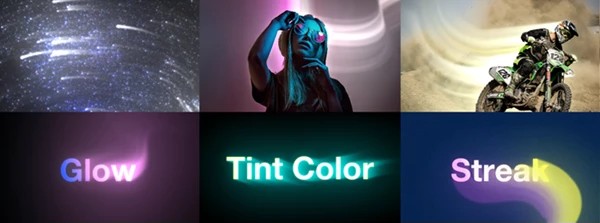
These controls make it easy to create anything from subtle highlights to dramatic cinematic light streaks.
Beautiful Bidirectional Lighting
PathSmear supports bidirectional glow, enabling light to extend in both directions when needed. This is especially useful for magical effects, energy pulses, and symmetrical lighting designs.
Advanced Quality Controls
Professional users can fine-tune rendering using:
- Smoothness controls for cleaner direction fields
- Adjustable sample quality
- Dynamic Sampling for optimized performance
- Ignore Alpha option for glowing transparent pixels
These advanced options help maintain excellent image quality while keeping rendering responsive.
GPU-Accelerated Performance
PathSmear is fully GPU accelerated and supports 8-bit, 16-bit, and 32-bit workflows, making it suitable for both everyday motion graphics projects and high-end visual effects production.
Professional Tips for Better Results
Use smooth paths when creating your masks for best results. Jagged or complex masks might produce unexpected stretching of the glow.
Adjust the threshold before adjusting the glow length setting for the best results.
Often, using both inner and outer glow gives the best results.
Use subtle color tints for glowing elements such as neon signs or futuristic interfaces.
Dynamic Sampling will work best with large After Effects projects.
Final Thoughts
PathSmear introduces a unique way of creating glow effects in After Effects. PathSmear allows users to define custom paths on their composition layers and create glowing elements that stretch in only that defined direction. The level of control given to users through PathSmear makes it a perfect tool to add to your After Effects software collection for creating motion graphics and visual effects.
PathSmear is ideal for creating any type of project that features glowing elements in only one direction. Whether it is glowing neon signs, futuristic interfaces, energy beams, or any other form of motion graphics feature, PathSmear will give you an efficient way of creating these effects with minimal effort.

Files Password : gfxplugin.com OR 123456