Downloadable Files
You can download the Crowd Mixer product for free from the end of this page.
Build Better Crowds Without Starting From Scratch
Creating believable crowds of characters is one of the biggest challenges of 3D production. Including the repetition of the same characters, the hours that it may take to place each of these characters into the scene manually, or the difficulty of editing large scenes of characters can all pose significant challenges for even the most experienced Blender artists. Whether the scene that you are creating is one that includes fans in a stadium, characters on a city street, or visitors to an event, the ability to create these crowds efficiently is a major selling point for any crowd authoring tool.
Crowd Mixer was specifically created to eliminate the need to start from scratch when authoring crowds. Instead, artists can start with some ready-made crowd presets, and then make any adjustments to these crowds to match the specifications of their project. This saves time, it increases the realism of the crowds that are created, and it allows for easy management of even the largest scenes that may contain thousands of characters.
What Is Crowd Mixer?
Crowd Mixer is a Blender add-on that helps artists generate, organize, and customize large crowds with an efficient and user-friendly workflow. It combines ready-to-use presets, character variation, animation tools, and performance optimization into a single solution.
Instead of manually duplicating and editing hundreds of characters, you simply choose a crowd type, adjust the settings, and let the system populate your scene with natural variation.
This approach improves both speed and visual quality because it reduces repetitive work while making crowds appear more believable. For example, a sports stadium can instantly be filled with thousands of spectators, while a shopping mall or convention center can be populated with diverse characters that don’t look identical.
Why Crowd Mixer Makes Crowd Creation Easier
Traditional crowd creation often requires significant setup before artists can even begin designing a scene. Crowd Mixer removes much of that complexity by providing prepared crowd presets and intuitive controls.
You can immediately choose from three common crowd layouts:
- Stadium Crowd for audience seating and organized row arrangements.
- Flow Crowd for moving characters that follow paths naturally.
- Standing Crowd for static groups in events, waiting areas, exhibitions, and public spaces.
Starting with these templates saves valuable production time while still allowing complete customization later in the project.
Features
Ready-Made Crowd Presets
By starting a scene with one of the ready-made crowd presets, artists can skip the setup process for creating a crowd and get straight into authoring the scene that they are creating.
Improved Character Library
This version of Crowd Mixer features a library of characters that have been specifically improved for increased visual diversity when rendered in 3D.
Rich Character Variation
Multiple models of characters in various outfits are included in this add-on that allow artists to create crowds of characters that all appear to be unique individuals rather than duplicated characters in the 3D scene.
Color Theme System
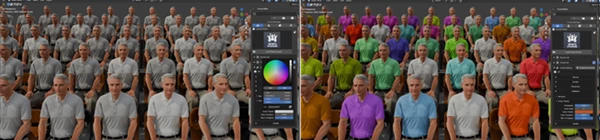
Apply coordinated color palettes across an entire crowd with a single adjustment, making it easy to match uniforms, event branding, or artistic direction.
Random Variation Controls
Automatic randomization introduces subtle visual differences throughout the crowd, improving realism while reducing repetitive patterns.
Instance Override
Modify individual characters without affecting the rest of the crowd. Replace characters, adjust position, rotation, scale, visibility, or even movement speed for Flow Crowds to eliminate obvious repetition.
Snap to Scene
Precisely position important characters exactly where they are needed, making it easy to highlight key people within large environments.
Proxy Mode
Use lightweight viewport representations during production so complex crowd scenes remain responsive while editing.
Crowd Visibility Control
Divide crowds into multiple node groups and display only the sections currently being edited, improving viewport performance and keeping workflows organized.
Faster Source Creation
Optimized source loading reduces waiting times when generating new crowd assets, helping artists stay productive throughout the creative process.

Professional Tips for Better Crowds
Always start with one of the built-in crowd presets before authoring your own variations of the preset.
Use different models of characters rather than using all of the characters from a single collection.
Use the Color Theme System only if you would like all of the characters of a crowd to have the same color of clothing; use it sparingly.
Use Instance Override to author any characters that are easily visible in the scene; this will save you time editing the scene and reducing the number of characters that appear to be duplicated.
Keep Proxy Mode enabled during authoring of your scene; only disable it when you are ready to prepare your scene for rendering.
Final Thoughts
Crowd Mixer is an add-on to Blender that will make it easier for 3D artists to author crowds of characters into their scenes. Whether an artist is creating a scene of a stadium, a city, an event, or any other type of scene, Crowd Mixer will allow the artist to more easily produce scenes with convincing crowds and without significantly increasing the complexity of their workflow in Blender.

Files Password : gfxplugin.com OR 123456