Downloadable Files
You can download the OD Houdini Shelf Tools for free at the end of this page.
Save Time and Work Smarter in Houdini
If you spend hours inside Houdini, then you understand how much time can be wasted on performing the same tasks over and over again. The OD Houdini Shelf Tools were created to eliminate these unnecessary tasks and to provide users with an extensive collection of tools that will make it easier for them to complete their projects.
Regardless of the type of projects that you like to create within Houdini, whether they are character rigging, visual effects, environments, or any other form of digital art, the OD Houdini Shelf Tools will make it possible for you to focus on the more creative parts of your work rather than the more tedious technical portions.
What is OD Houdini Shelf Tools?
OD Houdini Shelf Tools is a collection of professional tools that were created with SideFX Houdini, with a variety of features that were designed to automate the tasks that artists typically perform daily in their projects.
It is compatible with all Houdini licenses, including Apprentice, Indie, Core, and FX versions, as well as works with both Python 2 and Python 3 versions of the software. In addition, these tools also work with a variety of other applications and render engines that are used within the industry.
From automatically importing a hundred texture maps to different rendering applications at once, or automatically exporting files from Houdini to other applications such as RizomUV or Substance Painter, OD Houdini Shelf Tools will save you hours of work on your projects in addition to significantly reducing the amount of errors that you typically make when manually performing these tasks.
Meet OD Houdini Shelf Tools
OD Houdini Shelf Tools was developed with Houdini in mind, but comes with a variety of added tools that extend Houdini’s functionality. Furthermore, the tools are continually being developed and improved to assist with various aspects of Houdini projects.
Features
Extensive Workflow Automation
Automate dozens of tasks to improve your work within Houdini, including:
- Copying and pasting HDAs
- Creating OUT nulls
- Building File Cache nodes
- Moving SOP networks into Geometry nodes
- Splitting SOP networks into separate HIP files
- Creating batch render scripts
Smart Material Creation
Material creation becomes significantly faster with automatic support for multiple render engines, including:
- Octane
- Redshift
- Arnold
- RenderMan
- VRay
- 3Delight
The MultiPBR Import tool can automatically build complete material networks simply by selecting texture files.
Asset Management
Manage your projects easily with the following tools:
- Asset Library with thumbnails
- Reference Manager
- Snippet Manager (VEX and Python code)
- Project Selector
- Localize External Files
Powerful Import and Export Utilities
The package includes numerous converters and bridge tools for exchanging assets between applications, including:
- OBJ Exporter
- OBJ Sequence Export
- MDD Export
- XYZ Point Import
- LWO Import
- LightWave Scene Import
- Syntheyes Camera Import
- Bridge to RizomUV
- Bridge to Substance Painter
This greatly simplifies multi-application production pipelines.
Renderer Integration
Several tools are dedicated to renderer workflows, including:
- Octane Quick Setup
- Octane Quick Material
- Material Converter
- Per Renderer Material Assignment
- OpenGL Preview
- Image to OpenGL
Artists can quickly switch materials or convert imported shaders for their preferred renderer.
Animation and Camera Utilities
Animators and layout artists benefit from features like:
- Go To Frame Calculator
- Viewport to Camera
- Copy Object Motion
- Motion Path Display
- Object Animation to SOP Transform
- Camera Creation from Octane EXR Metadata
These utilities simplify animation setup and camera management.
Geometry Processing
Several modeling utilities improve procedural workflows:
- Primitive Group Split
- Parameters to Attributes
- Instance by Attribute
- Julienne Node
- Move Selection to Geo
- Combine Object Merge
- Primitives to Bones
- Height Baking
- Agent Conversion Tools
These help artists build cleaner procedural networks with fewer manual operations.
Real Production Examples
A VFX artist can automatically import hundreds of texture maps and generate complete Redshift materials within seconds instead of manually creating every shader.
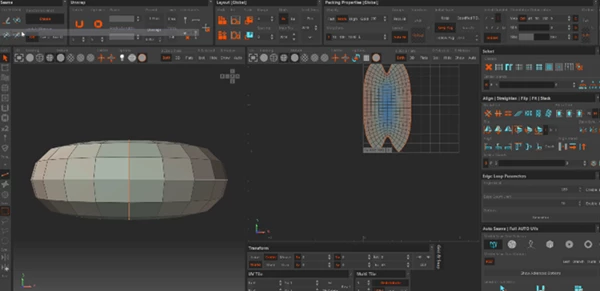
An environment artist can quickly export geometry to RizomUV, unwrap it, and return to Houdini while maintaining a procedural workflow.
A technical artist managing large productions can instantly review every external cache and texture through the Reference Manager, making project maintenance much easier.
Motion graphics artists can generate batch render scripts that automatically render multiple HIP files overnight without opening each project manually.
Professional Tips for Better Results
- Keep your most used VEX code within the Snippet Manager so you do not have to write the same code over and over.
- Use the Asset Library to store your HDAs, models, and texture maps with thumbnails so they are easily found.
- For importing 100s of textures, use the MultiPBR import tool to automatically create the materials.
- Creating File Cache nodes at an early stage in the project will allow your projects to remain lightweight and easy to work with.
- Use the Reference Manager prior to sharing your projects with others to ensure that all of the files are properly located.
- Use the Bridge tools to Substance Painter and RizomUV tools to save time when switching between these applications and Houdini.
Final Thoughts
OD Houdini Shelf Tools is a significant time-saving tool that will make every project you complete in Houdini faster and with fewer errors. From automating materials to managing your projects and files, the tools will assist every type of artist who works in Houdini.
Whether you are a new artist just getting to grips with Houdini’s features or a professional who works on the most complex scenes in Houdini, this tool will save you hours over the lifetime of your projects. Thus, it is an essential tool for every Houdini project.

Files Password : gfxplugin.com OR 123456