Downloadable Files
You can download Warm and Organic for free at the end of this page.
Transform Your Photos with Warm and Organic
Looking for a way to quickly give your photos a warm, cinematic, and professional look? Warm and Organic will help you achieve that look with a few simple clicks. Use the presets to edit any type of photo you’d like for stunning, rich colors and golden tones that will make each of your edited images stand out from the others.
What Is Warm and Organic?
Warm and Organic is a collection of premium Lightroom presets created for professional photographers, content creators, and bloggers looking to quickly enhance their photos. Each of these editing presets will give your images rich colors, warm tones, moody browns, and golden amber tones that will enhance your editing workflow.
These editing presets will retain the original lighting of your images, giving you more flexibility to edit your photos to your liking. This makes them ideal for beginners and professionals alike to use for their photo editing needs.
Professional Lightroom Presets for Every Device
The Warm and Organic collection has been specifically designed for Lightroom Classic, Lightroom Desktop, Lightroom CC, and the free Lightroom Mobile App. Thanks to multiple preset versions included in the package, you can edit your images seamlessly whether you’re working on a desktop computer or directly from your smartphone.
Features
- 9 professionally designed one-click Lightroom presets.
- Compatible with Lightroom 5, Lightroom 6, Lightroom Classic, Lightroom CC, and the free Lightroom Mobile App.
- Three different preset versions for desktop and mobile compatibility.
- Works perfectly on both RAW and JPEG images.
- Fully customizable to match your personal editing style.
- Preserves natural skin tones without changing exposure or white balance.
- Compatible with Windows, macOS, and mobile devices.
- Includes installation instructions and helpful video tutorials.
Included Presets
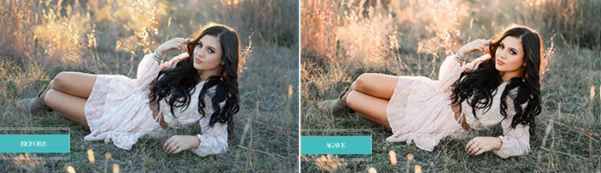
- Agave
- Desert Rose
- Dust Storm BW
- Kalahari
- Mariposa
- Mojave
- Oasis
- Paloverde
- Sahara
Perfect For
The collection performs especially well with:
- Sunset photography
- Golden hour portraits
- Fall photography
- Weddings
- Travel photography
- Lifestyle content
- Food photography
- Landscape photography
- Instagram content creation
For example, a travel photographer can instantly create a cohesive gallery with warm earth tones across multiple destinations, while a wedding photographer can maintain beautiful skin tones and romantic golden colors throughout an entire wedding album. Lifestyle creators can also build a recognizable Instagram aesthetic by mixing different presets from the collection while keeping a consistent editing style.



Professional Tips for Better Results
Warm and Organic presets work best with properly exposed images. Because the editing presets will work to retain the original lighting and white balance settings of the images, you will have more control to make small adjustments with your presets.
For portrait photography, these editing presets work well with slight modifications to the contrast of the photo. For landscape and travel photography, a slight adjustment to the clarity and vibrance settings of your photo will work to add more depth to your edited images without losing their natural look.
Experiment with each preset within the Warm and Organic collection to find the perfect editing style for each type of image. As each preset shares a similar editing style, you can incorporate them into your photo editing library to maintain the same look for all your photos.
Final Thoughts
Warm and Organic gives you a quick and professional edit for your library of photos to turn them into warm, vibrant tones. Whether you are a professional photographer or not, these editing presets will allow you to enhance your photography skills and create stunning edited photos in just a few clicks.
Use these editing presets for your Instagram content, wedding photo albums, travel content, or to simply enhance your everyday photographed moments.

Files Password : gfxplugin.com OR 123456