Downloadable Files
You can download Hair Card Studio for free at the end of this page.
Create Realistic Hair Cards Without the Complicated Workflow
Creating believable hair cards for digital characters can become one of the most time-consuming parts of the 3D production process. Each card requires the adjustment of several parameters with various tools to ensure the resulting texture for that character is complete and visually appealing.
Hair Card Studio simplifies the production of realistic hair cards directly within Blender. This powerful Blender addon makes it possible for artists to generate high-quality, customizable hair cards in just a few easy clicks. Whether the project is for game characters or even for cinematic portrayals of digital characters, Hair Card Studio will significantly reduce the time it takes to create these assets.
What Is Hair Card Studio?
Hair Card Studio is a professional Blender add-on designed to generate customizable hair cards for real-time characters, games, animation, and VFX projects.
Instead of manually modeling every strand or relying on complicated node setups, the addon procedurally creates hair cards while allowing artists to control every important aspect of the hairstyle—from strand count and thickness to curls, frizz, colors, lighting, and texture outputs.
For example:
- Create clean hair cards for game-ready characters.
- Design stylized anime hairstyles with controlled clumping.
- Produce realistic beard or eyebrow textures.
- Generate multiple hair texture variations within minutes.
- Export Normal Maps, Alpha Maps, Ambient Occlusion, and Specular outputs for modern game engines.
These features dramatically reduce production time while improving consistency across an entire character pipeline.
Features
Modern and Redesigned Interface
Version 1.5 introduces a completely overhauled user interface that makes every setting easier to access. Artists can generate, edit, preview, and render hair cards without navigating complicated menus.
Fully Customizable Hair Strand Generator
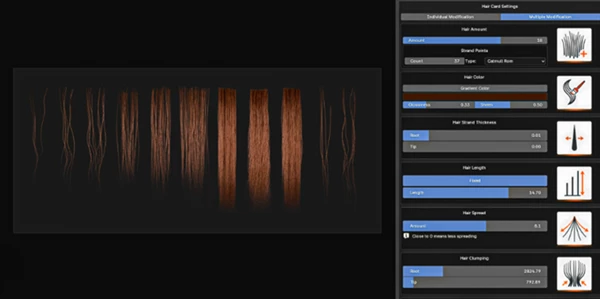
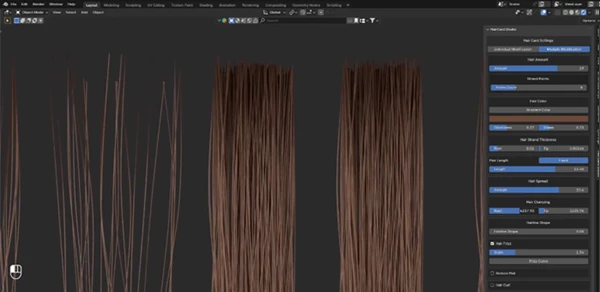
Hair Card Studio gives complete procedural control over every strand. Key controls include:
- Hair Amount for dense or sparse hairstyles
- Strand Points for smooth curves
- Independent root and tip thickness
- Adjustable strand length
- Hair spread for volume control
- Root and tip clumping
- Custom hairline shaping
- Frizz intensity and curve controls
- Curl and roughness variations
This flexibility allows users to create everything from clean hairstyles to messy, realistic hair with natural variation.
Professional Hair Material Controls
Creating convincing hair is about more than geometry. Hair Card Studio includes material controls such as:
- Global hair color adjustment
- Root-to-tip gradient colors
- Glossiness settings
- Sheen controls
- Material refinement for different hair types
These options make it easy to create blond, brunette, colorful fantasy hair, or highly polished cinematic looks without rebuilding materials.
Built-In Texture Map Generation
One of the biggest workflow improvements is the ability to generate multiple texture outputs directly. Version 1.5 supports:
- Normal Maps
- Specular Maps
- Ambient Occlusion Maps
- Alpha Maps
Instead of relying on external baking workflows, artists can quickly generate the textures needed for Unreal Engine, Unity, Blender, or other real-time pipelines.
Flexible Rendering Presets
Rendering hair textures becomes much easier thanks to several quality presets. Available options include:
- Low Resolution
- Medium Resolution
- High Resolution
- Ultra High Resolution
- Transparent Background Rendering
These presets allow artists to quickly switch between fast previews and production-quality exports.
Adjustable Studio Lighting
Hair appearance changes dramatically under different lighting conditions. Hair Card Studio includes lighting controls for:
- Light intensity
- Source size
- Position
- Overall illumination
This allows artists to preview how their hair cards will look under different environments before exporting textures.
Real Production Examples
Hair Card Studio is suitable for many professional workflows, including:
- Game-ready character creation
- Unreal Engine hair cards
- Unity character assets
- Stylized 3D characters
- Realistic digital humans
- Animation production
- Cinematic character rendering
- NPC asset generation
- Hair texture libraries
- Freelance character art pipelines
Because everything is procedural, artists can create multiple hairstyle variations in a fraction of the traditional production time.
Professional Tips for Better Results
For the best results with realistic digital hair, avoid creating every strand in the same way. Instead, use the built-in tools to create a slight amount of frizz to each strand, as well as allow each hair strand to have some amount of roughness in its texture. This will make the digital character’s hair appear more realistic.
For the same reason as creating frizz and roughness for each individual strand, clump some of the strands at the root and tip of the character’s hair. This makes the digital character’s hair look more natural.
Use gradient colors and glossiness control settings to allow for the creation of a variety of digital character hairstyles that can be used across a variety of projects.
Generate normal, alpha, and ambient occlusion maps together so that the digital 3D characters’ hair can be exported for use in game engines.
Use the lighting settings to render digital characters under various lighting setups prior to exporting the digital assets for use in other projects.
Final Thoughts
For anyone working within Blender to create digital characters with realistic hair strands, Hair Card Studio is a valuable tool that will significantly reduce the amount of time spent on creating realistic hairstyle assets for those characters.
Whether you are building 3D game characters or simply working on digital art projects that require realistic digital hair, Hair Card Studio will significantly reduce the time it takes to create each character. Its features make it a valuable tool that can be incorporated into any existing Blender project.
If you are interested in learning more about how to produce high-quality hair cards for digital characters and assets, Hair Card Studio is definitely worth exploring to see how this tool can accelerate your projects.

Files Password : gfxplugin.com OR 123456