Downloadable Files
You can download Qol Clean Slice Booleans for free at the end of this page.
Clean Boolean Cuts Without Shading Problems
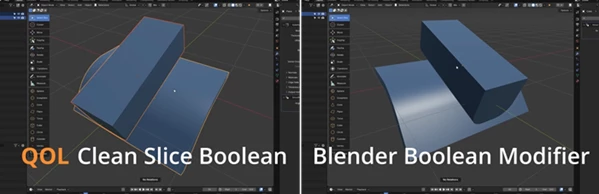
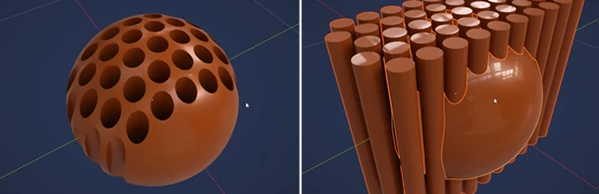
Boolean operations are one of the fastest ways to create complex hard-surface models in Blender. However, anyone who has worked with curved surfaces knows how frustrating it can be when a perfectly accurate cut still produces ugly shading artifacts around the edges. Even after adjusting topology or spending time fixing edge flow, the unwanted surface distortion often remains.
Qol Clean Slice Booleans was created to solve exactly that problem. Instead of forcing you to manually repair shading after every Boolean operation, it preserves the original surface shading and delivers clean, professional-looking results with a single click.
What is Qol Clean Slice Booleans?
Qol Clean Slice Booleans is a Blender modeling tool that performs Boolean operations while preserving the original shading information of your mesh. Before making the cut, it stores the surface normals responsible for smooth shading and reapplies them after the Boolean operation is complete.
The result is simple: your geometry is cut correctly while the surrounding curved surfaces continue to look smooth and clean.
This is especially valuable when working on:
- Hard surface product designs
- Vehicle modeling
- Mechanical parts
- Sci-fi assets
- Industrial models
- Curved panels and complex surfaces
Instead of spending extra time repairing shading artifacts, you can continue modeling with confidence and maintain a professional workflow.
Why Qol Clean Slice Booleans Makes Modeling Easier
Unlike Blender’s standard Boolean workflow, this tool focuses on maintaining visual quality after every cut.
Features
One-Click Clean Boolean Operations
Simply select the cutter, then the target object, run the operator, and receive a clean Boolean result without the typical shading issues found on curved surfaces.
Preserves Original Surface Normals
Before performing the cut, the addon saves the normals controlling the original shading and restores them afterward. This prevents newly created topology from damaging the appearance of smooth surfaces.
CAD-Like Results
The generated cuts look much cleaner, making the workflow feel closer to professional CAD modeling while still working inside Blender.
Supports Common Boolean Modes
The tool provides the standard Boolean operations:
- Difference
- Union
- Intersect
allowing you to perform the most common modeling tasks with cleaner visual results.
Bonus QOL Slice Tool
Users who own the complete QOL Collection gain access to the additional Slice operator.
This feature is particularly useful for creating invisible cuts on curved geometry, making it much easier to separate surfaces while preserving their appearance.
Designed for Fast Modeling
Qol Clean Slice Booleans is built as a modeling operator rather than a live modifier. To ensure reliable geometry, the current modifier stack is applied before executing the Boolean operation, producing clean and editable mesh data.
Real Workflow Benefits
Imagine you’re modeling a futuristic vehicle with multiple curved panels.
Normally, every Boolean cut would require additional cleanup because the shading around the new edges becomes distorted. You might spend several minutes adjusting topology or manually fixing normals.
With Qol Clean Slice Booleans, those cuts remain visually smooth immediately after execution, allowing you to focus on designing instead of repairing geometry.
The same advantage applies when creating:
- Mechanical housings
- Product visualization models
- Robotics
- Weapons and sci-fi props
- Automotive body panels
- Industrial equipment
The cleaner shading significantly improves both viewport quality and final renders.
Tips for Better Results
Although the addon simplifies Boolean operations, a few habits can improve your workflow even further.
- Finish your existing modifier stack before running the operator, since it applies current modifiers.
- Use clean cutter geometry for the best edge quality.
- Plan Boolean operations before adding fine detailing.
- Keep backup versions of important meshes when experimenting with complex cuts.
- Combine the Slice feature with curved models to create hidden panel separations without introducing unwanted shading artifacts.
These small workflow improvements help maintain organized projects and cleaner geometry.
Final Thoughts
Boolean operations should speed up modeling—not create extra cleanup work.
Qol Clean Slice Booleans focuses on eliminating one of Blender’s most common hard-surface frustrations by preserving smooth shading after Boolean cuts. Its one-click workflow, CAD-like visual quality, and intelligent normal preservation make it a practical addition for artists who regularly model mechanical objects, products, vehicles, and other precision assets.
If you frequently perform Boolean operations on curved surfaces, this tool can save valuable time while helping your models maintain a polished, professional appearance from the very first cut.

Files Password : gfxplugin.com OR 123456