Downloadable Files
You can download Sequence Inspector for free at the end of this page
Stop Searching for Hidden Editing Mistakes
No matter how experienced you are with Adobe Premiere Pro software, mistakes can still happen during the editing process. A single black frame or clip with reduced opacity within your edited footage can ruin the export of your project. The Sequence Inspector tool was created with the aim of eliminating these problems before they can ruin the export quality of your project.
It automatically scans your project for potential editing mistakes and mistakes in your final exported video and creates markers that highlight the specific locations of these errors. This tool saves editors time and ensures that the final project export is of high-quality.
What is Sequence Inspector?
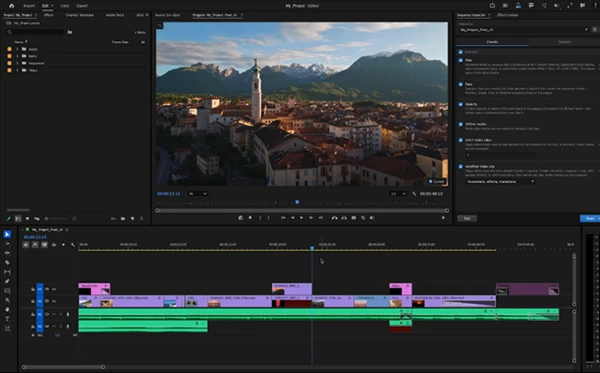
Sequence Inspector is a professional quality control panel for Adobe Premiere Pro that automatically analyzes your timeline for common editing mistakes.
Rather than relying on manual inspection, the plugin performs an intelligent scan across every video track and identifies issues such as black frames, exposed edges, offline media, dimmed clips, accidental short clips, and modified clips.
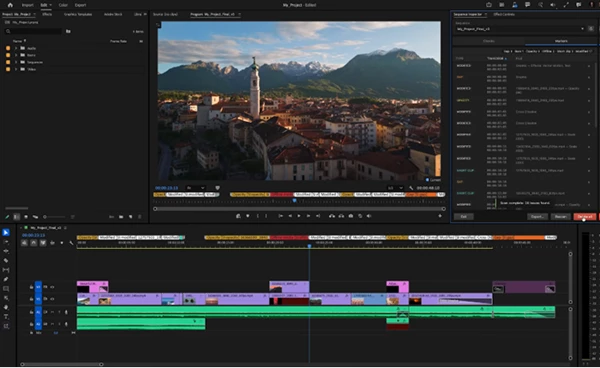
For every issue it detects, the plugin creates a timeline marker complete with the exact timecode and related file name. Instead of spending minutes—or even hours—scrubbing through a sequence, editors can instantly jump to each problem and fix it.
This streamlined workflow significantly improves production speed while reducing the risk of delivering projects with unnoticed errors.
Meet Sequence Inspector
Many editing projects include hundreds of clips across several video tracks in Premiere Pro. Manually scanning these projects for editing mistakes prior to exporting the video can take up a lot of an editor’s time.
Sequence Inspector simplifies this process and allows editors to quickly scan their projects and correct any editing mistakes before they must render their edited project.
Whether editing for YouTube, commercials, documentaries, or social media content, Sequence Inspector will make sure your project is edited to the highest quality.
Features
Fast Sequence Scanning
Sequence Inspector scans every video track in your Premiere Pro project, even if it contains hundreds of clips. Just click once to scan your project for editing mistakes.
Black Frame Detection
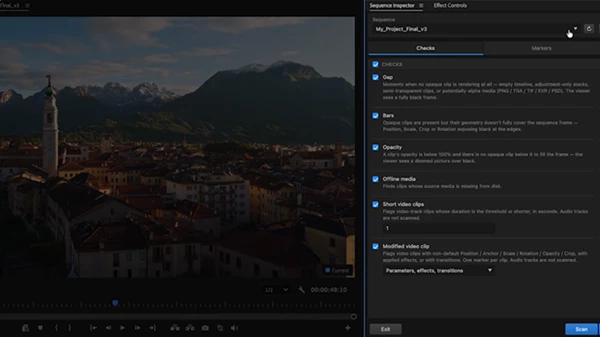
Black frames are created when there is no image being rendered on the screen in your editing software. These instances include empty timeline sections, adjustment layers, transparent image formats, and media with alpha channels.
Sequence Inspector will automatically detect these instances and make markers for you to correct.
Exposed Edge Detection
If transformations like Position, Scale, Crop, or Rotation reveal black borders around your footage, Sequence Inspector detects them automatically.
This helps maintain a clean, full-frame presentation throughout the project.
Opacity Verification
Sometimes, editors may accidentally reduce the opacity of a video clip when editing. This can result in your edited footage looking dimmed when played back.
Sequence Inspector will find these clips to ensure that editors are aware of their actions.
Offline Media Detection
Missing source files can easily make their way into exported videos if they aren’t caught early.
Sequence Inspector locates offline media before rendering, allowing editors to reconnect missing assets before delivery.
Short Clip Detecti
Tiny leftover clips created during trimming are common editing mistakes.
You can define your own duration threshold, allowing Sequence Inspector to identify accidental slivers that should be removed.
Modified Clip Detection
The plugin can identify clips that contain:
- Position adjustments
- Scale changes
- Rotation
- Crop modifications
- Applied effects
- Transitions
Editors can even customize what qualifies as a modified clip based on their workflow.
Organized Marker Management
Every detected issue appears inside an organized marker list displaying:
- Issue type
- Timecode
- File name
Markers can be sorted, deleted individually, cleared entirely, or exported as a quality control report for collaborators.
Customizable Quality Checks
Every project has different requirements. Sequence Inspector allows editors to:
- Enable or disable each quality check
- Set custom thresholds for short clips
- Choose marker colors
- Select marker types
- Save settings individually for each Premiere project
Real-World Benefits
Imagine finishing a 30-minute documentary with hundreds of edits.
Instead of spending another hour reviewing every frame, Sequence Inspector completes the quality control process in just a few moments.
For commercial editors, it helps prevent embarrassing exports containing offline footage.
For YouTube creators, it catches black frames and accidental transparency. For agencies, it provides consistent quality checks across multiple editors and client projects.
The result is a smoother production pipeline and far greater confidence before every final export.
Professional Tips
Customize Your Thresholds
Different projects require different quality standards. Set short-clip thresholds based on your editing style for more accurate results.
Scan Before Every Export
Running Sequence Inspector as the final step before rendering only takes a few seconds but can prevent expensive revisions later.
Sort Similar Issues Together
Use the marker panel to group identical issue types, making large correction sessions much faster.
Keep Project Settings Saved
Since settings are stored per project, you only need to configure your preferred workflow once.
Export QC Reports
When working with teams or clients, exporting the marker report provides a clear list of detected issues for review and approval.
Final Thoughts
Any editing mistake can turn into a problematic situation after the edited project is delivered. A single black frame, missing media file, or opacity mistake can require re-rendering of the edited project and communication with the client about the issues discovered.
Sequence Inspector transforms the editing mistake quality check process into a fast, organized, and reliable process for editors of all experience levels. By scanning your Premiere Pro project for potential editing mistakes and making markers of each mistake, editors will have more confidence in the quality of their edited projects before they are delivered.
Whether working on short videos for social media or professional editing projects, Sequence Inspector is an essential editing tool that will save editors time and ensure that their projects are always fully edited to the highest quality before being exported.
 Sequence Inspector - Quality Control Panel for Premiere Pro by Aescripts (v1.2).rar (Size: 994.7 KB - Date: 9/12/2026 2:27:53 PM)
- Sequence Inspector by Aescripts (v1.1.1).rar (Size: 1.1 MB - Date: 8/3/2026 12:01:28 PM)
- Aescripts - Sequence Inspector for Premiere Pro v1.0.0.rar (Size: 965.0 KB - Date: 7/25/2026 10:41:26 AM)
Files Password : gfxplugin.com OR 123456