Downloadable Files
You can download STMapper for free at the end of this page.
Bring Professional ST Map Workflows Into After Effects
If you’ve ever had to apply lens distortion to footage or apply a UV pass from a 3D render in After Effects, you know the challenge of having to render your project into another application to complete these tasks.
STMapper will change the game for you as it brings industry-standard ST map capabilities into After Effects.
What Is an ST Map and Why Does It Matter?
Before exploring the plugin itself, it’s helpful to understand the concept behind ST maps.
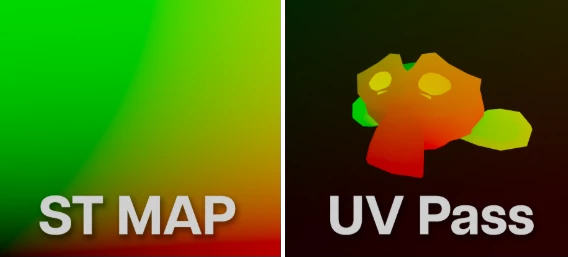
An ST map is a special image where the red and green color channels store coordinate information instead of visible colors. Every pixel tells the software exactly where to sample pixels from another image. This allows extremely accurate image distortion, warping, and remapping.
This technique is widely used in professional visual effects pipelines for tasks such as:
- Lens distortion correction
- Redistorting rendered CGI back onto camera footage
- Baking multiple distortions into a single reusable map
- Reprojecting images without quality loss
Another closely related workflow is the UV Pass.
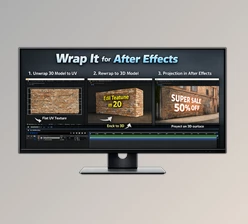
A UV pass stores UV coordinates generated by 3D software like Blender or Cinema 4D. Instead of manually tracking graphics onto rendered objects, the UV pass allows textures to be projected perfectly onto the rendered geometry inside After Effects.
These workflows dramatically improve both precision and efficiency because they eliminate manual tracking and preserve accurate pixel relationships throughout the compositing process.
Meet STMapper
STMapper is a native After Effects plugin that introduces complete ST map functionality directly inside the application.
Instead of relying on external compositing software, you can perform professional distortion workflows entirely inside After Effects with a clean and intuitive interface.
It supports ST maps from popular tracking applications, works with UV passes exported from major 3D software, and even allows you to generate brand-new ST maps for your own custom distortion workflows.
Features
Distort Footage Using ST Maps
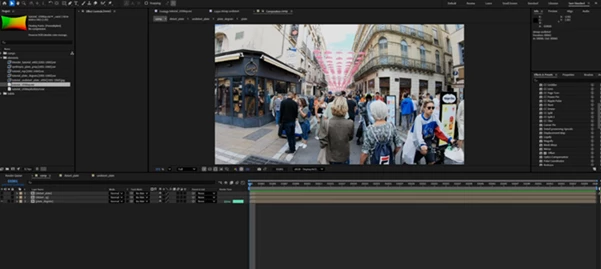
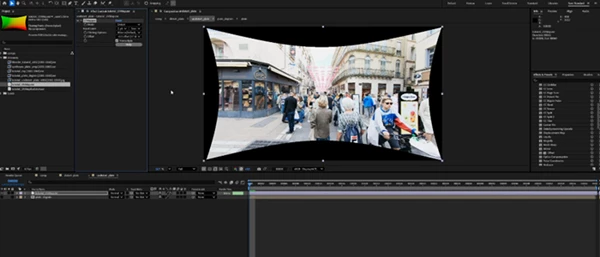
Import ST maps created in applications such as SynthEyes or 3DEqualizer and instantly apply accurate lens distortion or undistortion directly inside After Effects.
This makes camera matching and VFX compositing significantly easier while maintaining professional-quality image accuracy.
Apply UV Passes from 3D Software
Bring UV passes from Blender, Cinema 4D, or virtually any 3D application into After Effects.
You can quickly replace textures, add graphics, or project new artwork onto rendered objects without complex tracking or manual alignment. For example:
- Add animated graphics to product renders
- Replace labels on packaging
- Insert custom textures onto 3D models
- Update branding without rerendering the entire scene
Generate Blank ST Maps
One of the most powerful capabilities of STMapper is its ability to generate completely blank ST maps.
Once created, you can stack any After Effects distortion effects—including Transform, Turbulent Displace, Mesh Warp, or Optics Compensation—on top of the blank map.
After rendering, everything is baked into a single reusable ST map that can be applied to other footage with one effect.
This greatly speeds up repetitive workflows and helps maintain consistent distortions across multiple shots.
Native After Effects Workflow
Rather than switching between multiple applications, artists can remain inside After Effects throughout the entire distortion pipeline. This means:
- Faster iterations
- Cleaner project organization
- Fewer exported files
- Less time spent round-tripping between software
Practical Examples
STMapper can be used on a variety of projects, including but not limited to:
- Applying lens distortion to VFX projects
- Creating camera tracking projects
- Integrating CGI into live-action footage
- Creating motion graphics for 3D models
- Creating product visualization projects
- Creating broadcast and commercial graphics projects
- Creating advertising projects
- Creating film projects
- Applying UV passes to apply textures
- Creating reusable ST maps for future projects
Pro Tips for Better Results
Some of the best ways to work with STMapper include the following techniques:
- Always import ST maps and UV passes as Raw or Preserve RGB.
- If using multilayer EXR files, extract the channels you need before importing.
- Pre-compose any extracted maps to keep your project files organized.
- Use 32-bit color depth.
- When using UV passes, make sure to create a square composition.
- Bake frequently used effects into ST maps to save time in the future.
Combine STMapper with other popular After Effects plugins to create custom workflows for your projects.
Final Thoughts
All of the features of STMapper make it possible to bring professional ST map features directly into After Effects.
It will significantly reduce the difficulty of tasks like lens distortion, UV pass applications, and creating reusable ST maps for future projects.
For motion graphics, visual effects, and compositing artists, STMapper is an incredibly valuable tool that can save you time in your projects.

Files Password : gfxplugin.com OR 123456