Downloadable Files
You can download MaskMotion for free at the end of this page.
Stop Duplicating Layers
If you’ve ever animated anything in After Effects, then you know the pain of having to continually duplicate the same layer to mask specific areas of your composition. Eventually, you end up with dozens of duplicated layers that are difficult to manage and edit.
MaskMotion allows you to animate every masked area of your project independently, all within a single layer. This means you can have all the flexibility of having multiple layers while maintaining the simplicity of a single layer.
What is MaskMotion?
MaskMotion is a native C++ plugin for Adobe After Effects that transforms the way masked animations are created. It lets you assign existing masks to independent animation regions, giving each region its own Position, Scale, Rotation, Anchor, and Opacity controls.
Think of it as turning one layer into multiple independently animated objects—without actually creating multiple layers. For example:
- Animate a character’s head, hands, and eyes independently from one illustration.
- Move different parts of a product mockup without breaking layer organization.
- Create interface animations where icons, buttons, and panels move separately.
- Produce cut-out style animations while keeping projects lightweight and organized.
Because every region has its own transform controls, you gain the flexibility of separate layers while maintaining the simplicity of a single source layer. This significantly improves project organization and makes later revisions much easier.
Why MaskMotion Makes Animation Easier
Traditional mask animation in After Effects usually means:
- Duplicating the same layer repeatedly
- Managing dozens of identical layers
- Slower rendering
- Difficult project revisions
MaskMotion removes all of these limitations.
Instead of managing multiple duplicated assets, you animate directly inside one effect. This means your timeline remains readable, global edits become effortless, and rendering performance benefits from a more efficient workflow.
Whether you’re creating motion graphics, explainer videos, character animation, or UI animations, the workflow feels much cleaner and much more professional.
Features
Animate Up to 8 Independent Regions
Each MaskMotion effect instance supports up to eight independently animated regions. Every region can be assigned to one of your existing masks, allowing different parts of the same artwork to move independently.
This is especially useful for characters, product parts, icons, or interface elements.
Automatic Mask Detection
The plugin automatically detects every mask on your layer and displays their names inside convenient dropdown menus.
There’s no complicated setup or manual linking—simply name your masks clearly and assign them in seconds.
Independent Transform Controls
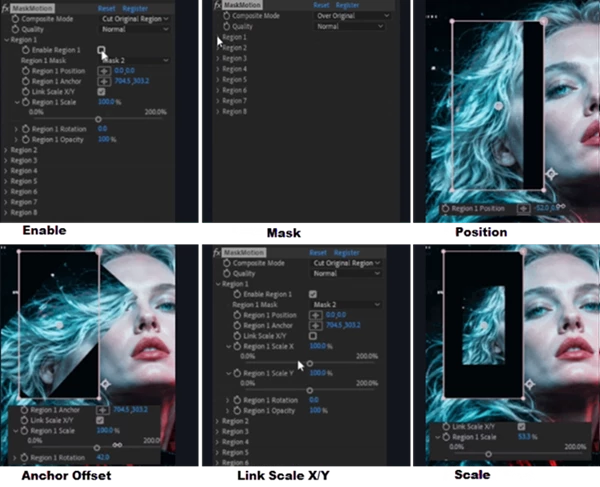
Each region receives its own animation controls, including:
- Position
- Anchor Offset
- Rotation
- Scale
- Independent X/Y Scale
- Opacity
These controls work with standard After Effects keyframes, making the workflow familiar for every motion designer.
Flexible Scaling Options
Uniform scaling works perfectly for most animations, but sometimes objects need independent horizontal or vertical stretching.
MaskMotion lets you link or unlink Scale X and Scale Y, giving you complete creative control over every masked element.
Full Keyframe Animation
Every transform property supports native After Effects keyframes.
This means you can combine MaskMotion with graph editor adjustments, easing, expressions, and other familiar animation techniques without changing your workflow.
Native C++ Performance
Unlike many script-based solutions, MaskMotion is built as a native C++ plugin.
This provides faster execution, greater stability, and better responsiveness, especially in larger professional projects.
Supports Professional Color Pipelines
MaskMotion fully supports:
- 8-bit
- 16-bit
- 32-bit
Whether you’re creating web content or high-end visual effects, the plugin integrates seamlessly into modern production pipelines.
Multi-Frame Rendering Compatible
The plugin is fully compatible with After Effects Multi-Frame Rendering (MFR).
As Adobe distributes rendering across multiple CPU cores, MaskMotion keeps up without introducing unnecessary performance bottlenecks. This allows large projects to render more efficiently.
Real-World Examples
MaskMotion works particularly well for projects like:
- Character cut-out animation
- Motion comic production
- Explainer videos
- UI and app interface animation
- Product showcases
- Infographic animations
- Social media motion graphics
- Logo reveal animations
- Educational videos
For example, imagine animating a cartoon character. Instead of separating the head, arms, body, and facial features into multiple duplicated layers, you simply create masks and animate each region independently.
The entire project remains organized and far easier to modify later.
Pro Tips for Better Results
Give every mask a descriptive name before applying MaskMotion. Clear names such as “Head,” “Left Hand,” or “Background” make assigning regions much faster.
Use Anchor Offset to create more natural rotations around joints instead of rotating directly around the mask centre.
Combine subtle Position, Rotation, and Scale animations to create organic movement rather than relying on a single property.
Take advantage of independent X and Y scaling when creating squash-and-stretch style animations.
Because everything stays inside one source layer, make your artwork revisions before animation whenever possible—changes automatically update every animated region.
Final Thoughts
MaskMotion allows you to animate each masked area of your project independently. This saves you the effort of continually having to duplicate your project’s layers.
With its automatic mask detection, native C++ performance, support for professional color pipelines, and support for multi-frame rendering, MaskMotion is a great tool for After Effects designers and animators alike.
Whether you are creating animations for characters, user interfaces, or any type of visual presentation, MaskMotion will greatly simplify your workflow and give you complete control over your project.

Files Password : gfxplugin.com OR 123456