Downloadable Files
You can download PreFlight for free at the end of this page.
Stop Last-Minute Rendering Mistakes
Have you ever discovered a typo, disabled audio, a solo layer, or incorrect render settings after you’d rendered your project?
While usually a quick fix, these mistakes are incredibly easy to miss when you’re in a rush to deliver your project.
PreFlight was created to eliminate these types of mistakes before they happen. Simply scanning a project for potential issues in seconds, PreFlight keeps designers in control - without the guesswork.
What is PreFlight and Why Should You Use It?
PreFlight is a comprehensive project verification tool for Adobe After Effects that automatically analyzes your compositions before rendering. Rather than modifying your project, it carefully inspects every composition—including nested pre-comps—and reports anything that could lead to unexpected results.
Whether you’re creating commercials, YouTube videos, social media content, broadcast graphics, explainer animations, or client presentations, even a small mistake can mean wasting hours on another render.
PreFlight helps prevent that. Imagine these common situations:
- A headline contains a spelling mistake after multiple client revisions.
- Audio is accidentally disabled in the Output Module.
- A Solo switch is still enabled inside a nested composition.
- A placeholder image was forgotten.
- Motion blur won’t render correctly.
- Your output resolution doesn’t match the client’s delivery requirements.
Instead of discovering these problems after rendering, PreFlight finds them beforehand, saving both time and frustration.
Meet PreFlight
PreFlight replaces the traditional “double-check everything” routine with a single click.
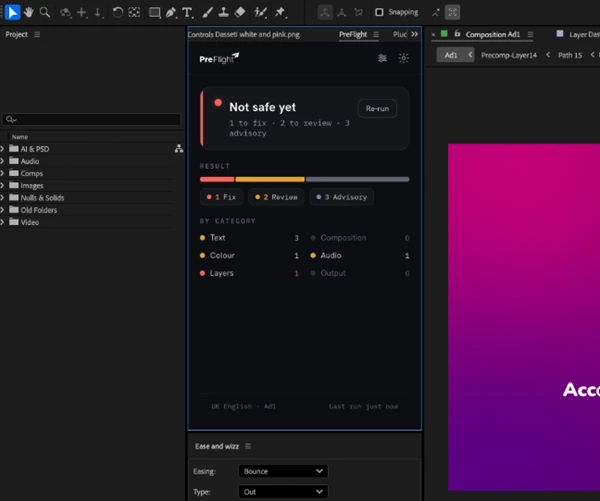
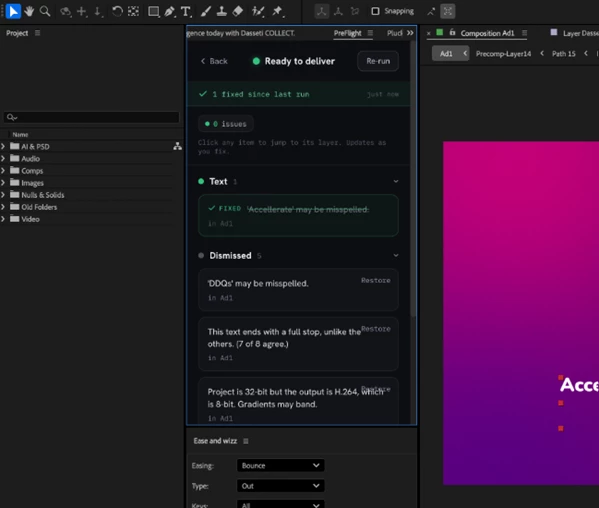
The plugin performs 45 intelligent quality checks across your entire project, organizing every issue into clear priority levels such as Fix, Review, and Advisory. Every reported problem is clickable, instantly taking you to the exact composition, layer, and frame where the issue appears.
Rather than searching through dozens of compositions manually, you can jump directly to the source, correct the problem, and continue working without rerunning the entire scan.
Features
Complete Project Verification
PreFlight scans every composition and nested pre-composition, helping ensure that nothing important is overlooked before rendering.
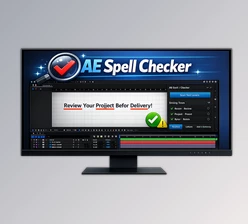
Intelligent Spell Checking
Unlike ordinary spell checkers, PreFlight understands the way motion designers work. It recognizes:
- ALL CAPS titles
- Brand names
- URLs
- Hashtags
- Product names
- Prices
- Motion graphics text formatting
It also allows you to build your own custom dictionary so recurring client names and brand terminology are never flagged again.
Instant Navigation to Problems
Every warning is interactive. Click any issue and PreFlight automatically:
- Opens the correct composition
- Selects the exact layer
- Moves the timeline to the frame where the problem is visible
This dramatically reduces the time spent hunting through complex projects.
45 Automated Quality Checks
The plugin analyzes multiple parts of your project, including:
Text
- Spelling mistakes
- Empty text layers
- Duplicate words
- Formatting consistency
- Quote styles
- Date formatting
- Trademark consistency
Composition
- Mixed frame rates
- Resolution mismatches
- Duration problems
- Safe margin issues
- Time-remapping freezes
- Background transparency
- Camera setup problems
- Non-square pixels
Color
- CMYK images
- Bit-depth mismatches before export
Audio
- Missing audio
- Silent layers
- Duplicate audio sources
Layers
- Solo layers
- Hidden layers
- Placeholder assets
- Watermarked stock footage
- Disabled expressions
- Overscaled media
- Motion blur issues
- Guide layers
- TODO markers
- Proxies still enabled
Output
- Audio disabled during rendering
- Draft quality settings
- Incorrect output paths
- Low disk space
- Test render regions left enabled
- Render effects disabled
Flexible Checking Presets
Different projects require different types of verification. PreFlight includes ready-made presets for:
- Spelling only
- Complete proofreading
- Full pre-render inspection
You can also create your own custom presets based on your workflow.
Privacy-Focused Workflow
Everything runs locally on your own computer. No cloud services. No online accounts. No project files or confidential client data ever leave your machine, making PreFlight suitable for commercial and professional production environments.
Professional Tips for Better Results
Although PreFlight automates most quality checks, combining it with a few good habits can make your workflow even more reliable.
- Run PreFlight before every final render, even after small revisions.
- Build a custom dictionary with your clients’ names and branding.
- Set your delivery specifications early so target validation becomes more accurate.
- Save personalized presets for different types of projects such as social media, television, or YouTube.
- Review advisory warnings as well as critical errors, since small inconsistencies can improve the overall polish of your animation.
- Use the clickable results panel instead of manually searching through nested compositions.
These simple practices can significantly reduce rendering mistakes while speeding up project delivery.
Final Thoughts
For most editors, the rendering stage is the last step in the After Effects process for clients.
However, it’s also the most stressful due to the possibility of making small mistakes along the way.
By using PreFlight, editors can verify their projects before rendering to eliminate these issues.
With intelligent project analysis, clickable results for editors to fix problems quickly, professional spell checking for text-heavy projects, and dozens of automated quality checks, motion designers can confidently render their projects without worrying about small mistakes.
For those who work on clients’ projects every day, or even for those who create their own motion graphics projects, PreFlight ensures that what gets rendered is the same as what was intended to be created and delivered.
 PreFlight (v1.4).rar (Size: 31.9 MB - Date: 10/14/2026 1:47:10 PM)
- PreFlight - AE Tool to Verify Before You Render by Aescripts (v1.2).rar (Size: 4.3 MB - Date: 7/30/2026 11:52:04 AM)
- PreFlight - AE Tool to Verify Before You Render by Aescripts (v1.1).rar (Size: 2.5 MB - Date: 7/25/2026 10:30:02 AM)
- Aescripts - PreFlight v1.0.rar (Size: 25.8 MB - Date: 7/22/2026 10:57:51 AM)
Files Password : gfxplugin.com OR 123456