Downloadable Files
You can download Viral Luts for DaVinci Resolve for free at the end of this page.
Give Your Photos and Videos a Viral Look
Color grading is one of the fastest ways to give your project a viral look. Whatever the genre of your editing project, whether it’s travel videos, YouTube videos, or professional client projects, color grading can make a world of difference to the mood of your footage.
This project (Videohive 64361134) was made with the editing process in mind, giving creators access to stunning color grading looks. Whether you're working on a feature film or a short film project, these color grading looks will give your editing project a professional look that can be customized to give it the perfect look for your project.
What is Viral Luts for DaVinci Resolve?
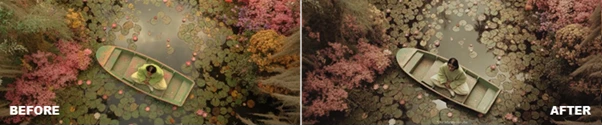
A LUT (Look-Up Table) is a color grading preset that changes the colors, contrast, brightness, and overall atmosphere of photos or videos. LUTs help editors achieve consistent color grading across an entire project without repeating the same adjustments for every clip.
Viral Luts for DaVinci Resolve provides a collection of handcrafted color effects that work with both photos and videos. These professionally designed looks make footage appear more vibrant, balanced, and visually appealing while maintaining a natural finish.
For example:
- Turn flat footage into vibrant social media content.
- Give travel videos a modern cinematic appearance.
- Create consistent colors across wedding or event footage.
- Improve product videos with cleaner and richer tones.
- Enhance portrait photography with stylish color grading.
These improvements save editing time while delivering a more professional final result.
Create Professional Results Faster
Instead of building complex color grades from scratch, Viral Luts for DaVinci Resolve offers ready-to-use creative looks that can be applied immediately. The package is designed for editors who want fast results without sacrificing quality.
Features
No Plugins Required
Everything works directly inside DaVinci Resolve without installing additional plugins. This makes setup simple and keeps your workflow clean and reliable.
Compatible with DaVinci Resolve 19 and Above
Built specifically for DaVinci Resolve 19+, ensuring smooth compatibility with the latest editing features and performance improvements.
Works for Photos and Videos
The LUTs are suitable for both still images and video projects, making them useful for photographers, filmmakers, and content creators alike.
Supports Any Resolution and Frame Rate
Whether you’re editing Full HD, 4K, vertical content, or high-frame-rate footage, the LUTs maintain consistent results without additional adjustments.
Easy Installation
The package is quick to install, allowing you to start editing within minutes instead of dealing with complicated setup procedures.
Drag & Drop Workflow
Simply drag the LUT onto your clip and instantly preview the effect. This speeds up editing and makes experimentation much easier.
Fully Customizable
Each LUT can be adjusted to match your footage. You can fine-tune intensity, exposure, contrast, or color balance for a personalized final look.
Handcrafted Professional Elements
Every included look has been carefully designed to provide polished and visually attractive results while saving valuable editing time.
Real-World Applications
- YouTube Videos
- Instagram Reels
- TikTok Videos
- Commercial Ads
- Wedding Films
- Travel Documentaries
- Fashion Videos
- Product Videos
- Lifestyle Photography Projects
These color grading looks can be used in almost any editing project you undertake.
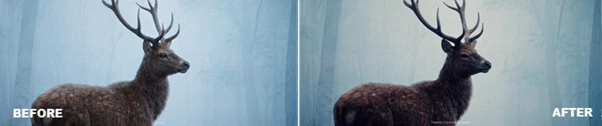
Tips for Better Color Grading
While this product (Videohive 64361134) comes with professionally crafted color grading looks, there are a few tips and tricks to color grading that will further enhance the quality of your projects.
- Correct exposure
- Reduce the intensity of the color grading look if the footage is exposed too much.
- Match the white balance of your project.
- Use the same color grading look for the same scene.
- Fine-tune the shadows and highlights after adding the color grading look.
- Experiment with color grading looks to find the one that works best for your project.
- Add sharpening to your project for further editing quality.
- Always view your project on different displays before exporting your project.
These tips will ensure your projects look great on various devices.
Final Thoughts
For editors looking for a color grading look that comes with many features that will enhance their editing projects, Viral Luts for DaVinci Resolve is an excellent solution. This color grading look is suitable for editors of any skill level.
From social media content to cinematic projects and professional photography, the color grading looks included with Viral Luts for DaVinci Resolve will ensure your projects turn out with the best colors and the most professional look possible.

Files Password : gfxplugin.com OR 123456