Downloadable Files
You can download the Saddlewood preset for free at the end of this page.
Bring Warm, Cinematic Tones to Your Photos
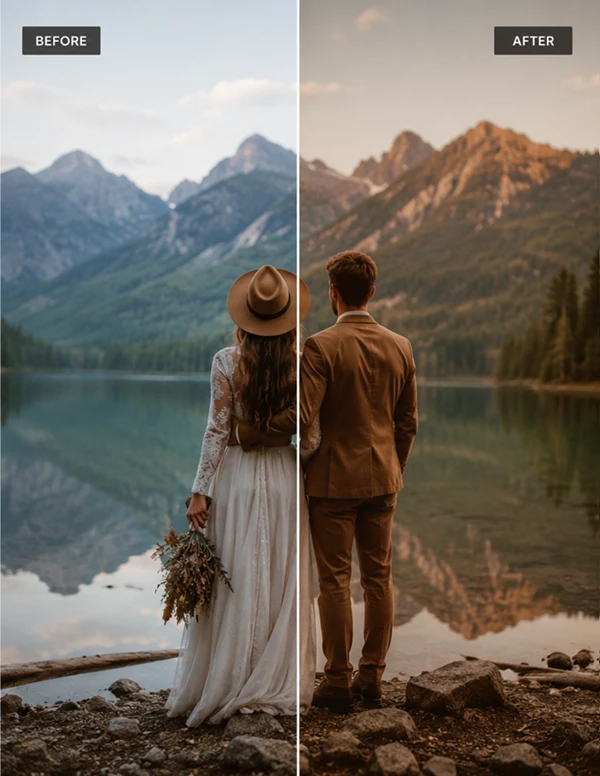
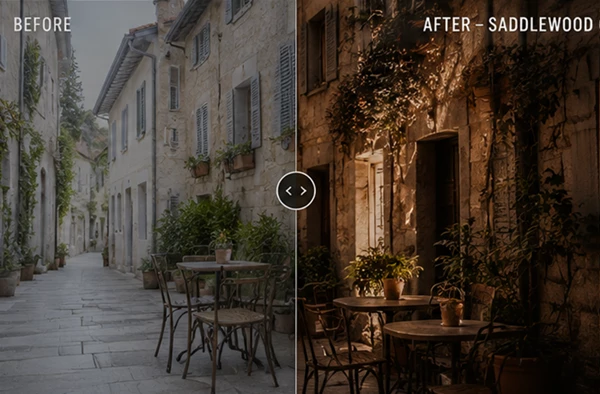
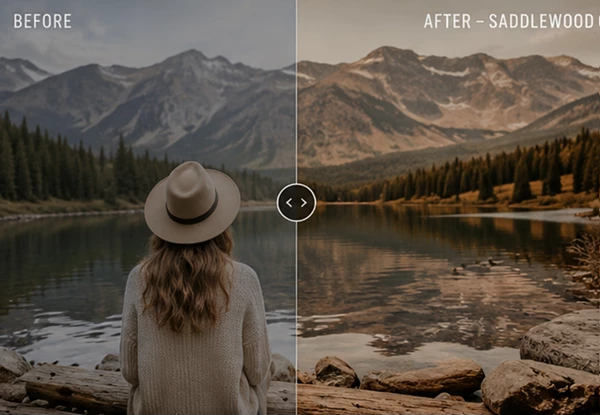
If you’re looking for a quick way to give your images a polished and professional look, Saddlewood is a great choice. Instead of spending time adjusting dozens of Lightroom settings, this preset applies a carefully crafted color grade in just one click. Whether you’re editing portraits, travel photos, or lifestyle content, Saddlewood helps create warm, natural, and cinematic results while keeping the workflow fast and enjoyable.
What is Saddlewood?
Saddlewood is an Adobe Lightroom preset distributed as XMP files. A Lightroom preset stores a complete collection of editing adjustments—including color grading, tone curves, contrast, exposure refinements, and more—allowing photographers to apply a consistent editing style across multiple images.
This preset package includes two versions:
- Saddlewood w/mask.xmp – Includes Lightroom AI masks that can be updated after importing the preset.
- Saddlewood wo/mask.xmp – A version without masks for maximum compatibility and quick editing.
Using the masked version allows photographers to take advantage of Lightroom’s intelligent masking tools for more localized adjustments, while the non-mask version provides a faster workflow when masking isn’t needed.
Meet Saddlewood
Whether you’re editing a single portrait or hundreds of images from a photoshoot, Saddlewood makes the editing process much faster while maintaining a natural and professional appearance.
Features
Two Preset Versions
Two versions of the preset are included: masked with AI edit tools and without masks for maximum editing software compatibility.
AI Mask Support
The masked version of the Saddlewood preset allows photographers to work with Lightroom’s masking editing system to adjust only specific areas of their photos. The masks can be updated after adding the preset to your photos to give more precise edits.
Simple XMP Installation
The Saddlewood preset files are in the XMP format that is used by Adobe Lightroom. To install the preset, just import the files into your editing software and begin editing right away.
Consistent Color Grading
All the edits will give your photos a consistent look, ideal for photographers who edit multiple photos with the same color grading and editing style.
Faster Editing Workflow
Instead of manually recreating the same adjustments for every image, apply the preset in seconds and fine-tune only when necessary.
Flexible Editing
The included version without masks offers excellent compatibility and serves as a great starting point for custom edits.
Real-World Editing Examples
Saddlewood works particularly well in situations like:
- Portrait photography with warm natural lighting.
- Outdoor lifestyle sessions.
- Travel photography with earthy landscapes.
- Social media content that needs a cohesive aesthetic.
- Personal photography collections requiring consistent color grading.
- Professional client galleries edited in Lightroom.
By starting with a professionally designed preset, photographers can spend more time refining creative details instead of repeating technical adjustments.
Tips for Better Results
To get the most out of Saddlewood, keep these practical tips in mind:
- Start with properly exposed RAW images whenever possible.
- Update AI masks after applying the masked version to ensure they match your subject.
- Fine-tune white balance to suit each lighting condition.
- Adjust exposure before making additional color corrections.
- Reduce or increase preset intensity slightly depending on the image.
- Save your customized version as a personal preset for future projects.
These small adjustments help maintain a natural appearance while preserving the preset’s intended style.
Final Thoughts
If you are looking for a way to achieve beautiful editing results using the Saddlewood preset without a complicated editing process, then you have found the perfect editing preset for your photography projects.
Both the masked and non-masked versions of the Saddlewood editing preset allow photographers to edit their photos quickly and with professional results.
From portrait to travel photography edits, the Saddlewood editing preset will significantly reduce the time you spend editing your photos.

Files Password : gfxplugin.com OR 123456