Downloadable Files
You can download the Convex Hull plugin for free at the end of this page.
Create Clean Geometric Outlines in Seconds
Have you ever wanted to wrap your text, logos, or even animated characters in a geometric outline in After Effects? Convex Hull will do it for you automatically. You can eliminate the need to draw shape layers manually and instead have the plugin generate a geometric enclosure around your chosen layer.
Convex Hull can be of great use for anyone making futuristic interfaces, motion graphics, explainer videos, and more.
What is Convex Hull and Why Is It Useful?
At its core, Convex Hull is an After Effects plugin that automatically creates a polygon surrounding the visible pixels (alpha channel) of another layer. Rather than relying on manual masks or complex shape editing, it uses advanced computational geometry to calculate the outer boundary in real time.
The plugin performs three intelligent processing stages:
- Detects the visible edges using Sobel Edge Detection.
- Calculates the outermost boundary with the Graham Scan algorithm.
- Renders a smooth anti-aliased polygon complete with fill and stroke controls.
This automated workflow delivers consistent results even when working with animated text, moving logos, character silhouettes, icons, or illustrations.
For example, imagine a technology presentation where every icon needs an animated outline, or a motion graphics package where each title is surrounded by a dynamic polygon. This tool creates these effects automatically, saving significant production time while maintaining clean, accurate geometry.
Convex Hull Makes Motion Graphics Faster
Instead of manually creating shape layers for every object, Convex Hull generates the enclosure automatically by analyzing the layer directly beneath it. Simply place the effect on an adjustment layer or neighboring layer, and the plugin handles the rest.
Because the boundary updates dynamically, your outlines automatically follow animated objects without requiring additional keyframes or mask adjustments.
This makes the plugin particularly valuable for:
- Motion designers
- UI/HUD animation creators
- Broadcast graphics
- Logo animations
- Kinetic typography
- Explainer videos
- Technical visualization
- Social media motion graphics
Features
Intelligent Geometry Detection
This tool automatically analyzes the alpha channel of the target layer and calculates the smallest possible convex boundary around it using optimized computational geometry algorithms.
This eliminates the need for manual tracing while producing consistent results.
Fast Three-Step Processing
The plugin performs three optimized operations:
- Sobel Edge Detection removes unnecessary interior pixels.
- Graham’s Scan Algorithm identifies the outermost boundary points.
- Anti-Aliased Rendering creates a perfectly smooth polygon ready for compositing.
This process remains extremely fast even when working with animated layers.
Flexible Layer Compositing
Choose exactly how the generated hull appears relative to the original artwork. Available compositing modes include:
- None
- Between (behind artwork)
- In Front
This flexibility allows designers to create background panels, interface frames, or foreground graphic elements with minimal setup.
Complete Fill & Stroke Controls
Customize every aspect of the generated shape, including:
- Fill Color
- Fill Opacity
- Stroke Color
- Stroke Width
- Stroke Opacity
These controls make it easy to match branding colors or create modern interface designs.
Adjustable Stroke Position
Instead of being limited to a centered outline, Convex Hull lets you position the stroke:
- Centered
- Inside Only
- Outside Only
This provides much greater control over the final appearance of the geometry.
Animated Trim Paths
The built-in Trim controls work similarly to native Shape Layer Trim Paths. Animate:
- Trim Start
- Trim End
- Trim Offset
- Reverse Direction
These options are ideal for creating animated line reveals and looping interface effects.
Dashed Lines and Arrowheads
Create technical illustrations and futuristic HUD graphics with:
- Dashed strokes
- Adjustable dash length
- Gap controls
- Dash offset animation
- Arrowheads
- Arrow size adjustment
- Start, End, or Both arrow placement
Professional Stroke Styling
Further customize your outlines using different cap styles:
- Flat
- Round
- Projecting
These subtle styling options help create polished motion graphics suitable for broadcast-quality work.
Alpha Threshold Control
Fine-tune which pixels are included during the hull calculation by adjusting the Alpha Threshold. This is especially useful when working with feathered edges, semi-transparent artwork, or complex compositions.
Real-World Creative Uses
Convex Hull can be used in a variety of projects to increase efficiency and accelerate the creation of certain effects. Some of those projects include:
- Animated title graphics
- Animated logo graphics
- Motion user interface elements
- Futuristic user interface graphics
- Callout graphics
- Infographic elements
- Product presentation graphics
- Corporate presentation animations
- Technical diagrams
- YouTube video intro animations
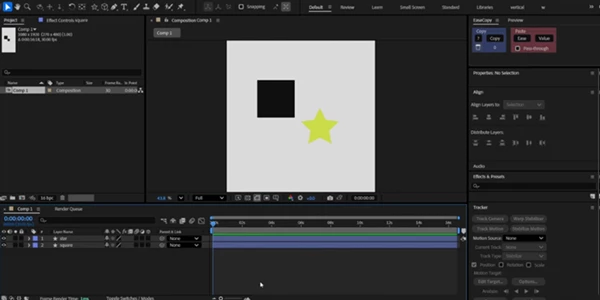
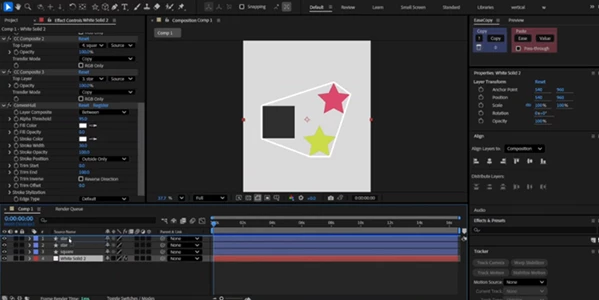
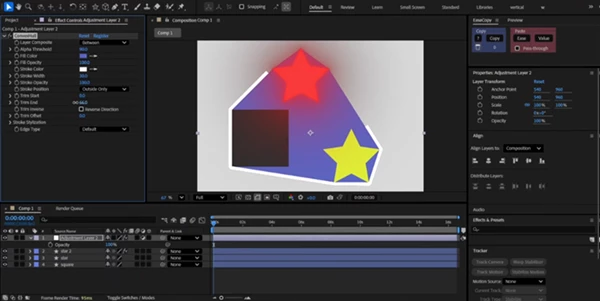
Professional Tips
This product is most effective and produces the best results when applied to projects with the following characteristics:
- The elements to be enclosed have clean alpha channels
- Increase the opacity of the fill of the convex hull to create dynamic background panels for presentations
- Animate the trim start and trim end of the convex hull to create reveals of elements
- Position the convex hull stroke outside of the element for highlighting logos or text elements
- Use the arrowhead features of convex hull for creation of technical diagrams
- Adjust the alpha threshold if working with elements that have soft edges
- Apply the Convex Hull effect to an adjustment layer to maintain organization of the After Effects project
- Combine Convex Hull with other elements to create futuristic motion graphics
These tips will help to maximize the functionality of Convex Hull within After Effects.
Final Thoughts
Convex Hull eliminates the need for users to manually create convex hulls around various elements within their projects. Instead, Convex Hull automates the process, requiring only a few clicks to generate convex hulls automatically.
Whether it be for the production of broadcast graphics, motion interfaces, kinetic typography, or even promotional videos, Convex Hull will significantly decrease the time required to create these types of visuals, while still allowing the same quality of visuals to be produced. Overall, this tool is an essential tool for any motion graphics designer within After Effects.

Files Password : gfxplugin.com OR 123456