Downloadable Files
You can download Kimodo Blender Bridge for free at the end of this page.
Generate AI Motion Without Leaving Blender
Creating realistic characters and animating them has always been a time-consuming task. While there are plenty of AI motion generation tools available, they usually require a bit of a learning curve for Blender artists who are used to working with Python scripts and BVH files.
Kimodo Blender Bridge changes the game for Blender animators by allowing them to type a text prompt and generate realistic AI motion directly within the app. It’s the ultimate tool for anyone who enjoys experimenting with different types of movements for their 3D characters in Blender.
What is Kimodo Blender Bridge?
Kimodo Blender Bridge is an addon that will let you connect NVIDIA’s Kimodo AI motion generator to your Blender installation. This means that instead of having to constantly export and import animation files, you can work directly within Blender.
All you have to do is type in a command such as:
- “A person walks confidently.”
- “Someone lifts a heavy box.”
- “A character jogs in a circle.”
- “A dancer performs a smooth spin.”
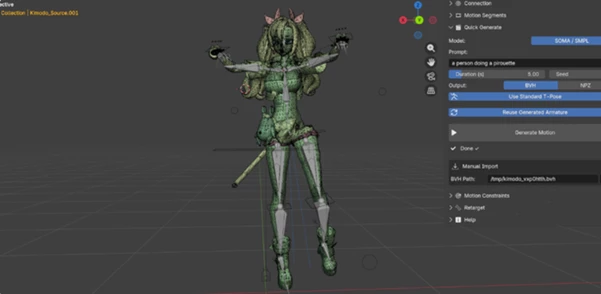
And hit Generate. Your animation will be applied directly to an armature within your Blender scene. This will save you an enormous amount of time that you would have spent working with files.
Features
One-Click Installation
One of the biggest barriers to AI animation is installation. Kimodo Blender Bridge removes that complexity with an automatic installer that:
- Creates its own Python environment
- Installs PyTorch automatically
- Downloads the AI model
- Configures everything without terminal commands
- Shows installation progress directly inside Blender
Even users with little technical experience can get started in just a few clicks.
Generate Motion From Simple Text
The main attraction is AI-powered text-to-motion generation.
Simply write what your character should do, choose the animation duration, and generate the result instantly.
This makes brainstorming incredibly fast because testing new animation ideas no longer requires hours of manual keyframing.
Examples include:
- Walking
- Running
- Dancing
- Carrying objects
- Sitting
- Jumping
- Combat movements
- Everyday actions
Multi-Prompt Motion Segments
Instead of generating only one action, you can combine multiple prompts into one continuous animation.
For example:
- Walk forward
- Stop and wave
- Turn around
- Start running
Kimodo smoothly blends these motions together, creating natural transitions across your timeline.
This feature is especially useful for cinematic scenes, game cutscenes, and storytelling animations.
Generate Multiple Variations
Creative work often requires options.
Kimodo Blender Bridge can automatically generate several variations of the same prompt using different random seeds.
Instead of repeating the process manually, you can compare multiple motion styles and simply choose the one that fits your project best.
Built-In Motion History
Every generated animation is automatically saved inside the addon’s history panel.
You can quickly:
- Reload previous animations
- Compare different generations
- Reuse successful prompts
- Track seeds and timestamps
This saves significant time during production.
Spatial Motion Constraints
Sometimes AI needs guidance. Kimodo Blender Bridge lets you control motion using various constraints, including:
- Root position waypoints
- Curve path following
- Hand targets
- Foot targets
- Full-body pose references
For example, you can draw a Bezier curve and let your character naturally follow that exact path.
These controls produce more believable movement while keeping the creative advantages of AI animation.
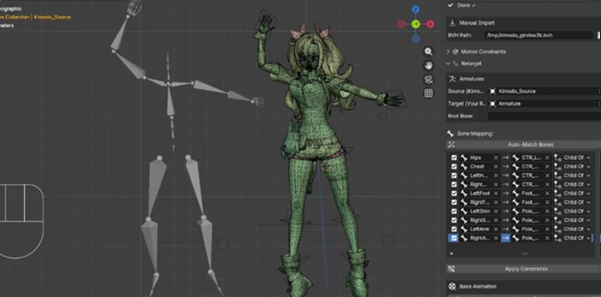
Automatic Retargeting
After generating motion, the animation can be transferred to almost any character rig.
The addon automatically matches bones, including many Mixamo-compatible rigs.
Users can choose different retargeting modes depending on the skeleton, resulting in cleaner animations with minimal manual adjustments.
Offline Workflow
Once everything is installed, no internet connection is required.
The entire AI model runs locally on your computer without:
- API requests
- Subscription fees
- Online limitations
- Usage quotas
This is particularly valuable for professionals working on confidential projects or offline production environments.
Real Project Examples
Kimodo Blender Bridge fits naturally into many production pipelines.
A game developer can rapidly prototype NPC animations before refining gameplay.
A filmmaker can generate realistic character acting for previsualization.
A motion designer can create social media animations much faster than traditional keyframe workflows.
An indie creator can produce professional-quality character movement without hiring a dedicated animator.
Even experienced animators benefit by using AI-generated motion as a strong starting point before adding their own artistic refinements.
Professional Tips
To get the best results from Kimodo Blender Bridge, follow a few tips and techniques from professional animators:
- Write detailed text prompts for better results
- Generate several variations on the same animation
- Use the multi-prompt motion segments function for longer animations
- Use spatial motion constraints for better movement control
- Save retargeting presets for your favorite characters
- Keep your Blender project at 30 frames per second
- Fine-tune the generated keyframes for better results
These tips will significantly improve your animation projects with Kimodo Blender Bridge.
Final Thoughts
Animating characters and adding AI motion capabilities to your 3D software projects has never been easier. Kimodo Blender Bridge brings AI motion generation to Blender with a set of features that cater to artists.
From the one-click installation to the automatic retargeting, spatial motion constraints, and offline workflow, Kimodo Blender Bridge will make your animation project faster and more streamlined.
Whether you are working on 3D games, cinematic projects, visual effects, or any kind of animation to present to your clients, Kimodo Blender Bridge will make your life easier.