Downloadable Files
You can download Polydome for free at the end of this page
Instantly Transform Your Blender Lighting
Creating realistic lighting within Blender can take considerable time, particularly if you are using HDRIs to illuminate your projects. Polydome simplifies the entire lighting process and gives you complete control and creative freedom. Use Polydome to create lighting for a variety of projects, including product illustrations, architectural visualizations, automotive art, and more.
Focus on creating your art instead of lighting.
What is Polydome and Why Should You Use It?
Polydome is an HDRI environment lighting plugin for Blender that significantly speeds up your lighting and environment creation process.
Polydome will automatically import your HDRI files, create your environment lighting, floor, reflections, and more.
The benefits of Polydome include:
- Create lighting almost instantly
- Get automatic ground reflections
- Materials appear more realistic
- Product illustrations have realistic environments
- Artists can focus on creating their art
This tool can be used to:
- Allow product designers to illustrate products within realistic studio lighting
- Place vehicles into outdoor environments
- Allow architectural artists to visualize buildings in different lighting
- Character artists can switch between outdoor and studio lighting environments
These features significantly improve your illustrations and cut your preparation time.
Meet Polydome
Polydome was created for Blender artists who use HDR lighting but desire a faster, more intelligent lighting workflow.
The plugin works within both EEVEE and Cycles. This allows artists to rapidly create lighting in EEVEE and then render the same scene in Cycles for final illustration work.
Polydome combines all of the features you need to create realistic lighting and reflections with automatic floors and HDRI management within one easy-to-use interface.
Features
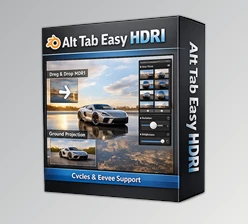
Drag & Drop HDRI Workflow
Simply drag any HDRI directly into the Blender viewport and Polydome automatically builds the environment lighting, dome, and matching floor.
This removes the repetitive setup process every time you start a new project.
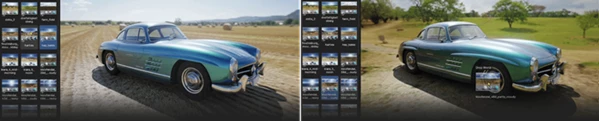
Poly Haven Integration
This project integrates directly with Poly Haven’s Asset Browser, providing instant access to over 1,800 free HDRI environments.
Browse the library, select your resolution, and drag the environment directly into your project.
Asset Browser Compatibility
Besides Poly Haven, Polydome works with your local HDRI collection or any Asset Browser source, making it flexible for every production pipeline.
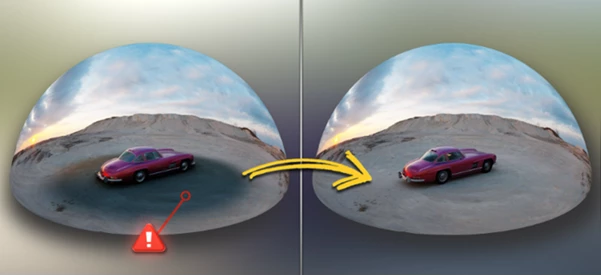
Automatic Floor Matching
Traditional HDRI lighting setups will result in a seam between the floor and the environment lighting. Polydome automatically creates a seamless transition between the floor within the project and the imported HDRI files.
Photorealistic Ground Shading
Automatically add reflections, roughness, and bump maps to your floor to provide realistic lighting within the project.
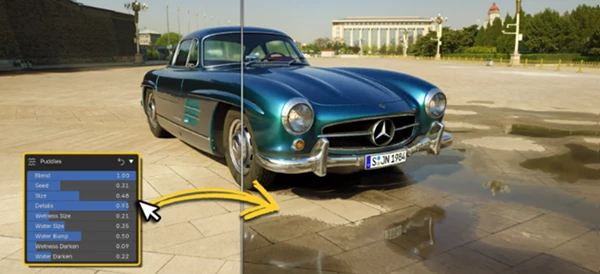
Procedural Water Puddles
Add realistic wet surfaces using procedural puddles. You can control:
- Puddle size
- Water depth
- Surface roughness
This feature is especially useful for:
- Automotive renders
- Rainy environments
- Cinematic scenes
- Urban visualizations
Invisible HDRI Mode
Need HDRI lighting without seeing the environment?
Invisible Mode hides the HDRI from the camera while preserving all lighting information. You can also choose custom background colors and even apply vignette effects for cleaner compositions.
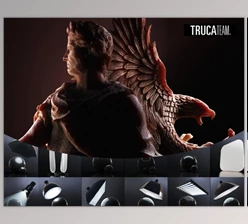
Professional Studio Lighting
Polydome includes studio lighting tools that help create clean product presentations with controlled illumination and neutral backgrounds.
Perfect for:
- Product visualization
- Portfolio renders
- Jewelry
- Consumer electronics
- Character showcases
Dome and Box Projection
Different scenes require different environment projections. This tool lets you switch between:
- Dome Projection
- Box Projection
This flexibility produces more accurate floor alignment depending on the environment you’re recreating.
Advanced HDRI Color Controls
Without opening Blender’s Shader Editor, you can easily adjust:
- Exposure
- Gamma
- Saturation
- Brightness
- Warmth
- Complete desaturation
These controls make it easy to match lighting moods or create studio-style looks.
New Features
Version introduces several powerful workflow improvements:
- Live rendered HDRI preview with automatic updates
- Background floor calibration while editing
- Global Brightness and Gamma controls
- Transparent rendering mode for Cycles compositing
These additions make the lighting workflow even faster while improving rendering flexibility for professional compositing.
Tips for Getting Even Better Results
To get the most from Polydome, keep these practical tips in mind:
- Use lower HDRI resolutions while building your scene and switch to higher resolutions for final rendering.
- Combine subtle puddles with roughness variation to create more natural outdoor environments.
- Fine-tune exposure and warmth instead of replacing HDRIs whenever possible.
- Use Invisible Mode when compositing renders over custom backgrounds.
- Test different dome and box projections depending on the environment you’re recreating.
- Studio Lighting mode works especially well for product visualization because it produces clean reflections with minimal setup.
Small adjustments often create dramatically more realistic renders.
Final Thoughts
Polydome is much more than a plugin that imports HDRIs into your Blender projects. Polydome is a complete lighting solution to simplify the entire lighting process and create beautiful, realistic lighting for a variety of projects.
This project is perfect for artists creating product illustrations, architectural visualizations, automotive art, and more.
With Polydome, artists of all skill levels will find significant benefits to their creation processes. It is an essential tool that every Blender artist should have in their toolkit.

Files Password : gfxplugin.com OR 123456