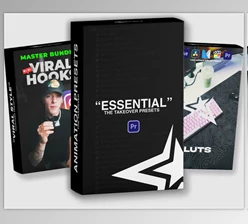
Downloadable Files
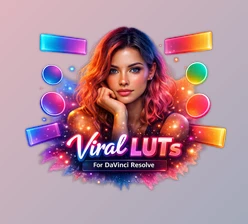
You can download Viral Luts for free at the end of this page.
Give Your Photos and Videos a Viral Look
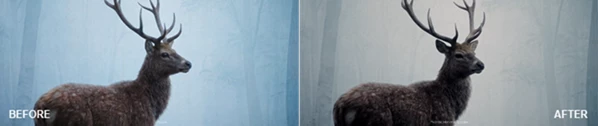
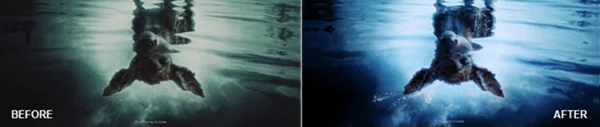
Color grading plays a significant role in transforming your ordinary footage into viral videos. Whether you are editing travel videos, wedding videos, commercial videos, or any other kind of project, color grading can drastically improve the look of your videos.
Viral Luts gives you a range of professional color grading effects that you can use to give your projects a viral look. No matter where your editing software package comes from, this project (Videohive 64361127) has been developed to work seamlessly within Adobe After Effects.
What Are LUTs and Why Are They Useful?
A LUT (Look-Up Table) is a color grading preset that instantly changes the colors, contrast, brightness, and overall mood of a photo or video. Rather than editing every color parameter individually, a LUT applies a complete cinematic color style with just a few clicks.
This saves valuable editing time while maintaining a consistent visual identity across an entire project.
For example:
- Give travel videos vibrant cinematic colors.
- Create stylish Instagram Reels and TikTok videos.
- Enhance wedding footage with soft, elegant tones.
- Add dramatic contrast to promotional videos.
- Improve lifestyle photography with professional color grading.
Using Viral Luts also makes it much easier to keep every scene visually consistent, even when footage is captured under different lighting conditions. This consistency helps videos look more polished and professional while reducing the amount of manual color correction required.
Viral Luts Features That Make Editing Easier
This tool (Videohive 64361127) is a ready-to-use color grading package built for speed, flexibility, and professional-quality results. It works seamlessly inside Adobe After Effects without requiring additional plugins, making it accessible for both beginners and experienced editors.
Features
No Plugins Required
Everything works directly inside After Effects. You don’t need to install any third-party plugins, reducing setup time and avoiding compatibility issues.
Compatible with After Effects CC2025 and Above
Designed for modern versions of Adobe After Effects, ensuring smooth performance and access to the latest editing features.
Works with Both Photos and Videos
Apply cinematic color grading to both still images and video footage, making it suitable for mixed-media projects.
Compatible with Any FPS and Resolution
Whether you’re editing HD, 4K, vertical social media videos, or cinematic widescreen footage, the LUTs work consistently across different frame rates and resolutions.
Drag & Drop Workflow
Simply drag the Viral Luts you prefer and start editing your footage. This feature is helpful for beginners who want to produce professional videos without having to mess with editing settings.
Fully Customizable
Since every editing project is different, Viral Luts allows you to tweak the colors to ensure it fits the project you are editing.
Video Tutorial Included
A detailed tutorial helps users learn installation and usage quickly, making the package easy to understand even for first-time users.
Ready-to-Use Elements
All the color grading look presets are ready to use and will save you time in your editing projects. Furthermore, they will ensure your videos maintain consistent visuals throughout the entire editing project.
Real-World Examples
Some of the many projects that you can enhance with Viral Luts include the following:
- Social media content
- YouTube videos
- Travel films
- Wedding videos
- Promotional commercials
- Product showcases
- Lifestyle photography
- Creative cinematic edits
Tips for Better Results
Although this project (Videohive 64361127) can provide your videos with professional-looking colors with a click of the mouse, a few simple techniques can improve the outcome of your projects.
- Always correct the exposure of your footage before using Viral Luts.
- Adjust the intensity of Viral Luts to match the scenes in your videos.
- Ensure all the videos in your project use the same Viral Luts color grading look.
- Edit your footage with proper lighting and high-quality footage before using Viral Luts.
- Experiment with the various Viral Luts color grading choices before finalizing one.
- Fine-tune the contrast and saturation settings to match your project’s vibe.
These techniques can take your editing game to the next level and allow you to turn average edits into viral editing projects that look great on social media platforms.
Final Thoughts
Getting into professional color grading does not have to be complicated. Viral Luts gives you professional color grading for your videos with ease.
Whether you are a beginner or a professional editor, Viral Luts will make your editing process easier and give your projects a professional color grading look.
Whether you edit social media content or cinematic films, Viral Luts will allow you to produce vibrant, visually appealing projects with minimal editing time.

Files Password : gfxplugin.com OR 123456