Downloadable Files
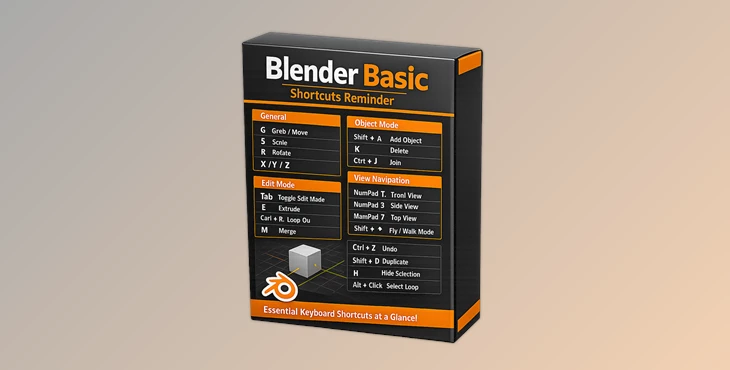
You can download Blender Basic Shortcuts Reminder for free at the end of this page.
Learn Faster with Instant Shortcut Access
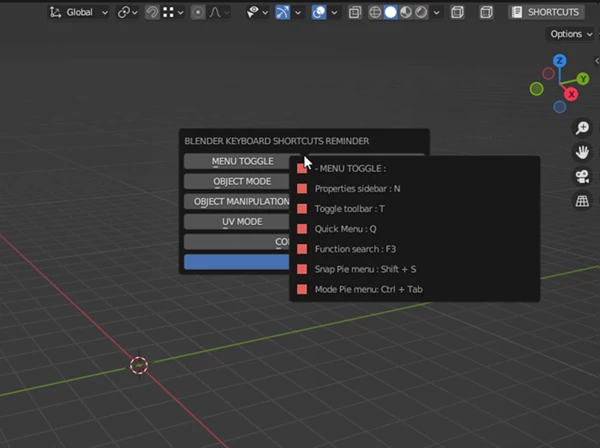
When you first start using Blender, remembering dozens of keyboard shortcuts can feel overwhelming. Even experienced users occasionally forget rarely used commands and have to interrupt their workflow to search for them online. Blender Basic Shortcuts Reminder is designed to solve this problem by keeping the most important Blender shortcuts easily accessible whenever you need them.
Instead of breaking your creative focus, this lightweight add-on gives you a convenient reminder of essential shortcuts, helping you work more confidently and efficiently while learning Blender.
Who Can Use the Blender Basic Shortcuts Reminder?
Blender Basic Shortcuts Reminder is perfect for users of all skill levels. However, if you are a beginning Blender user, it will be of the most help to you.
Here are a few examples of the different ways that Blender Basic Shortcuts Reminder can benefit users:
- New Blender users can use the Blender Basic Shortcuts Reminder to quickly access the most common navigation shortcuts.
- Blender students can use it to practice new commands while watching Blender tutorials.
- Hobbyists can use it to build muscle memory for the most common Blender commands.
- Professional artists can use it to spend more time creating instead of searching for the correct keyboard commands for their projects.
Having quick access to Blender keyboard shortcuts can help you to learn the software at a faster rate and improve your productivity.
Meet Blender Basic Shortcuts Reminder
Whether you’re taking your first steps in Blender or simply want a convenient reference while working, Blender Basic Shortcuts Reminder makes everyday navigation much easier.
Its installation process is straightforward. Simply open Edit → Preferences → Add-ons → Install, select the provided Python add-on file, and enable it inside Blender.
Features
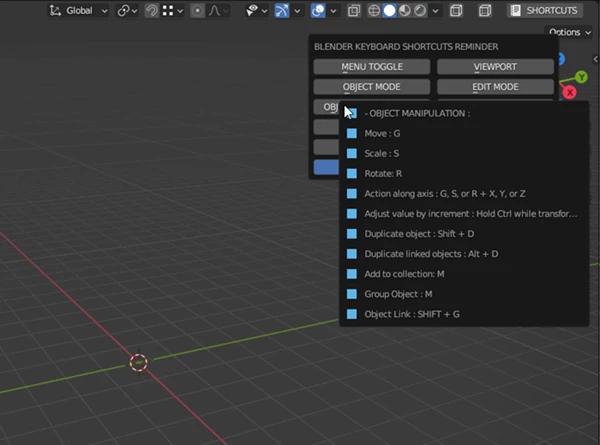
Quick Shortcut Reference - Get instant access to a list of the essential Blender keyboard shortcuts.
Beginner-Friendly Design - Blender Basic Shortcuts Reminder has been developed specifically for helping new Blender users learn the software’s essential commands and keyboard shortcuts.
Faster Learning Experience - The add-on encourages beginners to memorize the most essential Blender keyboard shortcuts while learning the software.
Smooth Workflow - Blender Basic Shortcuts Reminder reduces the number of times you have to interrupt your projects to search for essential commands.
Lightweight Add-on - Unlike other Blender add-ons that may take up a lot of your computer’s memory, Blender Basic Shortcuts Reminder is extremely light in terms of memory use.
Easy Installation - Simply install the Python file directly from within Blender’s Add on Manager.
Practical Examples
Let’s say you are learning a Blender tutorial that takes you through a specific modeling command, but you have momentarily forgotten the keyboard shortcut for that function. Instead of taking a break from your Blender project to look up the command online, you can simply use the Blender Basic Shortcuts Reminder add-on to find the command you are looking for.
Additionally, if you use Blender every day as a hobby or profession, the more you look at the reminder feature, the more muscle memory your brain will build for the most common Blender commands. Eventually, your brain will begin to remember these commands without having to look them up.
Pro Tips for Better Results
- To get the most out of Blender Basic Shortcuts Reminder, use the tool while you are learning Blender’s first projects.
- Additionally, try to use the keyboard shortcuts instead of clicking the menu commands on the screen.
- Try to learn and remember the commands and their associated keyboard shortcuts every single day to build muscle memory.
- Use the Blender Basic Shortcuts Reminder in conjunction with Blender’s beginner tutorials for the fastest possible learning experience.
- Challenge yourself to use the keyboard shortcuts instead of the menu commands as you become more familiar with the commands’ associated keyboard shortcuts.
- These simple strategies can dramatically increase your speed with Blender over time.
Final Thoughts
Blender Basic Shortcuts Reminder is a great tool to help you remember Blender’s essential keyboard shortcuts. For beginners to Blender, it reduces the software’s intimidation factor and allows them to work at an increased rate on their projects.
By using this helpful Blender add-on, you will find that you are more focused on your 3D projects instead of struggling to remember essential keyboard commands. Additionally, you will find yourself working at a faster rate in Blender over time.

Files Password : gfxplugin.com OR 123456