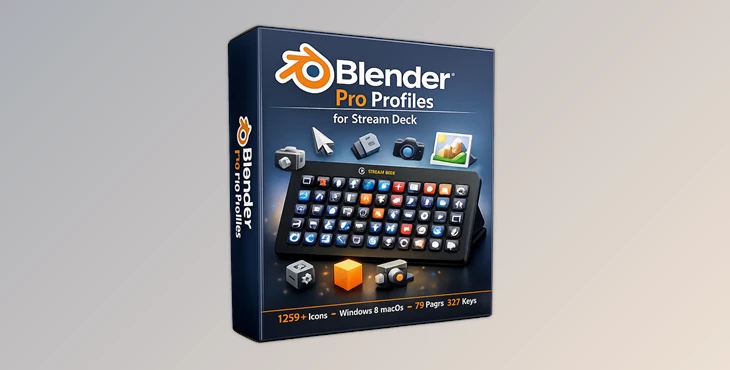
Downloadable Files
You can download the Blender Pro Profiles for Stream Deck for free at the end of this page.
Work Faster and Focus on Creativity
If you spend a lot of time working in Blender, you already know how often you need to remember dozens of keyboard shortcuts. Switching between tools, menus, and commands can interrupt your creative flow and slow down even experienced artists.
Blender Pro Profiles for Stream Deck is designed to solve exactly that problem. It transforms your Stream Deck into a dedicated Blender control panel, giving you instant access to hundreds of commonly used shortcuts, organized workflows, and beautifully designed icons. Instead of searching through menus or memorizing key combinations, you can focus on modeling, animation, sculpting, rendering, and creating.
Whether you’re a beginner learning Blender or a professional working on complex 3D scenes, this tool helps make your workflow smoother, faster, and more enjoyable.
What Is Blender Pro Profiles for Stream Deck?
Blender Pro Profiles for Stream Deck is a professionally designed collection of pre-programmed Stream Deck profiles created specifically for Blender. It includes hundreds of ready-to-use shortcut buttons, custom icons, and organized pages that make navigating Blender much easier.
Rather than relying solely on keyboard shortcuts, users can trigger Blender commands with a single button press on their Stream Deck device.
This approach offers several practical advantages:
- Reduce the need to memorize hundreds of keyboard shortcuts.
- Speed up repetitive modeling and editing tasks.
- Keep frequently used tools within easy reach.
- Create a cleaner and more efficient production workflow.
- Stay focused on creative work instead of navigating menus.
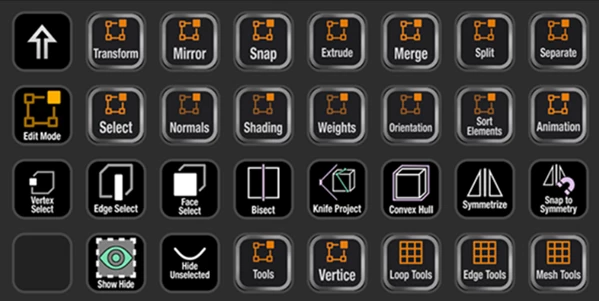
For example, while modeling a complex environment, you can instantly switch between edit modes, transformation tools, snapping options, and viewport controls without interrupting your workflow. Small improvements like these can save a significant amount of time over large projects.
Features
Ready-to-Use Stream Deck Profiles
The package includes fully programmed profiles for both the 15-Key Stream Deck (MK1 & MK2) and the Stream Deck XL, allowing users to start working immediately without building custom layouts from scratch.
Large collections of organized pages provide quick access to Blender’s most commonly used commands.
Hundreds of Pre-Programmed Shortcuts
The Stream Deck XL profiles contain up to 927 pre-programmed shortcut keys, while the 15-Key version includes over 900 programmed shortcuts organized across dozens of workflow pages.
This extensive setup helps reduce repetitive keyboard input and makes professional workflows much faster.
Massive Custom Icon Library
The package comes with more than 1,250 custom-designed Blender icons, created specifically to match Blender’s visual style.
Users can mix and match multiple icon sets to personalize their Stream Deck while maintaining a clean, consistent interface.
Organized Workflow Pages
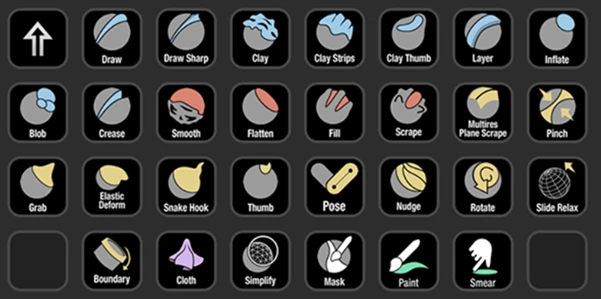
Instead of placing random shortcuts on individual buttons, every page is carefully organized around common Blender tasks.
This makes it much easier to locate commands during modeling, sculpting, animation, rendering, and scene management.
Compatible with Windows and macOS
The profiles support both Windows and macOS systems and are designed for English keyboard layouts, making them suitable for most Blender users with compatible Stream Deck devices.
Real-World Uses
Blender Pro Profiles for Stream Deck can improve productivity across many different creative workflows. Some common examples include:
- Faster polygon modeling.
- Efficient sculpting sessions.
- Quicker animation editing.
- Improved camera and viewport navigation.
- Faster rendering workflow.
- Easier scene management.
- Better organization for large production projects.
- More comfortable long editing sessions with fewer keyboard shortcuts to memorize.
For artists working on client projects, architectural visualization, game assets, or animation, these workflow improvements can significantly reduce production time.
Professional Tips
Getting the most from Blender Pro Profiles for Stream Deck is easy with a few practical habits.
- Keep your most frequently used pages near the main screen for faster navigation.
- Customize icon colors or layouts to match your personal workflow.
- Spend time learning where commands are grouped to build muscle memory.
- Combine the Stream Deck with Blender’s favorite tools for even quicker access.
- Update your profiles as your workflow evolves and add your own custom shortcuts when needed.
These small adjustments help create a faster, more personalized Blender workspace.
Final Thoughts
Blender Pro Profiles for Stream Deck is more than a collection of shortcuts—it’s a workflow enhancement designed to keep artists focused on creativity instead of keyboard commands.
With hundreds of pre-programmed buttons, professionally organized profiles, and an extensive library of custom Blender icons, it provides a faster and more intuitive way to work inside Blender. Whether you’re creating game assets, product visualizations, animations, or detailed 3D environments, this tool helps streamline everyday tasks and makes your creative process more efficient.

Files Password : gfxplugin.com OR 123456